Table of Contents
This guide covers toshiba qosmio x305-q706 is flaming with practical context and easy-to-follow details. Use it to understand the subject and apply the information confidently.
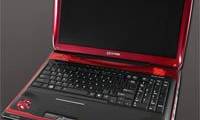
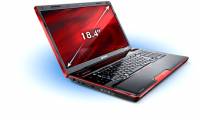
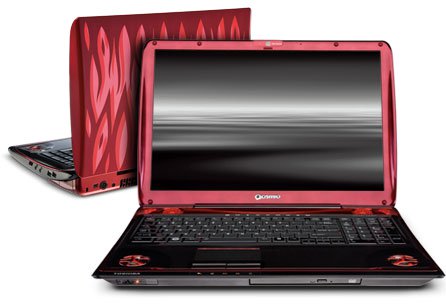 Toshiba Qosmio X305-Q706 has a 17-inch screen Photo: Toshiba .
Powerful performance is demonstrated by Toshiba right from the outside of the case with a blazing red fire, burning flames. Appearing in the middle of the case is normally the silver "Qosmio" logo. When opening the lid, the red color continues to be the dominant color tone in the design with the border around the edges, around the screen, and the plastic ring protecting the speaker. Even multimedia tap keys are also equipped with red LEDs. Compact in those red borders is a full-sized black and glossy keyboard with both individual number keys showing the 'spaciousness' of machine body. However, I don't understand why Toshiba left the Space key shorter than usual. Toshiba Qosmio X305-Q706 uses touchpad (touchpad) surface of the Alps, smaller than usual. If the user of the external mouse can turn off, or reactivate the touchpad, thanks to the tap button nearby, it would be better if Toshiba also used this key to simultaneously stop supplying the power as seen in the model. HP Pavilion.
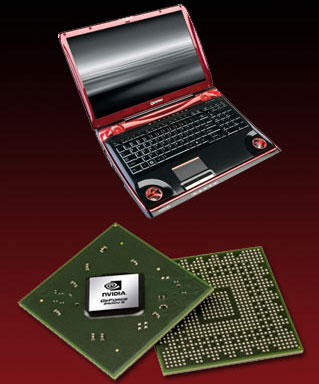 This is the first model in the world equipped with 3 graphics cards, in which, 2 512 MB NVIDIA GeForce 9800M GTS cards with SLI interface Photo: Techshout .
Toshiba's 17-inch mirror screen Qosmio X305-Q706 has a lower resolution than the screen of conventional 17-inch laptops (1, 680 x 1, 050 compared to 1, 920 x 1, 200 pixels). But it still gives users sharp images with even small text and icons, thanks to a set of 3 graphics cards GeForce 9400M and two NVIDIA GeForce 9800M GTS cards. When playing games, there is nothing to discuss, even gamers can clearly see the shadow details of the game's image. Above the screen is a 1. 3 Megapixel Webcam and built-in microphone. Toshiba Qosmio X305-Q706 owns one of the 'spectacular' speakers and has the best sound quality among gaming laptops, with 4 stereo speakers and a subwoofer. That is so remarkable, but this speaker system is also very annoying, especially in crowded places, with loud noises emitted when playing games or even the music starting up on Windows. And yet, the noise can also be emitted from the three fan radiators of graphics cards when the CPU and GPU accelerate processing. Thanks to the larger size, the Toshiba Qosmio X305-Q706 is fully equipped with connectors. The edge is a USB port, an integrated USB e-Sata port. Right side is 2 USB ports, Headphone / Mic headphone jack, volume control knob, and 5-in-1 card reader with dust-proof cover. DVD drive is located on the front. The back is charging port, HDMI, FireWire, VGA and LAN port and Lock.
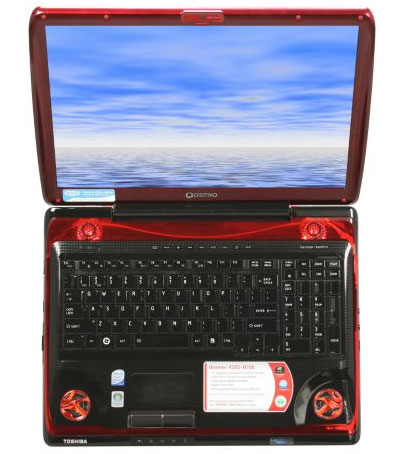 Comfortable wide keyboard.
FAQ
What should I check before following these steps?
Confirm device and software compatibility, save important data, and make sure you have the required permissions, files, and account access.
Why might the process not work?
Common causes include outdated software, missing permissions, incompatible hardware, an unstable connection, or completing a step in the wrong order.
Can I undo the changes if necessary?
That depends on the tool or setting. Use built-in restore options when available, keep a backup, and record the original configuration first.
Related Articles
 Laptop Toshiba for Gamers 'Terrible'3 minutes read
 Top-notch Laptops Can Replace Desktop Computers5 minutes read
 Toshiba Qosmio G50 and X300 Appear3 minutes read
 Qosmio Recently Used PS3 Cell Chips5 minutes read
 Toshiba Satellite and Qosmio Are Equipped with Ivy Bridge Chips4 minutes read
 Toshiba Introduces 3 New Models of the X5054 minutes read
Reader Comments 0
Sign in with email or Google to join the discussion.