Table of Contents
Nvidia's Latest Update Will Make Your GPU Look Like New is easier to approach with a clear overview and reliable steps. This guide organizes the essential information, highlights practical details, and explains what to check along the way.
Key Takeaways
- Review update now and run the game faster.
- Explore dozens of stability issues have been resolved.
- Follow the recommended steps in order to avoid common mistakes with nvidia's latest update will make your GPU look like new.
Update Now and Run the Game Faster
Most Nvidia GPU driver updates bring bug fixes or feature additions like DLSS4 support in new and existing games. However, the 576.02 update reportedly brings a 5-10% performance improvement, as shown by increased FPS across games.
A thread on the Nvidia subreddit has screenshots showing a 7% improvement in Cyberpunk 2077 with the game's RT Overdrive preset, which enables both Ray and Path Tracing, compared to the previous driver version. The 5070 Ti used in this case achieved 80 FPS without framerate injection and DLSS set to balanced.
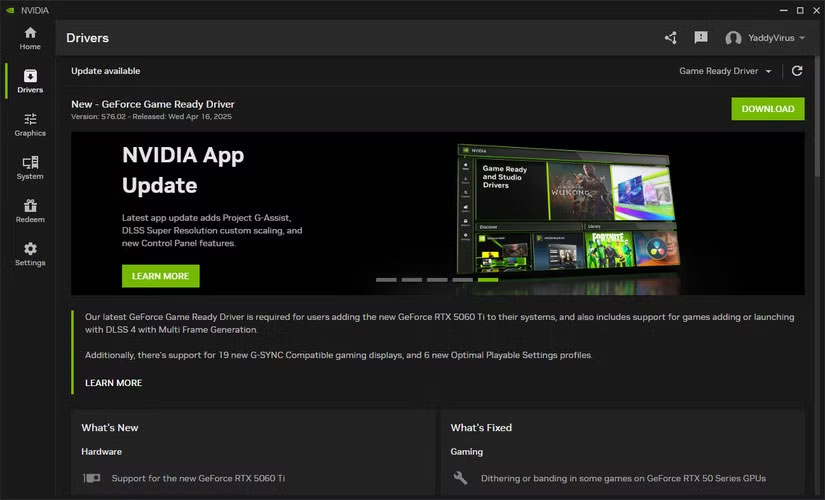
Benchmarks also reported significant performance gains on the 50-series cards. Another 5070 Ti user, CurryGorYT, saw a 7% improvement in their GPU in 3DMark Steel Nomad, with a final score of 6,467 and an average frame rate of 64.68 FPS. Tech619 reported their 3DMark Steel Nomad score increased from 8,832 to 9,215 with an average of 92.16 FPS after the update on an MSI RTX 5080 Vanguard.
The biggest performance increase was on CellTastic's RTX 5070 Ti - 8% with the latest driver, with the score increasing from 6504 to 7006 on the Steel Nomad. Interestingly, an RTX 5090 user reported no performance difference on the same thread.
The improvements aren't limited to RTX 50-series cards. There are claims of 3-5% performance gains on 40-series GPUs. Reddit user AerithGainsborough7 shared a thread showing improvements of 3, 4.1, and 3.6% in Steel Nomad, Blackmyth Wukong, and Cyberpunk 2077 on the RTX 4070 Ti, respectively.
Keep in mind that the performance gains mentioned above are on desktop versions of the GPU. Mature drivers like Nvidia's often offer much smaller, if any, performance improvements while these numbers may not seem like much. Considering the incredibly thin performance margins between Nvidia's new GPU releases, these numbers are pretty solid.
Dozens of Stability Issues Have Been Resolved
As mentioned before, driver updates are mostly focused on bug fixes and feature additions, and Nvidia has implemented many bug fixes in this update. There are also stability improvements for various games.
Nvidia has fixed dithering or banding in some games on 50-series GPUs. Game stability issues when playing with DLSS and G-Sync enabled together have also been resolved. Minor stutters that were annoying when forcing VSync via the Nvidia Control Panel have also disappeared.
Games like inZOI, Fortnite, Monster Hunter Wilds, Overwatch 2, Senua's Saga: Hellblade II, The First Berserker: Khazan, The Last of Us Part I, and Uncharted: Legacy of Thieves, among many others, have also received fixes for various issues.
There are too many fixes in this update to list them all, but if you're having issues with your GPU, there's a good chance that applying this graphics driver update will fix the problem.
Final Thoughts
The most reliable way to handle nvidia's latest update will make your GPU look like new is to follow the process in order, verify each important setting, and test the result before moving on. Use the guidance above as a practical reference, then adjust the details for your device, software version, or specific goal.
FAQ
What should I know first about Nvidia's Latest Update Will Make Your GPU Look Like New?
Now's a good time if you haven't updated your Nvidia GPU in a while.
How do I get the best results with Nvidia's Latest Update Will Make Your GPU Look Like New?
Use current software or equipment, follow the steps in order, review the recommended settings, and test one change at a time so you can identify what improves the result.
What should I do if Nvidia's Latest Update Will Make Your GPU Look Like New doesn't work as expected?
Check compatibility, permissions, connectivity, and version-specific settings. Restart the relevant device or app, then repeat the process carefully before trying a more advanced fix.
Related Articles
 How to Update Itunes to the Latest Version6 minutes read
 How to Update Your iPhone to the Latest iOS Version5 minutes read
 Latest Lien Quan Update Details7 minutes read
 How to Update Applications on iOS 115 minutes read
 How to Update Skype to the Latest Version: Step-by-Step5 minutes read
 3 Ways to Update Windows 10 to the Latest 2026 Update11 minutes read
Reader Comments 0
Sign in with email or Google to join the discussion.