Table of Contents
Copilot Studio can ground an agent in documents and knowledge articles from sources such as uploaded files, OneDrive, SharePoint, Salesforce, ServiceNow, Confluence, and Zendesk. The platform ingests supported content, divides it into searchable chunks, and retrieves relevant passages when the agent answers a question.
Adding a source does not automatically make every answer correct or every deployment secure. Makers must choose the right ingestion method, require appropriate user authentication, verify permission trimming, and test whether the agent cites the expected content.
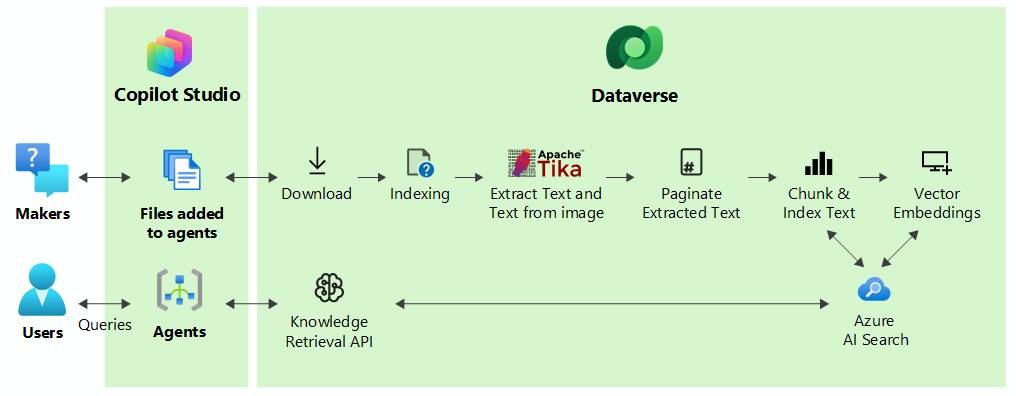
Choose the right knowledge-source method
| Source method | What it is good for | Important behavior |
|---|---|---|
| Upload individual files | A stable policy, manual, or reference set | The uploaded copy is static; replace or update it when the source document changes. |
| OneDrive files or folders | Documents maintained by individuals or teams in OneDrive | Connected content is synchronized in the background. |
| SharePoint files or folders | Managed organizational documents | Retrieval depends on supported content, SharePoint indexing, authentication, and permissions. |
| Salesforce or ServiceNow | Knowledge bases containing articles | The connector operates at knowledge-base level rather than selecting one article at a time. |
| Confluence | Pages within a selected space | The indexed unit is the space; individual page selection is not supported in this unstructured connector. |
| Zendesk | A help-center knowledge base | Individual articles, categories, or sections cannot be selected separately. |
Add OneDrive or SharePoint files and folders
- Open the agent in Copilot Studio and go to its Knowledge page.
- Select Add knowledge.
- Choose OneDrive or SharePoint from the unstructured-data options.
- Sign in with a connection that is permitted by your organization's Power Platform data policies.
- Select the required files or folders. Avoid choosing an entire broad repository when the agent needs only a defined set of documents.
- Add a clear source name and description. The description helps the orchestrator decide when the source is relevant.
- Add the source and wait until processing has completed before testing it.
OneDrive and SharePoint sources can include supported files in selected folders and subfolders, subject to current quotas. Microsoft's limits page currently documents file, folder, nesting, size, type, and synchronization constraints. Do not copy a numeric limit into a long-lived internal guide without linking to that page, because limits can change.
Uploaded files are different
Dragging a document directly into Copilot Studio creates a stored copy in Dataverse. It is not automatically updated when the original file changes. Use a connected OneDrive or SharePoint source when ongoing synchronization matters; use upload when an intentionally fixed snapshot is preferable.
Uploaded files require Dataverse search and consume available Dataverse file storage. Microsoft supports a broader set of uploaded document types than the connected OneDrive and SharePoint path, so check the current supported-type list for the method you selected.
Add a knowledge-base connector
For Salesforce, ServiceNow, Confluence, or Zendesk:
- From the agent's Knowledge page, select Add knowledge and the relevant connector.
- Create or select the Power Platform connection and complete sign-in.
- Choose the available knowledge base or Confluence space.
- Name and describe the source narrowly enough that generative orchestration can distinguish it from other sources.
- Add it to the agent, wait for ingestion, and test with questions that map to known articles.
The original article mislabeled Salesforce as “Steam.” The supported source is Salesforce. In this unstructured connector, a selected Salesforce or ServiceNow knowledge base is represented as one knowledge object even though it contains many articles. Confluence works at space level, and Zendesk works at knowledge-base level.
How indexing and retrieval work
Copilot Studio stores chunks and retrieval indexes in Dataverse for these unstructured sources. At question time, it searches for passages that are semantically related to the user's request and supplies relevant material to the language model. This is retrieval-augmented generation: the source informs an answer, but the model still composes the response.
Semantic similarity is not the same as factual validation. A document can be retrieved because it uses related language even when it is obsolete, superseded, or written for a different audience. Curate the corpus before ingestion:
- remove duplicates and expired policies;
- identify the authoritative owner and review date;
- use descriptive titles and headings;
- separate conflicting regional or product versions;
- avoid scanned files without reliable text recognition;
- keep confidential and public collections in separate, intentionally governed sources.
Authentication and permission checks
Enterprise knowledge requires authentication. For connector-based unstructured sources, Microsoft says the system uses the current user's connection information to check the source at query time. If the user lacks permission to the relevant files or articles, the agent should not return them and may report that no results were found.
Although chunks and indexes are stored in Dataverse, Microsoft documents that content-permission information is checked live rather than stored as a permanent local access list. This makes identity configuration central to the security design.
Before publishing:
- configure the agent to authenticate users with the identity method required by the source;
- assign only the necessary Dataverse and source-system roles;
- test with at least one permitted user and one deliberately unpermitted user;
- confirm that citations and summaries do not expose document titles or snippets across a permission boundary;
- apply Power Platform data policies to restrict knowledge sources, connectors, unauthenticated usage, and channels as appropriate;
- do not assume an anonymous agent can safely use a permission-trimmed enterprise source.
SharePoint considerations
SharePoint unstructured retrieval uses SharePoint search indexing rather than reading an AllItems.aspx view directly. A newly added or edited item may therefore be absent until SharePoint and Copilot Studio processing are complete. The relevant app and delegated permissions, including required site and file read permissions, must also be approved in the tenant.
Protected or unsupported content may appear added but return no useful answer. Microsoft's current limits note restrictions for password-protected documents and some sensitivity labels. Test every protected content class instead of assuming “Ready” means retrievable.
Synchronization and deletion
A scheduled background job refreshes connected OneDrive, SharePoint, and knowledge-base sources. Microsoft currently documents a synchronization interval measured from ingestion completion, but the exact cadence can change and a manual refresh is not available for this feature.
The refresh processes edits and removes source content that was deleted. Allow for indexing delay in operational procedures: an urgent policy correction should not depend on the agent until the new version has been retrieved in a test query, and a sensitive deletion should be treated as pending until its absence is verified.
Test retrieval before release
Create a small evaluation set with four kinds of questions:
- Answerable: the correct answer exists clearly in one approved source.
- Ambiguous: two documents appear relevant, but only one is current or applicable.
- Unanswerable: the corpus does not contain the requested fact, so the agent should say so.
- Unauthorized: the answer exists, but the test user lacks source permission.
For each response, record whether the correct source was retrieved, the citation opens for that user, the answer stays within the evidence, and the agent declines when evidence is missing. Repeat the evaluation after source updates, connector changes, or prompt revisions.
Common problems
- Source option is missing: verify environment features, required Dataverse extensions, Dataverse search, licensing, and administrator data policies.
- Status is Ready but answers are empty: allow indexing time, check the file type and protection state, then test the underlying source permission and search visibility.
- Updated content is not returned: connected sources refresh on a schedule; uploaded files require manual replacement.
- Users see “no results”: confirm both source permissions and an appropriate Dataverse security role.
- The wrong source is selected: improve the knowledge-source description, reduce overlap, and test orchestration with representative questions.
- Citations are too broad: page-level citations are supported only in specific paths and file conditions; otherwise the citation may point to the document rather than a page.
Use Microsoft's unstructured knowledge documentation and current quotas and limits as the source of truth for supported formats, capacities, synchronization, and preview status.
Related Articles
 Add unstructured data as a knowledge source for the Copilot13 minutes read
 Add Copilot Connectors to Copilot Studio Agents8 minutes read
 Copilot Studio Knowledge Sources: Complete Guide10 minutes read
 How to Create File Groups in Microsoft Copilot Studio13 minutes read
 Add SharePoint Knowledge to a Copilot Studio Agent11 minutes read
 Add Power Platform Knowledge Connectors in Copilot Studio9 minutes read
Reader Comments 0
Sign in with email or Google to join the discussion.