Table of Contents
Apple has quietly added Performance Management - managing its performance on iPhone 8, 8 Plus and iPhone X models.
iPhone X, iPhone 8 May Slow Down After Upgrading to iOS 12. 1 Overview
In 2017, Apple included this feature in software updates to slow down the smartphone, to prevent the device from being shut down suddenly. This makes older iPhone models (only for iPhone 6, 6s and 7) after updating to the latest iOS often perform poorly.
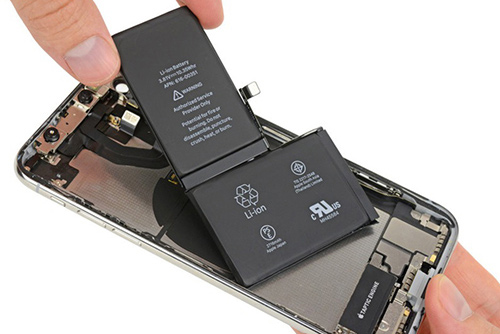 The iPhone 2017 models have more performance management features.
When users discovered and condemned, Apple had to offer a discount program to replace the old iPhone battery with battery, suddenly shut down. In addition, the company also added the Battery Health menu in its own settings of iPhone 6 templates to iPhone 7 in iOs 11. 3 update onwards.
In the newly released iOS 12. 1 update, Apple also added Performance Management on iPhone 8, 8 Plus and iPhone X.
Thus, when Apple's 2017 iPhone models updated to iOS 12. 1 may be slowed down to avoid sudden power failure. However, Apple also added that iPhone 8 and newer iPhone models have more advanced hardware and software designs, which will be less affected by this performance management feature.
 Performance management can be turned off on iPhone models with poor batteries.
To test iPhone performance, users access Settings -> Battery -> Battery Health. If the iPhone has a bad battery, Performance Management will be enabled to optimize the experience. Users can choose to turn off this feature to be able to use the phone with the highest performance, but will face the possibility of a sudden phone crash.
See more:
- Apple allows users to download all data on iPhone
- This is the details of what happens when the old iPhone is slowed by Apple
FAQ
What is the main point of iPhone X, iPhone 8 May Slow Down After Upgrading to iOS 12. 1?
Apple has quietly added Performance Management - managing its performance on iPhone 8, 8 Plus and iPhone X models.
Which details should readers focus on?
Focus on the requirements, key benefits or risks, practical steps, and any limitations that could affect your situation.
Where can I verify current information?
Check the relevant developer, manufacturer, or service provider's official documentation, release notes, and support pages for current requirements and policies.
Related Articles
 iPhone Is Slow If Updated to iOS 11.2.2?3 minutes read
 minutes read
 3 Ways to Fix Slow iPhone Keyboard5 minutes read
 Reduce Battery Consumption, Slow Down for iPhone 5 / 4S When7 minutes read
 iPhone, iPad Are Slow or Suspended, This Is a Fix6 minutes read
 What Do You Need to Prepare for iPhone While Waiting for iOS 11. 3?7 minutes read
Reader Comments 0
Sign in with email or Google to join the discussion.