Table of Contents
Quick Overview
Esim : Get a clear, practical overview of Esim, including iPhone cannot add eSIM, quick and easy solution.
Currently, eSIM has become popular with iPhone users. This is a digital SIM that helps users activate the carrier's mobile plan without having to use a physical SIM. Normally, activating eSIM is extremely simple, but some of you have encountered a situation where your iPhone cannot add eSIM . This problem will be fixed immediately with the tricks mentioned below.

iPhone cannot add eSIM, quick and easy solution
Not being able to activate Viettel eSIM is a common problem for Apple users. The reason may be that your iPhone is not in the line that supports eSIM, the iOS version is outdated, the iPhone is hand-carried from China or Hong Kong so it does not support eSIM, the iPhone has some errors or there is no internet connection on the device so it cannot be done.
Some solutions when iPhone cannot activate eSIM
First, try to find out if your iPhone supports eSIM or not. If it does, follow these steps to fix the error of not recognizing eSIM on your iPhone device!
As the admin shared, the iOS version on the device being outdated, old, and not being updated for too long is also the leading cause of problems with the device. Including the inability to activate or use eSIM.
Therefore, users should check and update iOS to the latest version (if available). New software versions not only bring new features but also help fix existing problems in the old version.

According to the admin's research, when you want to add eSIM and use eSIM on iPhone, the device needs to have a network connection. Only the iPhone 14 series does not need an internet connection when using and setting up eSIM. Therefore, you need to check again whether the device is connected to Wifi or using mobile data. You need to ensure that the network connection is stable and strong.
Enabling airplane mode on iPhone and then turning it off is Among the ways to F5 the connections on the device, thereby helping to fix errors related to SIM and connection on the device effectively. You should try turning on airplane mode for a few minutes and then turning it off and checking again to see if the eSIM can be used.
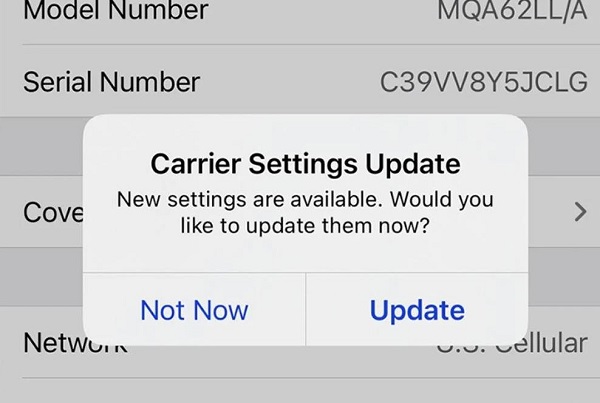
Mismatched carrier settings can also be the culprit for not being able to use an eSIM. The Apple brothers need to make sure that your carrier settings are up to date so that your iPhone has the latest network-related configuration from your carrier. This can improve cellular connectivity and performance.
You need to go to Settings > General > About > Then you will see a prompt to update your carrier settings (if available). Follow the on-screen instructions to complete the update!
Sometimes, the failure to set up or use eSIM is due to some temporary error. So, you should not ignore the solution of 'powering off' and restarting the device. This will help the device reset the network settings. At the same time, clear any temporary glitches on your phone.
None of the above solutions helped? The last solution is to seek help from your eSIM provider. Because the problem is not always due to the device, but sometimes the eSIM is faulty so you cannot use or add it. You should contact your carrier for more detailed support!
the editorial team has revealed how to fix when iPhone cannot add eSIM. Wish you successfully solve this annoying error.
FAQ About Esim
What is Esim?
The last solution is to seek help from your eSIM provider
Why is Esim important?
This is a digital SIM that helps users activate the carrier's mobile plan without having to use a physical SIM
How can you use or manage Esim effectively?
Mismatched carrier settings can also be the culprit for not being able to use an eSIM
Related Articles
 How the 2 SIM Mode Works on the iPhone Xs Duo?5 minutes read
 To Activate eSIM on the Phone5 minutes read
 iPhone 17 Pro: Complete Guide4 minutes read
 4 Reasons Esim Is More Secure Than Physical SIM Card7 minutes read
 How Can eSIM Be Hacked?7 minutes read
 Viettel Is the First and Only Network Operator in Vietnam to3 minutes read
Reader Comments 0
Sign in with email or Google to join the discussion.