Table of Contents
This guide covers Intel presents 4-screen laptop with practical context and easy-to-follow details. Use it to understand the subject and apply the information confidently.
 The prototype is codenamed Tangent Bay Photo: Cnet .
Recently, in a meeting with the theme "Mobility Meetup" between representatives of Intel and tech bloggers in San Francisco - USA, Intel introduced the idea of the first 4-screen laptop in the world. . The exhibited prototype, code-named Tangent Bay, is a 15-inch laptop with the main LCD screen of the same size and three extra-tap OLED screens located just above the keyboard.
 Photo: Cnet .
The idea of using multiple monitors at the same time on a computer system is not so new and the main purpose is to help users master the way of organizing, displaying the most optimal information. Tangent Bay's 3 sub-OLED displays all have separate dedicated features, but still synchronize with each other as well as support the display of the main screen. Besides, 3 OLED displays equipped with tap feature also support processing tasks and "throw" information from one screen to another with the movement of the fingertips.
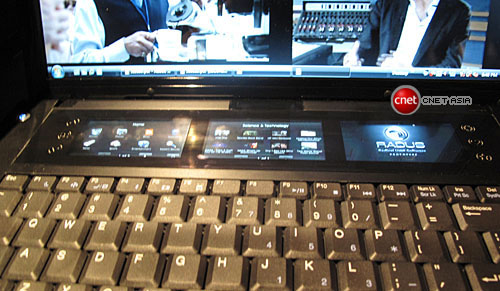 Photo: Cnet .
FAQ
What should I check before following these steps?
Confirm device and software compatibility, save important data, and make sure you have the required permissions, files, and account access.
Why might the process not work?
Common causes include outdated software, missing permissions, incompatible hardware, an unstable connection, or completing a step in the wrong order.
Can I undo the changes if necessary?
That depends on the tool or setting. Use built-in restore options when available, keep a backup, and record the original configuration first.
Related Articles
 MSI Presents a Laptop with 3K Screen, Dual SSD3 minutes read
 MSI Presents the Laptop to Play 'Dinosaur' GE70 Apache Pro4 minutes read
 LG Presents the 3D Laptop Near full-HD Screen3 minutes read
 The 70 Million Sony Vaio Laptop Is About to Be Sold in Vietnam4 minutes read
 Intel's Plan to Launch a Folding Laptop Is Troubled, but the3 minutes read
 Intel Is About to Launch a Touchscreen Laptop5 minutes read
Reader Comments 0
Sign in with email or Google to join the discussion.