Table of Contents
This practical guide walks through how to use Kidgeni to Create Photos for Children Using AI. It organizes the required steps, settings, and checks so you can complete the task with fewer mistakes.
Kidgeni is a website that creates drawings into a complete picture thanks to AI technology. For families with young children, Kidgeni is practical as your child can freely draw and create interesting pictures. You don't need to create an account and can use Kidgeni right away. this guide explains how to use Kidgeni to draw pictures with AI.
Instructions for Using Kidgeni to Draw Pictures with AI
Step 1:
At the interface on the Kidgeni website, follow the official provider, users Select Draw To proceed with drawing.
https://kidgeni.com/
Step 2:
Next we will see A white frame for drawing . Simply draw pictures in this interface. Below is an eraser icon to erase wrong or unwanted strokes. If you are a child, please guide your child to draw on this white frame.
If you already have a drawing, select Upload image to upload it.
Finally Choose OK, I'm finished To complete the drawing.

Step 3:
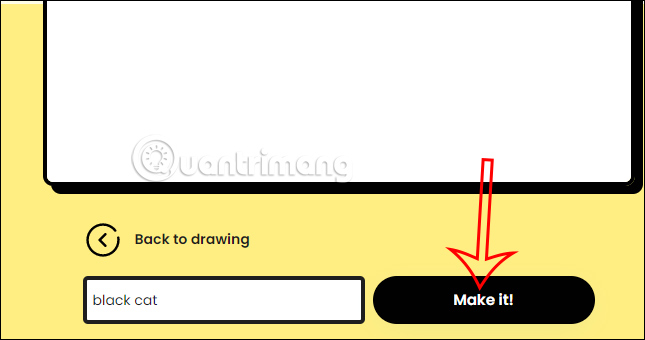
If you want to Clearly describe the drawing , Enter additional keywords In the bar below to describe. After filling out, Select Make it So the website will draw a picture from what you drew and described.
Step 4:
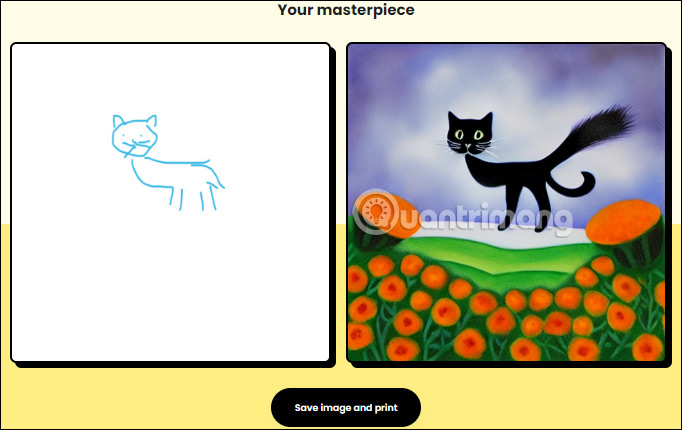
Now the user will see how the AI picture is created from your drawing. Currently, the website does not support downloading the picture, but you can take a photo of your computer screen to save this picture.
FAQ
What do I need before I use Kidgeni to Create Photos for Children Using AI?
Prepare the required device, software, account access, and any files mentioned in the steps. Back up important data before changing system settings.
Why does the process look different on my device?
Menus and options can vary by operating system, app version, device model, or region. Use the closest matching setting and check the official documentation when needed.
What should I do if a step does not work?
Restart the app or device, confirm permissions and connectivity, update the software, and repeat the step carefully. Avoid unofficial downloads or tools.
Related Articles
 27 Funny Pictures Show That a Home with Young Children Is5 minutes read
 AI and Children: What Should Parents Do to Help Children Use AI Without6 minutes read
 30+ Funny Shots Prove Men Never Bear Big4 minutes read
 How to Create a Gmail Account for Children Under 18 Years5 minutes read
 Prompt Creates Stunning Photos with Flowers Using AI8 minutes read
![[funny] a Bunch of Funny Photos About the Difference Between](/data/thumbs_200x120/[funny]-a-bunch-of-funny-photos-about-the-difference-between-raising-first-and-second-children_thumbs_200x120_3QmWOsC9l.jpg) [funny] a Bunch of Funny Photos About the Difference Between4 minutes read
[funny] a Bunch of Funny Photos About the Difference Between4 minutes read
Reader Comments 0
Sign in with email or Google to join the discussion.