Table of Contents
Apple's Depth Effect can separate a recognized subject from the background of a Lock Screen photo and place part of that subject in front of the clock. This helps keep a face or other focal point visible while creating a layered look. The feature first appeared with the customizable Lock Screen in iOS 16, and the exact buttons may differ on newer iOS versions.
The photo does not have to be taken in Portrait mode. What matters is whether iOS can identify a suitable foreground subject and create a convincing separation from the background.
Set a photo as the Lock Screen wallpaper
- Wake the iPhone, then touch and hold the Lock Screen until the wallpaper gallery appears. Authenticate if prompted.
- Tap the add button to create a new Lock Screen. You can also go to Settings > Wallpaper > Add New Wallpaper.
- Choose Photos, then select an image with a clear person, pet, or object in the foreground.
You may also start from the Photos app on some iOS versions by opening the image, tapping the Share button, and choosing Use as Wallpaper.
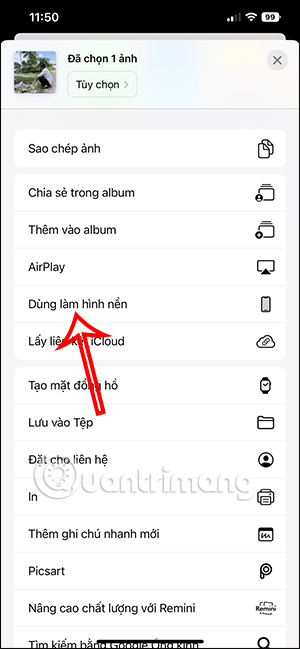
Turn on Depth Effect and position the subject
- In the Lock Screen preview, drag the image with two fingers to reposition it.
- Pinch open to zoom in or pinch closed to zoom out. Place the face below or around the clock so the crop does not cut off important details.
- Tap the Depth Effect button if it is visible. On some versions, tap the More button with three dots and choose Depth Effect.
- Check that the clock remains readable and the layering does not cover too much of it.
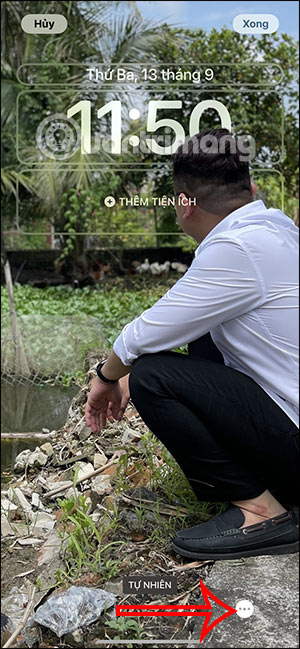
The effect is generated from the selected photo; it is not a manual cutout tool. Small changes to the zoom and vertical position can make the Depth Effect appear or disappear, so adjust the composition gradually.
Save the Lock Screen
When the preview looks right, tap Add or Done, depending on your iOS version. Then choose whether to use the image as a wallpaper pair or customize the Home Screen separately.
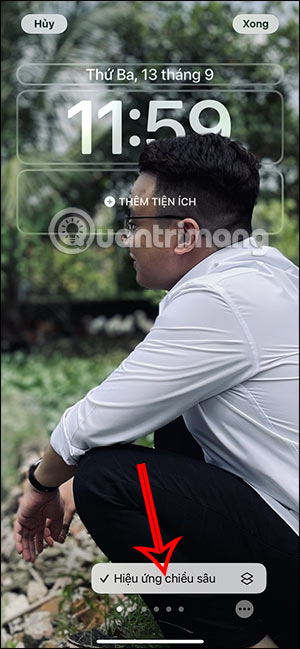
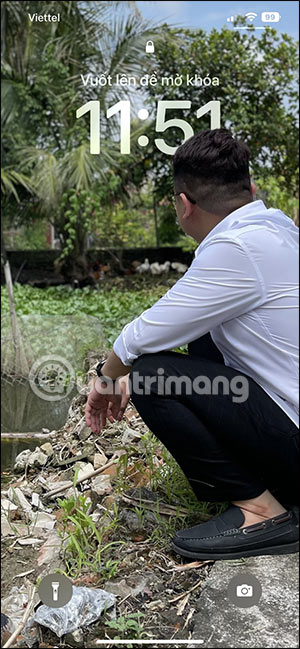
Lock the iPhone and wake it again to check the finished composition. Verify the face, clock, widgets, and bottom controls under the real Lock Screen overlay rather than relying only on the editor.
If the Depth Effect option is missing or unavailable
Depth Effect works only when iOS can separate a compatible subject from the background. Try these fixes:
- Choose a clearer image. A well-lit subject with distinct edges and separation from the background is easier to detect.
- Reframe the photo. Move or zoom it so the subject overlaps the clock area slightly without covering most of the time.
- Avoid an extreme crop. If the subject is too large, too small, or partly outside the frame, iOS may not produce the effect.
- Try a different photo. Busy backgrounds, low contrast, motion blur, or multiple overlapping subjects can prevent reliable layering.
- Check the current controls. Depending on the iOS release and photo type, Depth Effect may have its own button or appear in the More menu.
- Update iOS if appropriate. Lock Screen features and photo processing can change between releases.
If iOS never offers the option for a particular image, there is no switch that can force a valid subject mask. Use the photo without layering or select another image instead.
Choose a photo that works well
A strong Depth Effect wallpaper usually has:
- One obvious foreground subject.
- Clear edges around the head, hair, pet, or object.
- Enough empty space around the clock and widgets.
- A vertical crop that still looks good on the Lock Screen.
- Foreground and background colors that leave the time readable.
Do not focus only on the layered trick. Notifications, widgets, controls, and light or dark text all compete with the image. A simpler photo often produces a more useful Lock Screen.
Manage multiple Lock Screens
The Lock Screen gallery can store multiple designs. Touch and hold the Lock Screen, then swipe between saved options to switch designs or edit one. You can use different photos, styles, widgets, and Focus associations without replacing every existing setup.
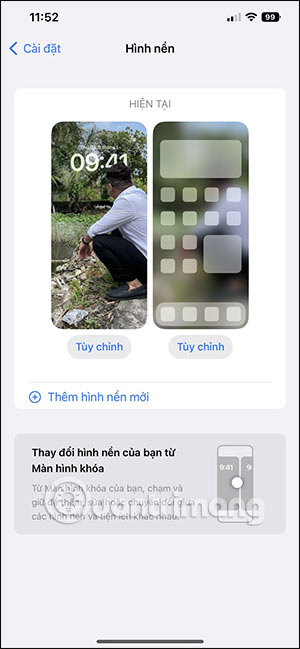
For more customization ideas, see these iPhone Lock Screen widgets and iPhone Home Screen customization apps. Apple's current Lock Screen customization guide documents the available wallpaper controls for the installed iOS version.
Related Articles
 Why Do Cats Cover Their Faces When They Sleep?4 minutes read
 Baby Three Wallpaper, Baby Three Wallpaper6 minutes read
 The Best Halloween Cover Photo for Facebook3 minutes read
 Facebook Cover Art Photos for Those Who Want to Show Personality3 minutes read
 Download Now a Beautiful and Exclusive Facebook Cover Photo3 minutes read
 Collection of 50+ Unique Wallpapers for Samsung S10 // S10 + to Help4 minutes read
Reader Comments 0
Sign in with email or Google to join the discussion.