Table of Contents
Learning how to see which websites are sharing your activity with instagram doesn't have to be complicated. This updated guide presents a clear workflow, practical checks, and troubleshooting advice you can use while completing the process.
Key Takeaways
- Review find out which sites share activity about you.
- Explore disconnect activity from your meta account.
- Follow the recommended steps in order to avoid common mistakes with see which websites are sharing your activity with instagram.
Find Out Which Sites Share Activity About You
Since Meta has seamlessly integrated its services, you can use the Instagram or Facebook app or website to access Meta's Accounts Center. The steps are the same. Note that any changes made here will apply to Meta's other social media platforms before you begin.
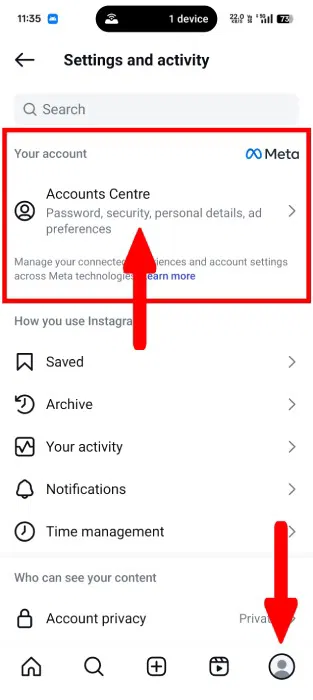
Open the Instagram app and log in to your account. Tap your Profile in the bottom-right corner and open Settings. From Settings and activity, tap the Accounts Centre option under Your Account.
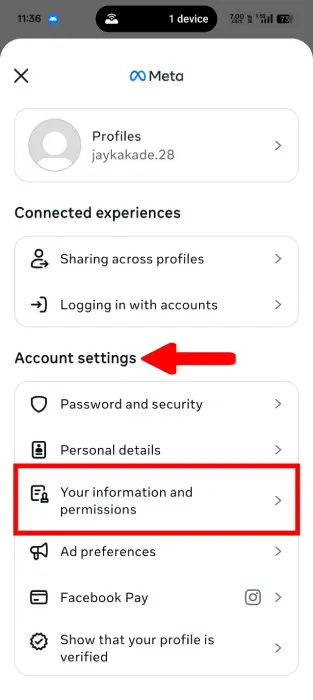
Navigate to the Account Settings tab, select Your Information and Permissions.
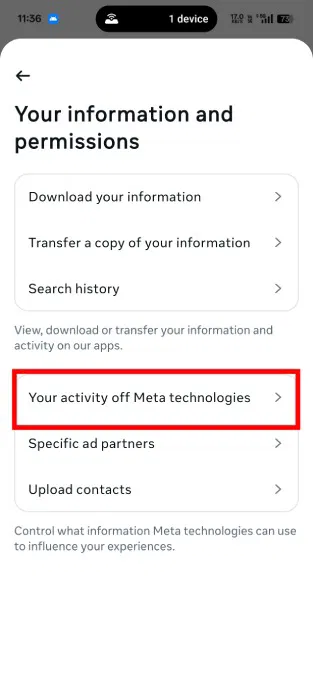
A new pop-up menu will appear, allowing you to interact with your account information. Select Your activity off Meta technologies.
This screen gives you more control over what information you share. Under What you can do, open the Recent Activity setting to see a list of your shared activity entries. Meta may ask you to confirm your identity by asking for your Instagram password.
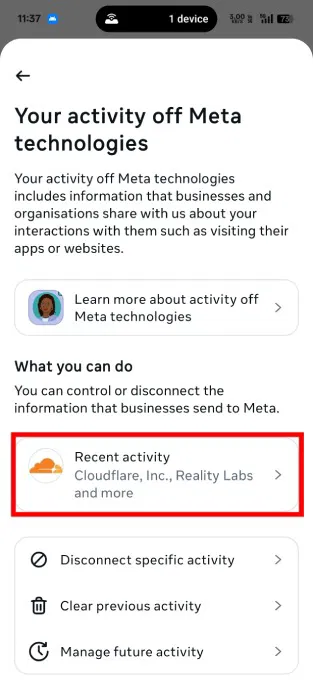
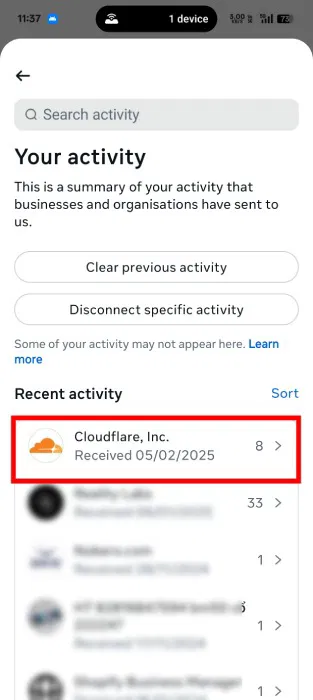
Here you'll see a list of all the businesses and organizations that share your activity and data with Instagram.
For more information about the shared data, click the entry list.
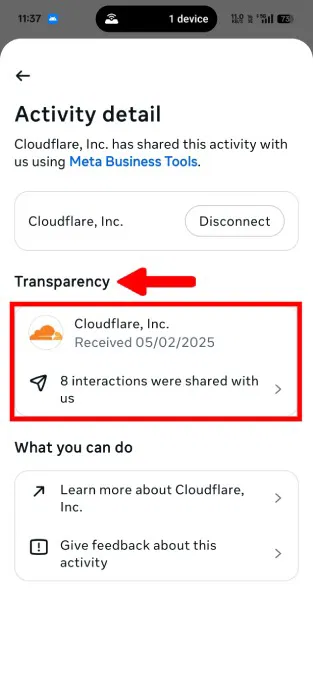
Under Transparency, tap the number of shared interactions.
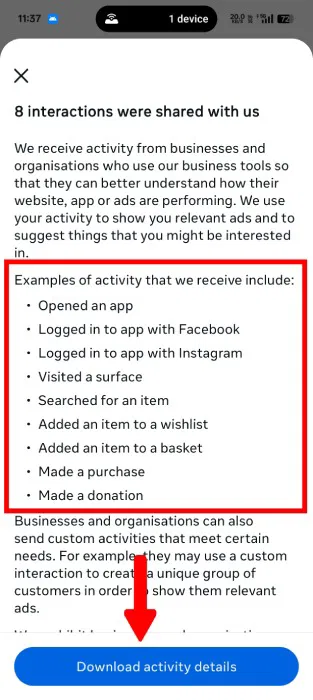
One thing that's confusing is that the engagement numbers don't provide a detailed breakdown of the exact data points, but rather show examples of pre-established activity. This can be frustrating in terms of maintaining data privacy and transparency, but Meta won't share the level of detail you're looking for.
Even if you click the Download activity details button to download your activity file, it doesn't show the shared data.
Disconnect Activity from Your Meta Account
You can still disconnect saved data from your account while you don't have full control over these activities. Go back to Your Activity and tap the Disconnect specific activity button. This helps you disconnect the data stream.
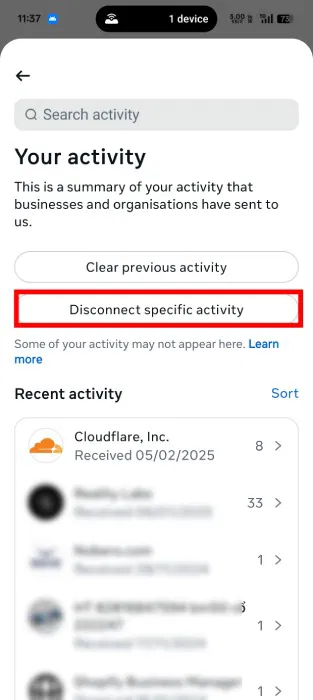
Select the activities you want to disconnect from your Meta account and press Continue.
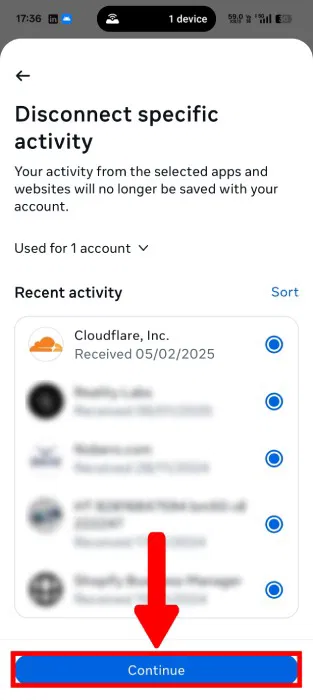
A confirmation pop-up menu will appear, showing more information about you and your third-party data. Note that you will be logged out of any sites or apps you used Facebook to log in to before you tap Confirm. Additionally, Meta will prevent you from logging in with Facebook in the future.
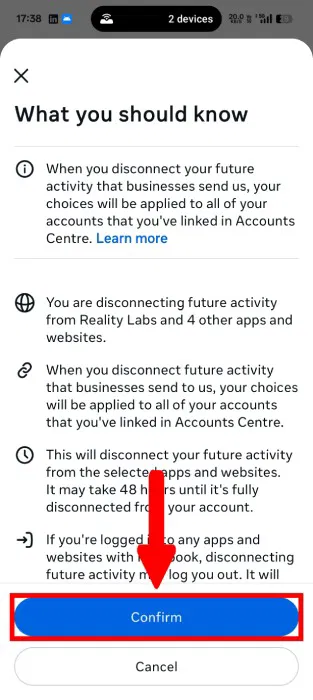
It may take up to 48 hours for the system to disconnect specific activities from your account.
The lack of precise data fields is disappointing while Meta Account Center provides a glimpse into third-party sites and data sharing. You may want to limit what Meta does with your personal data if you don't want to disconnect your activities.
Final Thoughts
The most reliable way to handle see which websites are sharing your activity with instagram is to follow the process in order, verify each important setting, and test the result before moving on. Use the guidance above as a practical reference, then adjust the details for your device, software version, or specific goal.
FAQ
What should I check before I see which websites are sharing your activity with instagram?
Use the latest available software, confirm that your device meets the requirements, and make sure you have the necessary permissions, account access, or backup before changing anything.
Why might I be unable to see which websites are sharing your activity with instagram?
Common causes include outdated software, missing permissions, incompatible settings, incomplete setup steps, or a temporary network problem. Recheck the process from the beginning and restart the app or device if needed.
Is it safe to see which websites are sharing your activity with instagram?
It is generally safe when you use official tools, review every permission, and back up important data before making system-level or account-level changes.
Related Articles
 How to Create Sharing Shortcuts on Instagram3 minutes read
 How to Use Instagram for New Users: Instagram Use9 minutes read
 How to Delete Previous Activity on Instagram2 minutes read
 How to Fix Instagram Sharing Errors to Facebook5 minutes read
 How to Fix Sharing Instagram Photos on Facebook4 minutes read
 How to Hide Your Reels Activity from Your Friends on Instagram3 minutes read
Reader Comments 0
Sign in with email or Google to join the discussion.