Table of Contents
You can run a local DeepSeek-R1 model on your computer with Ollama. Install Ollama, choose a model size that fits your hardware, and run it from a terminal. This walkthrough uses a downloaded local model, rather than DeepSeek's hosted website or API.
Choose a model before downloading
The DeepSeek-R1 family includes smaller distilled models as well as a much larger full model. Running an 8B distilled version is not the same as running the full 671B model, and answers may differ in quality.
Check the Ollama model tags for download sizes and variants. Download size is not the total memory required while running: leave room for the operating system, model context, and other applications. Larger models need substantially more memory and storage.
Use Ollama's current platform requirements instead of a generic AI-training checklist. Ordinary inference through Ollama does not require you to install Python, TensorFlow, or PyTorch. GPU support depends on the hardware and drivers; a compatible GPU can improve performance, but do not assume NVIDIA CUDA is the only supported path.
1. Install Ollama
Download the package for your operating system from the Ollama website. On Windows, open the installer and follow its prompts. Check the Windows requirements and allow space for both the application and your model downloads.
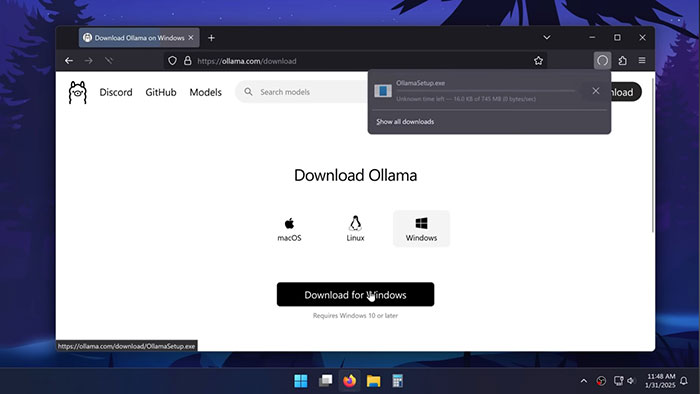
For macOS or Linux, use the official instructions for that platform. The installation process is different, but the model command below is the same once the command-line tool is available. Our Ollama desktop guide provides additional background.
2. Confirm the command works
Open Command Prompt, PowerShell, or your preferred terminal. If it was open during installation, reopen it so it sees the updated program path.
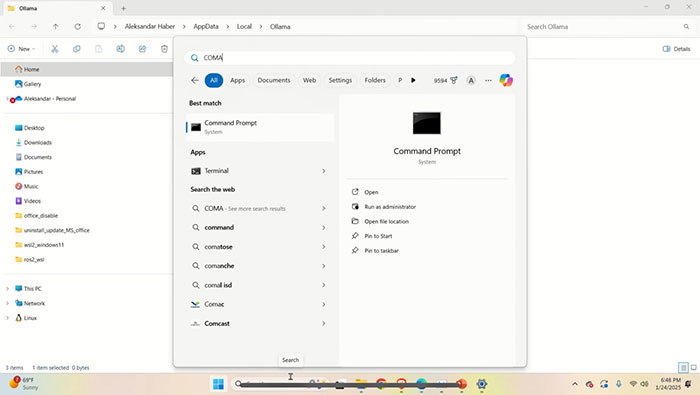
ollama --versionIf the command is not recognized, confirm installation and restart the terminal. You do not need to enable debug mode to start a normal model session.
3. Download and run DeepSeek-R1
For the 8B variant used in this walkthrough, enter:
ollama run deepseek-r1:8bThe first run downloads the model if needed, so allow the download to finish. Once the prompt appears, type a question and press Enter.
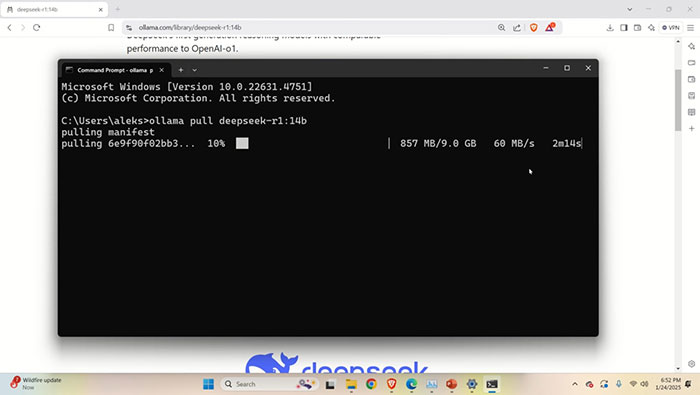
If that model is too demanding for your machine, a smaller alternative is:
ollama run deepseek-r1:1.5bExpect a tradeoff between size, speed, and answer quality. Test the model with your actual tasks rather than assuming a smaller variant has the same capabilities as a hosted service.
4. Check the result and resource use
Start with a short, non-sensitive question whose answer you can verify. For code, inspect and test the output before using it. Reasoning-style output can still contain mistakes.
In another terminal, use ollama ps to inspect loaded models. Use ollama list to see downloaded models. If responses are very slow or loading fails, check available memory, close unnecessary applications, try a smaller model, and consult the current GPU compatibility guidance.
Local operation, privacy, and costs
Downloading model files requires internet access. Afterward, local inference can run without sending each prompt to a hosted model, provided you are using a local model and no connected feature sends the content elsewhere. Ollama also offers cloud features, so check the selected model and configuration. Its FAQ explains local-only controls.
Local operation is not a complete privacy guarantee: files, logs, other software, and any network integrations still need appropriate handling. Hardware, storage, and electricity also have costs even when there is no per-token charge for local inference.
For a separate model using the same runner, see running Qwen locally with Ollama.
Related Articles
 Install DeepSeek on PC, Laptop6 minutes read
 DeepSeek Suffers Data Leak4 minutes read
 DeepSeek Hit by Cyberattack, New Registrations Restricted4 minutes read
 DeepSeek AI: What You Need to Know5 minutes read
 The Easiest Way to Use DeepSeek7 minutes read
 Which Is Better, DeepSeek or ChatGPT?10 minutes read
Reader Comments 0
Sign in with email or Google to join the discussion.