Table of Contents
This practical guide walks through how to find Hidden Tracking Devices Using Apple and Google. It organizes the required steps, settings, and checks so you can complete the task with fewer mistakes.
Bluetooth trackers are great for helping you keep track of your luggage, hardware, and other important items, no matter where you go.
But they also present potential dangers, where AirTags and other Bluetooth tracking devices are used to track unsuspecting victims, in connection with harassment and stalking incidents.
Google and Apple have recognized these concerns and collaborated to provide a unified response to this growing problem.
What Is a Bluetooth Tracking Device?
When emitting sound, Bluetooth trackers are small devices capable of tracking the location of an object. Apple's AirTag is one of the most popular options worldwide, especially among Apple users. However, Tile, Chipolo, Eufy, Samsung, Cube and other manufacturers all offer similar Bluetooth trackers, all used for the same purposes.
Several reasons to use Bluetooth trackers, but most focus on tracking valuable or useful objects. They can be attached to car keys, tucked into purses, sewn into the lining of handbags, etc.
However, their versatility also makes them used for more nefarious needs, such as tracking people, vehicles, etc., often for the purposes of theft, stalking, harassment, etc.
How Are Apple and Google Preventing Hidden Bluetooth Tracking Devices?
This dangerous downside is being attempted to be eliminated by Google and Apple by consolidating messaging and tracking features for hidden and unwanted Bluetooth trackers.

Under Apple Newsroom, Apple and Android devices will notify users if an unknown Bluetooth tracking device is moving with them - regardless of platform.
That's the main difference here. Previously, Apple devices would notify you if an unknown AirTag was traveling with them, while Google had its get unwanted tracking warnings.
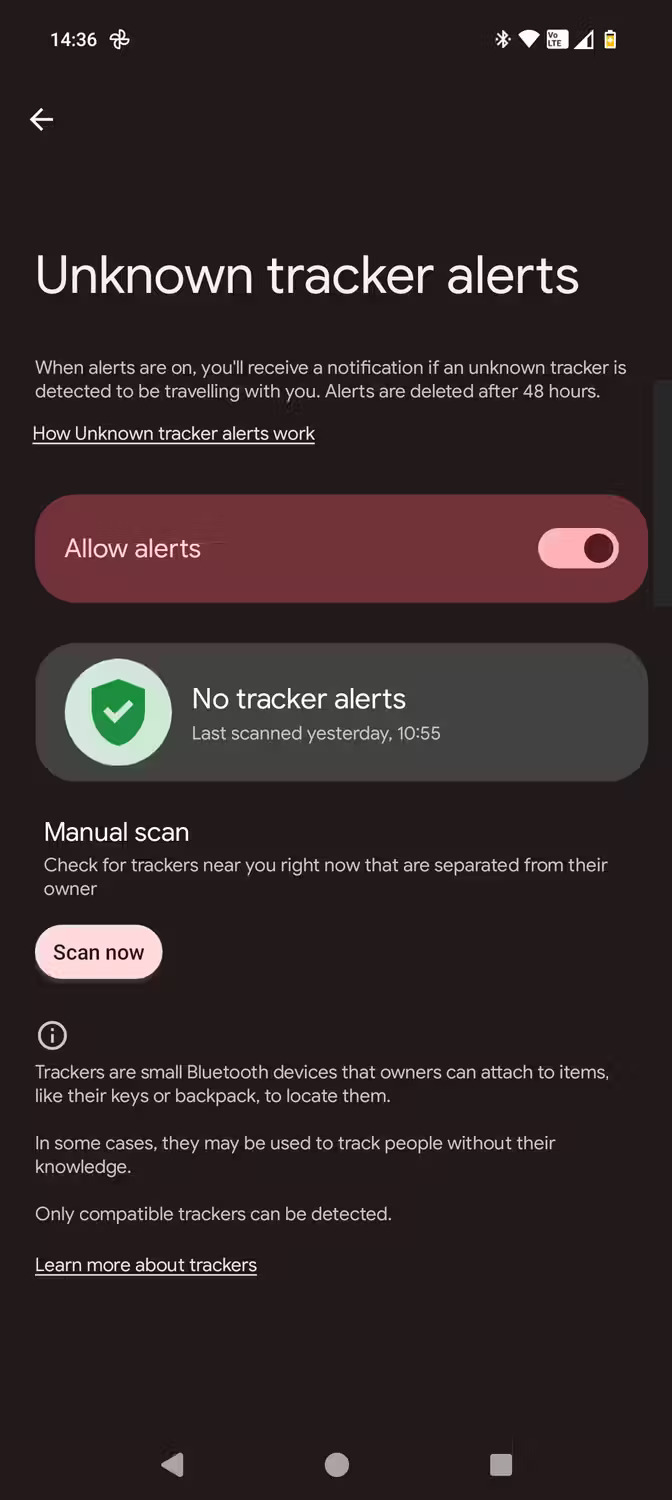


But the two tech giants have combined forces for greater benefit, and now Apple devices running iOS 17.5+ and Android devices running Android 6.0+ will issue the warning "[Item] Found Moving With You" regardless of the platform on which they are paired.
What Bluetooth Tracking Devices Can Be Detected?
The alert will include Apple's AirTag and Find My devices, while Bluetooth tracker manufacturers such as eufy, Chipolo, Motorola, Jio and Pebblebee have all committed to making future products compatible with new system.
If a suspicious device is detected, you can view the identifier of the specific tracking device, have the tracking device play a sound to monitor, and access specific instructions on how to disable it..
The new combined alerts will significantly reduce the chance that someone could put an unknown and unwanted Bluetooth tracking device on your person or object, which is great for privacy and personal safety.
FAQ
What do I need before I find Hidden Tracking Devices Using Apple and Google?
Prepare the required device, software, account access, and any files mentioned in the steps. Back up important data before changing system settings.
Why does the process look different on my device?
Menus and options can vary by operating system, app version, device model, or region. Use the closest matching setting and check the official documentation when needed.
What should I do if a step does not work?
Restart the app or device, confirm permissions and connectivity, update the software, and repeat the step carefully. Avoid unofficial downloads or tools.
Related Articles
 Android's New Find Nearby Feature Helps Detect Unwanted Bluetooth4 minutes read
 3 Free Tools to Keep Track of Google Update Algorithms Every Day4 minutes read
 How to Restrict Ad Tracking on Roku, Fire TV, Apple TV and6 minutes read
 Hidden Tips on iOS 9 (Part 1)9 minutes read
 Turn Off This Hidden Panel to Stop Chrome from Tracking Your Browsing6 minutes read
 17 of Google's Extremely Useful 'Treasures' May Not Be Known to You4 minutes read
Reader Comments 0
Sign in with email or Google to join the discussion.