Table of Contents
You can temporarily deactivate your Facebook profile and continue using Messenger if Facebook offers that option during the deactivation flow. Choose Deactivate account, not Delete account. Deactivation is reversible; permanent deletion can remove access to Messenger and associated data.
Before starting, make sure you can still access the email address or phone number connected to the account. Review Pages, groups, apps, Meta Quest access, and additional profiles that may depend on the same account.
Deactivate Facebook while keeping Messenger
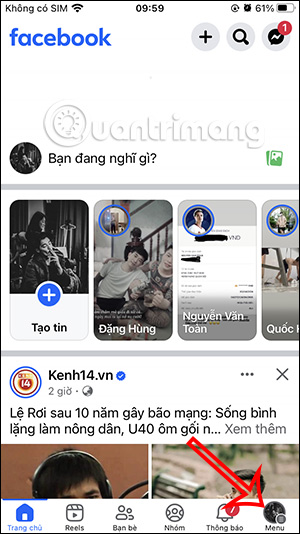
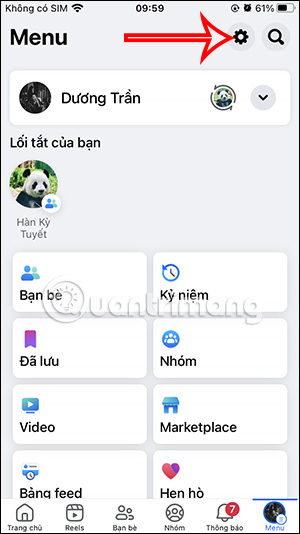
Step 1: In the Facebook app, tap the Menu icon. Open Settings using the gear icon or Settings & privacy > Settings.
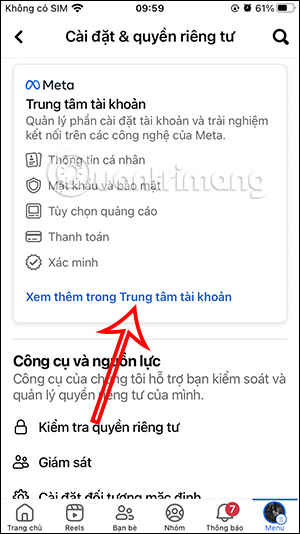
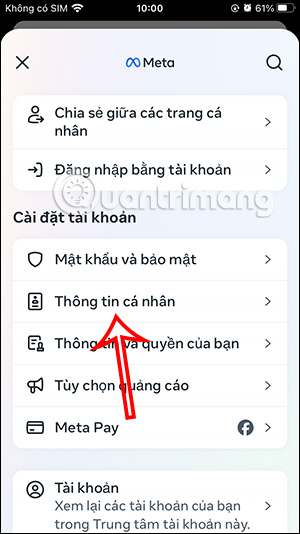
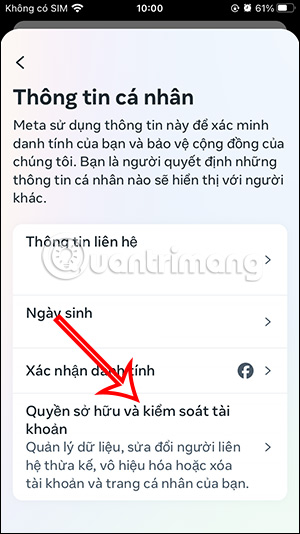
Step 2: Select See more in Accounts Center. Open Personal details or Personal information.
Step 3: Select Account ownership and control, then Deactivation or deletion. Choose the Facebook profile you intend to deactivate, not an Instagram account or a different Facebook profile.
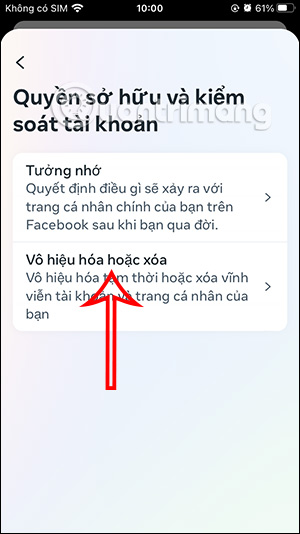
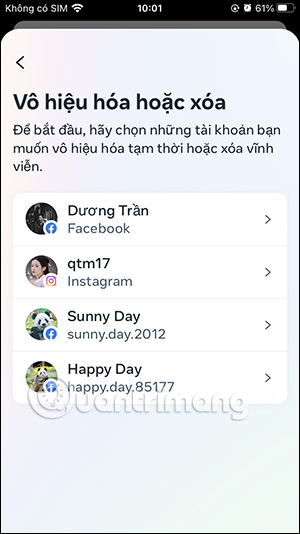
Step 4: Select Deactivate account. Read any warning about additional Facebook profiles, Pages, or other connected features. Continue and enter your Facebook password when requested.


Step 5: Select a reason and continue. Facebook may offer automatic reactivation after a chosen period; choose the option that matches your intended break.
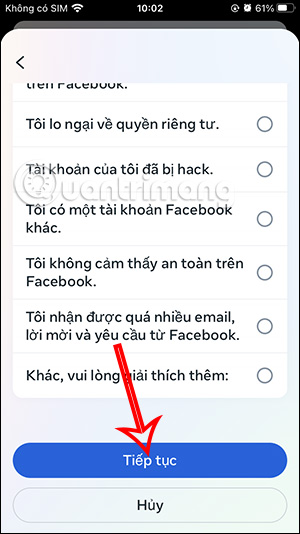
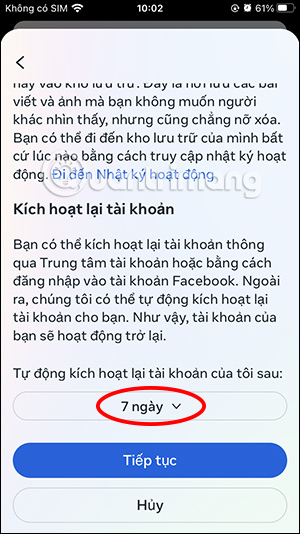
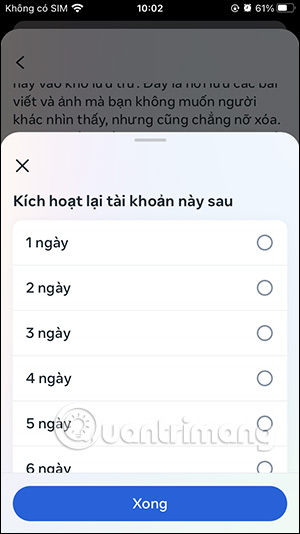
On the final review screen, confirm that Messenger will remain available. Then select Deactivate my account.
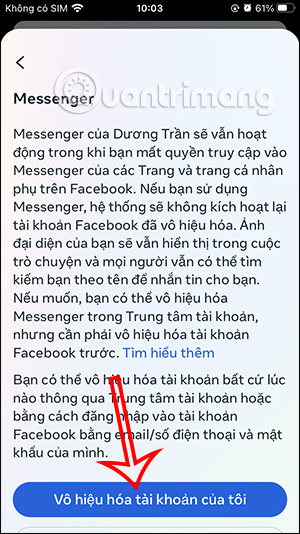
What still works in Messenger?
When Messenger remains active, you can generally continue to:
- send and receive messages;
- make voice and video calls;
- see existing conversations and contacts;
- appear to other people in Messenger search or conversations;
- use the Messenger profile photo associated with the account.
Your deactivated Facebook profile is hidden from ordinary Facebook browsing, but messages you previously sent can remain visible to recipients. Using Messenger alone does not normally reactivate the Facebook profile.
Deactivation is not deletion
| Action | Facebook profile | Messenger | Reversible? |
|---|---|---|---|
| Deactivate | Temporarily hidden | Can remain available if selected | Yes |
| Delete | Scheduled for permanent removal | May become unavailable with associated data | Only during Facebook's cancellation window |
Do not select Delete account when the goal is simply to take a break from Facebook. Download a copy of important account information before any permanent deletion request.
How to reactivate Facebook
Sign in to Facebook again with the same account. In some cases, using another Facebook-connected product or choosing to reactivate from Accounts Center can also restore the profile. Make sure you control the account's login email or phone number.
If you set an automatic reactivation date, Facebook may restore the profile at that time without a separate manual step.
If Messenger stops working after deactivation
- Confirm that you deactivated rather than deleted the account.
- Update Messenger and sign in with the same account credentials.
- Check whether the Messenger-active option was offered and selected during deactivation.
- Review Accounts Center for the status of the correct profile.
- If access depends on an organization, Page, or managed account, contact its administrator.
Related Articles
 Disable Facebook but Still Send Messenger4 minutes read
 How to Disable the Text 'Seen' Texting on Facebook3 minutes read
 Fixed a Bug with Facebook Messenger Being Escaped on iOS2 minutes read
 All About How to Use Facebook Messenger Lite4 minutes read
 GIFUR Emoji Set for Facebook Messenger: Emoji Facebook Messenger5 minutes read
 How to Know Someone Blocked You on Facebook Messenger?6 minutes read
Reader Comments 0
Sign in with email or Google to join the discussion.