Table of Contents
This practical guide explains how to Chat with Santa Claus on ChatGPT through clear, ordered steps. It also covers useful settings, common mistakes, and checks that can improve the final result.
This year, OpenAI decided to join the Christmas festivities by adding a Santa voice to its AI assistant ChatGPT. You can now talk to Santa via voice mode in the chatbot on ChatGPT. Here is a guide to chat with Santa on ChatGPT.
Instructions for Chatting with Santa Claus on ChatGPT
Step 1
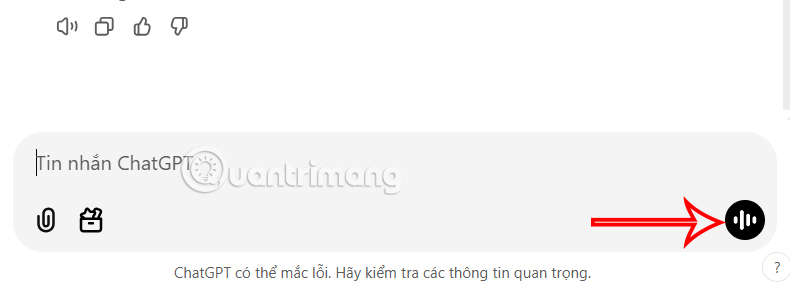
First, you access ChatGPT and log in to your account. In the ChatGPT interface, in the chat box, click on The voice chat icon To use.
Step 2:
Switch to the voice chat interface on ChatGPT. We Continue to click on the customization icon In the top right corner of the interface.

Step 3:
Then the user will see the voices displayed in the ChatGPT interface. We click on the arrow on the right to Find the Santa voice As shown below. Click Start a new chat To chat with Santa on ChatGPT.
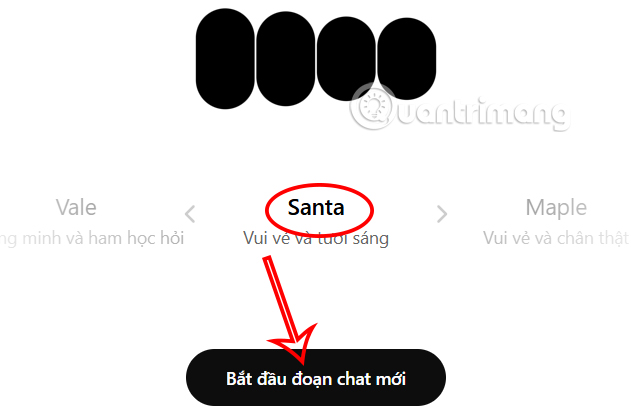
The new Santa voice will be rolling out to all ChatGPT users worldwide by December 31 on the web, ChatGPT mobile app, and ChatGPT desktop app on Windows and macOS.

FAQ
How do I Chat with Santa Claus on ChatGPT?
Follow the steps in this guide in order, verify each setting before continuing, and check the result after every major change.
What should I prepare before I Chat with Santa Claus on ChatGPT?
Confirm compatibility, install current updates, save important work, and back up data before changing system or application settings.
What can I do if chat with Santa Claus on ChatGPT does not work?
Review permissions and requirements, restart the relevant device or app, repeat the steps carefully, and use official support resources when the issue continues.
Related Articles
 Where Is Santa Claus? Where Is Santa Claus?6 minutes read
 How to Draw Santa Claus Simply, Drawing of Santa Claus: Complete Guide5 minutes read
 Where Does Santa Come from: Santa Claus7 minutes read
 How to Create Santa Claus Memoji on iPhone: Complete Guide4 minutes read
 Interesting Facts About Christmas, Santa and Reindeer That You5 minutes read
 Santa Claus, Church and Pine Tree Coloring Pages for Kids4 minutes read
Reader Comments 0
Sign in with email or Google to join the discussion.