Table of Contents
Overview
This guide examines the question 'Gaming Monitor Should Choose LCD or LED?' in clear, practical terms. It covers the key concepts, recommended steps, common limitations, and useful checks so you can make a better-informed decision.
Many people have been confused about the two types of LED and LCD screens, especially when used for gaming, but the distinction and selection are much simpler than you think.
From panel technology to refresh rate, there are many things to consider when looking for a gaming monitor. The two most common display technologies we often see are LED and LCD, but what are their pros and cons, and how should you choose the right one for your gaming needs that require sharpness and realism in the displayed image? Let's explore the differences and make the most accurate choice.

What Is LCD? How does it work?
LCD stands for Liquid-Crystal Display, which is a description of how the display works. Behind the screen, liquid crystals are sandwiched between two layers of glass and are used to change the color of the pixels to create the image you see. These are the gist of how LCDs work, but in reality, things are a lot more complicated. In the past, many LCDs used CCFL (Cold-Cathode Fluorescent Lamps) backlights. These LCDs have been around for a long time, so they are cheaper than LED displays. However, if you are a gamer looking for good refresh rates and response times, you will be hard-pressed to find a monitor with a CCFL backlight that will satisfy. They have been almost completely replaced by LCDs with LED backlights.
In summary, when talking about LCD we will have the following views:
• Their scarcity in the market today. • Consumes more electricity. • Contains mercury, thus causing pollution when used for a long time. • Low graphic contrast.
What Is LED? How does it work?
LEDs work in a similar way to LCDs; in fact, you can consider LEDs a subcategory of LCDs. The only difference between them is the type of backlight, LEDs use LEDs (Light-emitting Diodes).
LED backlighting typically provides brighter colors and sharper contrast than cold fluorescent backlighting. The displays are also thinner and, in the long run, more energy efficient than LCD displays. LED backlighting is a newer technology and is the current standard for displays with high refresh rates and fast response times.
Today even though monitors are labeled as LCD, they use LED backlights (instead of fluorescent lamps). For example, BenQ's EL2870U is listed as an LCD, but it is an LCD with LED backlight.
There are different types of LED backlights, edge-lit and array-lit. In edge-lit displays, the lights are placed around the edges of the screen. Light guides are then used to diffuse the light evenly across the screen. In array-lit displays, the lights are placed behind the screen in a panel. Some of these two types of backlights have local dimming capabilities, which is a feature that can selectively dim certain areas of the LEDs. Local dimming improves contrast ratios and provides deeper blacks in low-light scenes. As a result, displays that support this capability will cost more.
With LED screens we have the following points of view: • High popularity, so modern gaming screens will often have LED lights. • No mercury, easier to recycle. • Good color contrast and thin screen size. • More energy efficient than screens with fluorescent backlights.
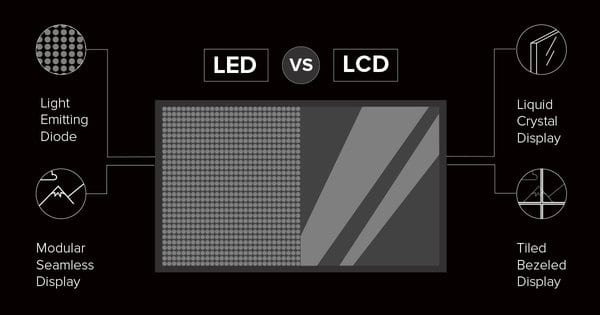
You don't have much choice between LED or LCD. Most monitors, regardless of whether they are labeled as LED or LCD, will use LED backlighting. LED backlighting has become the new standard because it allows manufacturers to offer thinner, more energy-efficient, and efficient displays with better graphics. From the comparison between LCD and LED, the choice of monitor for gaming purposes will favor LED, LCD is only slightly more expensive.
Key Takeaways
Use the guidance above as a practical reference for gaming monitor should choose LCD or LED. Check compatibility, follow the steps carefully, and verify important details with official documentation when software, security, accounts, health, or purchases are involved.
FAQ
Gaming Monitor Should Choose LCD or LED?
The answer depends on the conditions, limitations, and evidence explained in this article. Review the relevant section before applying the conclusion to your situation.
What factors can change the answer?
Hardware, software version, location, budget, compatibility, timing, and individual requirements can all affect the result.
How can I verify the information for my situation?
Check current official documentation, compare your exact model or account settings, and confirm any time-sensitive details before acting.
Related Articles
 Top 10 Best Gaming Screens Under 5 Million34 minutes read
 How Is a Gaming Monitor Different from a Regular Monitor?6 minutes read
 Old Monitor: Hunting for Used Gaming Monitors and What4 minutes read
 ASUS Launches ROG Strix XG27JCG: the World's First 5K 180Hz Gaming Monitor5 minutes read
 6 Reasons Not to Buy an HDR Monitor for a Gaming PC7 minutes read
 How to Buy a Computer Monitor That Suits Your Needs7 minutes read
Reader Comments 0
Sign in with email or Google to join the discussion.