Table of Contents
What is enumeration (enum) in C ? How to use Enum in C ? Let's find out with TipsMake.com!
Key Takeaways About Enum in C
- The details are explained below. with TipsMake.com!
- Enum is a special type, representing a group of constants (values that cannot be changed).
- To create an enum in C, use the enum keyword, followed by the name of the enum, and separate the enum items with a comma: enum Level { LOW, MEDIUM, HIGH }; Note that the last item does not
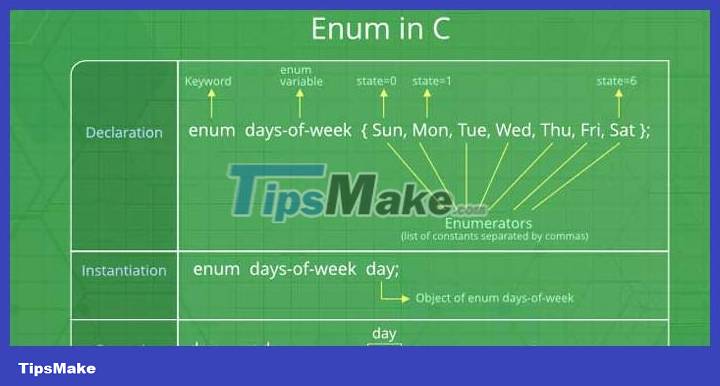
What Is Enum in C?
Enum is a special type, representing a group of constants (values that cannot be changed).
To create an enum in C , use the enum keyword, followed by the name of the enum, and separate the enum items with a comma:
enum Level { LOW, MEDIUM, HIGH };Note that the last item does not need a comma. You don't have to capitalize, but it's generally recommended.
Enum is an abbreviation for enumeration. It means 'to enumerate specifically'.
To access the enum, you must create a variable for it. Inside the method main(), specify the enum keyword, followed by the name of the emum ( Level), then the name of the enum variable ( myVar) in this example):
enum Level myVar;Now that you have created an enum variable ( myVar), you can assign it a value.
The attached value must be one of the items inside emum ( LOW, MEDIUMor HIGH):
enum Level myVar = MEDIUM;By default, the first item ( LOW) has value 0, the second item ( MEDIUM) has value 1.
Now if you try printing myVar, it will produce the result 1, representing MEDIUM:
#include enum Level { LOW, MEDIUM, HIGH }; int main() { // Tạo một biến enum và gắn cho nó một giá trị enum Level myVar = MEDIUM; // Print biến enum printf("%d", myVar); return 0; }Change the Values
As you know, the first item of the enum has value 0. The second item has value 1…
To make the values more meaningful, you can easily change them:
#include enum Level { LOW = 25, MEDIUM = 50, HIGH = 75 }; int main() { enum Level myVar = MEDIUM; printf("%d", myVar); return 0; }Note that if you assign a value to an item, the next item will update the corresponding number:
enum Level { LOW = 5, MEDIUM, // Now 6 HIGH // Now 7 };Enum in a Switch Command
Enum is often used in Switch commands to check corresponding values:
enum Level { LOW = 1, MEDIUM, HIGH }; int main() { enum Level myVar = MEDIUM; switch (myVar) { case 1: printf("Low Level"); break; case 2: printf("Medium level"); break; case 3: printf("High level"); break; } return 0; }Why and When to Use Enum in C?
- Enum in C is used to name constants. That makes the code easier to read and maintain.
- Use enum in C when you have immutable values like date, color, tag set.
FAQ
What is the main update about Enum in C?
Let's find out with TipsMake.com!
Why does Enum in C matter?
Enum is a special type, representing a group of constants (values that cannot be changed).
What should readers know about Enum in C?
To create an enum in C , use the enum keyword, followed by the name of the enum, and separate the enum items with a comma: enum Level { LOW, MEDIUM, HIGH }; Note that the last item does not need a comma.
Related Articles
 How to Use Enum in Typescript9 minutes read
 C ++ Data Type: Data Type in C // C ++3 minutes read
 Cme: Mitre Introduces Anti-virus Support Website1 minutes read
 Determine an Attribute in C #: Attribute in C #10 minutes read
 Hackers: Basic Hacking Techniques -- Attendance -- Part Iii19 minutes read
 How to Play Pokémon GO on a Computer6 minutes read
Reader Comments 0
Sign in with email or Google to join the discussion.