Table of Contents
This article examines Free photo editing application and explains the main developments, practical implications, and context readers should understand.
Free Photo Editing Application Overview
In 2008, Darktable was introduced to the public and after 8 years Darktable version for Windows appeared.

At the time Darktable Windows version has some features such as:
- Manage colors of images.
- Support multiple image formats (JPEG, RAF, HDR.).
- Quick image processing.
- Support for multiple cameras and languages.
However, it still lacks some features such as:
- Not yet supported printing and an error occurred in case of file name.
- Non-ASCII characters in file names are not supported when importing and exporting TIFF.
Ignoring the above restrictions, according to PetaPixel, this photo editing application is still stable and they hope it will bring great experience for users when using.
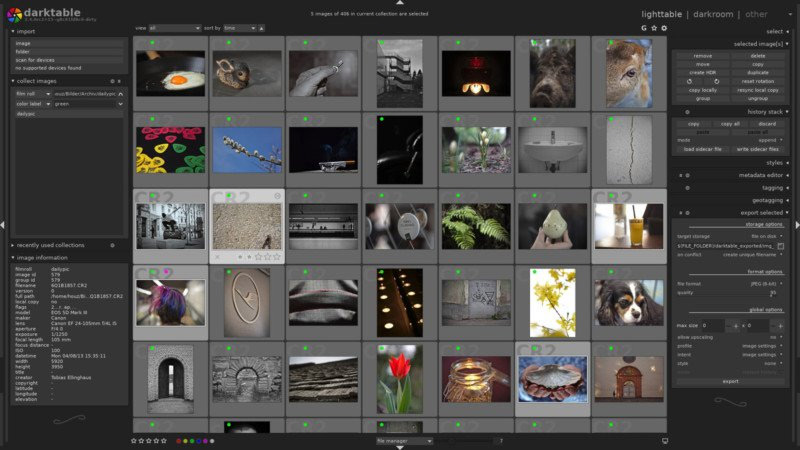
Darktable has a lot of functions similar to Lightroom and completely free, so if you are looking for another application to replace Lightroom to manage and process raw images, it is a great alternative.
You can download Darktable application for Windows and experience.
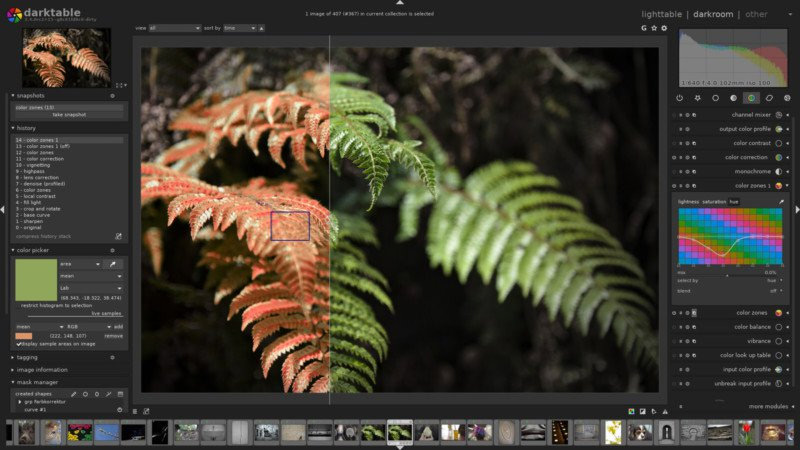
Besides the Windows version, the Mac version has also been upgraded to Darktable 2.4.0 and has many new features such as bug fixes and support for more cameras, with a new module for the ability to type. Remove haze, support back to the mask, the group of steps turns smarter.
- Photo editing software for Lightroom alternative
- 18 tips for screen capture tool on iOS 11 you should not ignore
- 30 tools to support online photo editing without using Photoshop
- 15 best photo editing apps for Android
FAQ
What does Download and Experience Darktable, Free Raw Image Processing and explain?
This article examines Free photo editing application and explains the main developments, practical implications, and context readers should understand.
Who is most affected by Free photo editing application?
Free Photo Editing Application Overview In 2008, Darktable was introduced to the public and after 8 years Darktable version for Windows appeared.
What are the key takeaways from this topic?
At the time Darktable Windows version has some features such as: Manage colors of images.
Related Articles
 Download Professional HDR Image Processing Software HDR Projects 44 minutes read
 Download a Software for Processing Professional Dxo Opticspro 114 minutes read
 Invitation to COLOR Projects 4, a $ 99 Professional Image5 minutes read
 How to Use Darktable, a Free Tool to Replace Adobe Lightroom9 minutes read
 Offers, Videoproc - Professional Video Processing Software for $4 minutes read
 Top Download Acceleration Software for Mac12 minutes read
Reader Comments 0
Sign in with email or Google to join the discussion.