Table of Contents
This guide covers build a PC to watch hd movies with practical context and easy-to-follow details. Use it to understand the subject and apply the information confidently.
 A home theater PC in a pretty luxury case.
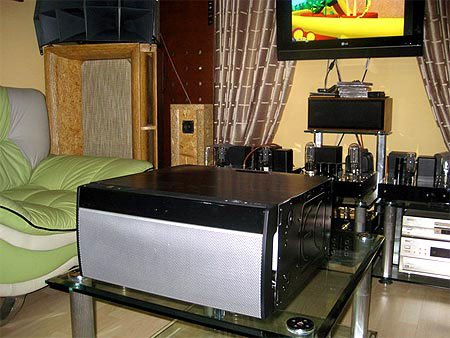 CPU unit in home theater system Photo: VNAV .
Hard drive : This is also an important part because HTPC's goal is to "hide" Blu-ray or HD DVD discs (though the format has been killed) very expensive. The 500 GB capacity can also be enough to download movies from the Internet, for example the Desktar P7K500 500GB of 7, 200 revolutions per minute costs about 60 USD. Blu-ray Drive: Currently Blu-ray drives are no longer expensive, for example, CH08LS10 BD-ROM Combo Drive by LG reads Blu-ray discs but only burns DVDs at about $ 120. If you have a cheap Blu-ray source (the sencond-hand is only about $ 20), you should also install it. Asus's TV Tuner : My Cinema-PHC3-100 costs $ 80, which helps you watch a channel and still record another channel or record two channels at the same time. This product also has a remote control. Graphics card : This computer requires a strong discrete graphics card, for example, the ATI Radeon HD 4670 1GB ($ 65) has DVI, VGA, and HDMI ports. Sound card : Asus Xonar DX 7. 1 ($ 57) is a pretty good device, supporting 7. 1 surround sound for the corresponding surround speakers. If you only have 5. 1 speakers, just select the card 5. 1. Power supply : With the integrated equipment "crisis", the power supply must have a large real capacity so that the machine will suddenly turn off suddenly. If savings choose poor quality resources, your whole machine will be vulnerable to explosion. Note to check the real power of the power supply, not the maximum capacity (normally the actual power in most of the time the machine runs normally is about 2/3 of the maximum running capacity). For example, the 600 watt ModXStream Pro OCZ600MXSP set costs $ 40. The total is more than 800 USD. After assembly, just plug in the surround speaker set, tweak it a bit, you can enjoy HD movies conveniently on the support screen. The advantage of HTPC is that it can both watch movies and do high-demand jobs, suitable for those who specialize in graphic design, video editing.
FAQ
What should I check before following these steps?
Confirm device and software compatibility, save important data, and make sure you have the required permissions, files, and account access.
Why might the process not work?
Common causes include outdated software, missing permissions, incompatible hardware, an unstable connection, or completing a step in the wrong order.
Can I undo the changes if necessary?
That depends on the tool or setting. Use built-in restore options when available, keep a backup, and record the original configuration first.
Related Articles
 Get 3 Months of Free Movies on Iflix with Viettel Sim5 minutes read
 The Free Code Is Exclusively for IFLIX Account4 minutes read
 Decipher Psychological Fear of Ghosts but Like to Watch Horror3 minutes read
 Top Netflix Movies of All Time, Constantly Updated11 minutes read
 How to Watch VIP Full HD Movies Without Account on Hdonline and10 minutes read
 6 Movies That Technology Lovers Must Watch at Least Once5 minutes read
Reader Comments 0
Sign in with email or Google to join the discussion.