Table of Contents
This updated guide examines Instructions: Beware of Phishing Emails Impersonating Facebook and organizes the essential facts, background, and practical takeaways in clear American English.
Below is a screenshot from Facebook's email and hacker:

Facebook email notification form
 Email form similar to hackers
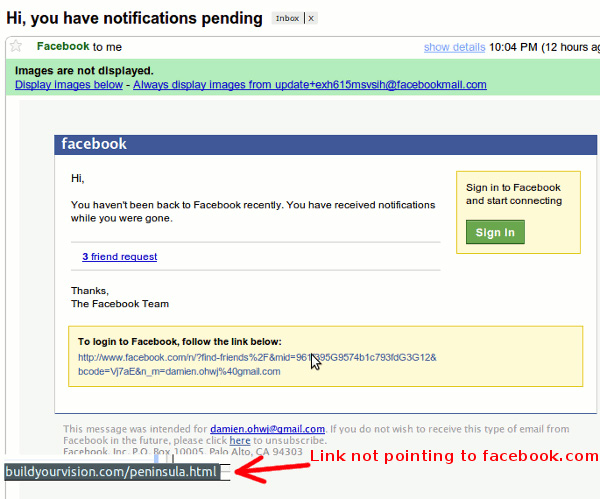
If you look at the interface, the layout will be very difficult to distinguish. You need to pay close attention to the following details:
- Title: the first point is the pending notification. In the test, we proceeded to log many Facebook accounts with different registration emails, but never received any notifications that started with the notification pending , meaning that Facebook never sent an email request. You log in to your account.
- The reply address is incorrect: normally, the From and Reply-to addresses are the same. In most cases, noreply@facebookmail.com means that you do not need to respond to these email notifications.
- Do not give personal names: correct email from Facebook usually starts with Hi + your name , while email of hackers only has Hi .
- Content of email: if you log in to Facebook at least 1 time a day, so if you receive a message like You haven't been back to Facebook recently , it is definitely fake. Besides, if there is a message like 3 pending friends requests , it can't be trusted.
- The links do not point to FaceBook.com: the most important and recognizable clue is when hovering over the links in the email, not pointing directly to facebook.com , but instead being buildyourvision.com :
Hopefully some of these basic tips can help you avoid permanent dangers on Facebook and other popular social sites. In case of uncertainty about the strange emails you receive, it is best not to open and read them. Good luck!
FAQ
What is Instructions: Beware of Phishing Emails Impersonating Facebook about?
It provides a structured overview of instructions, explains the main context, and highlights practical takeaways for readers.
Why does this topic matter?
Understanding the main concepts helps readers evaluate the issue, avoid common mistakes, and make better-informed decisions.
How should readers use this information?
Use the guidance as a practical starting point, confirm details that may have changed, and follow current product, safety, or security recommendations.
Related Articles
 Phishing Emails Are Getting More Sophisticated, Can You Spot Them?6 minutes read
 How to Identify Phishing Emails19 minutes read
 25% of 'over-the-Counter' Phishing Emails Are the Default Security of Office 3657 minutes read
![[Infographic] How to Recognize and Prevent Phishing Attacks](/data/thumbs_200x120/[infographic]-how-to-recognize-and-prevent-phishing-attacks_thumbs_200x120_uJR0hPgYg.jpg) [Infographic] How to Recognize and Prevent Phishing Attacks5 minutes read
[Infographic] How to Recognize and Prevent Phishing Attacks5 minutes read How to Report Phishing Emails in Outlook.com4 minutes read
 Outlook on Android Is About to Add Phishing Email Feature3 minutes read
Reader Comments 0
Sign in with email or Google to join the discussion.