Table of Contents
Learn about bad rabbit - Petya's new ransomware spreads throughout eastern, who may be affected, and which practical steps users or administrators can take to reduce exposure.
Bad Rabbit - Petya's New Ransomware Spreads Throughout Eastern Europe Overview
A new ransomware called Bad Rabbit is stirring up many countries in Eastern Europe, including government and business units. The spread rate is similar to WannaCry and NotPetya which took place in May and June.
Currently, this ransomware is available in Russia, Ukraine, Bulgaria and Turkey. Confirmed affected units include Odessa airport in Turkey, the Kiev metro system in Ukraine, the Ukrainian transport ministry and three newspapers in Russia, including Interfax and Fontanka. Ukraine's CERT group has warned businesses about the incident.
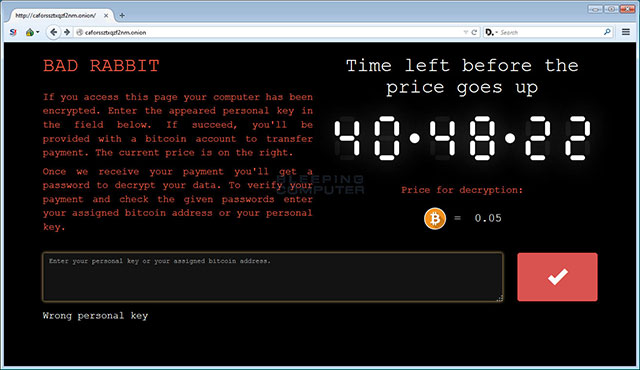 Notice that the computer has been attacked by Bad Rabbit
Bad Rabbit Spreads Through Fake Flash Updates
Researchers at ESET and Proofpoint say that Bad Rabbit was originally distributed through fake Flash update packages, but ransomware also has its own tool to migrate within the network. This also explains why Bad Rabbit spread so quickly in such a short time.
See also: Instructions for updating the latest Adobe Flash Player version
In the Kaspersky report, there was data showing that 'ransomware spread through drive-by attack' and 'the victim was redirected to [the site claiming to be the Flash update package] from the actual pages'.
Based on analysis by ESET, Emsisoft and Fox-IT, Bad Rabbit uses MImikatz to retrieve login information on computer memory and hard-coded, try to access the server on the same network via SMB and WebDAV.
Bad Rabbit as well as Petys and NotPetya, first encrypt the file on the computer and then replace it with MBR (Master Boot Record). When it is done, it will restart the computer and from here only the MBR extortion notice will remain.
This notice is the same as the one NotPetya uses. Also, Bad Rabbit and NotPetya are not the same. Intezer says only 13% of the code in NotPetya is used again in Bad Rabbit. The attacker asks the victim to access the page via the Tor network and pays 0. 05 Bitcoin (about $ 280) in 40 hours before the money goes up.
It seems that Bad Rabbit is written on DiskCryptor, an open source disk encryption tool, similar to ransomware HDDCryptor, which attacked the Minu traffic service in San Francisco earlier this year. Bad Rabbit's source code also contains references to Game of Thrones characters.
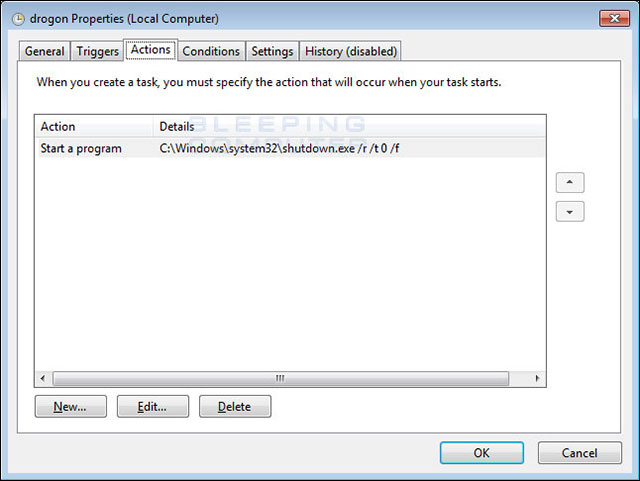 The available scheduling tasks are named after Game of Thrones
Bad Rabbit Specifications
Bad Rabbit attacks by displaying a fake Adobe Flash update message. When the user clicks, the install_flash_player. exe file will be downloaded. When executed, it will leave the file C: Windowsinfpub. dat and execute it using the C: Windowssystem32rundll32. exe command C: Windowsinfopub. dat, # 1. 15
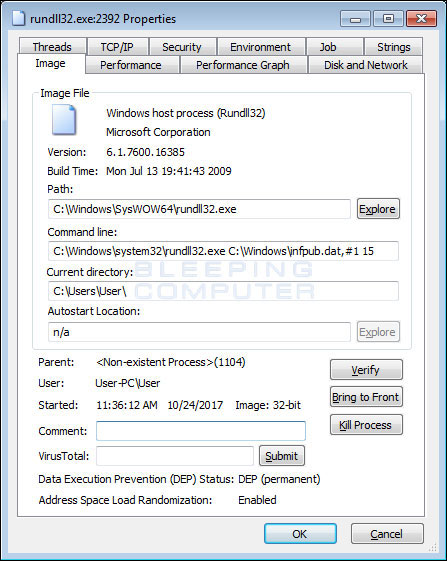 Infpub. dat executes via rundll32
Then, Infpub. dat will create the C file : Windowscscc. dat and C: Windowsdispco. exe . Cscc. dat is actually a renamed copy of dcrypt. sys, DiskCryptor driver. Infpub. dat will create a Windows Client Side Caching DDriver which is used to start the cscc. dat driver .
Infpub. dat sets the schedule available to launch dispci. exe when the user logs on to the computer. This is called Rhaegal and will execute the command 'C: Windowsdispci. exe' -id [id] && exit
The cscc. dat driver with dispci. exe file is used to encrypt the drive and modify the boot record to display the following blackmail notification when the victim turns on the computer.
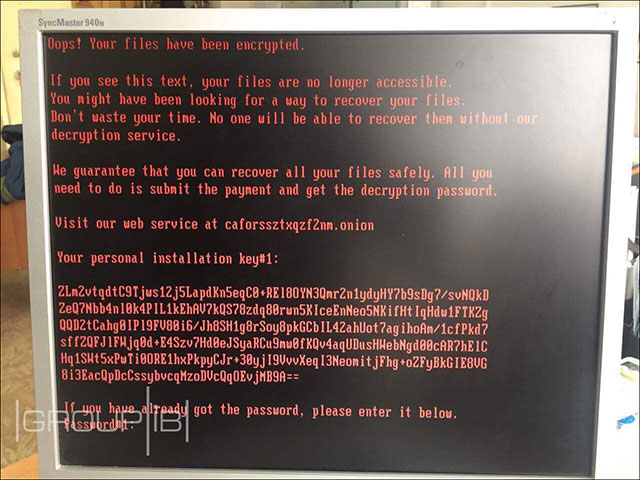 This is Bad Rabbit's blackmail notice
Infpub. dat is not done yet. After installing the DiskCryptor element, it also encrypts the file on the victim's computer, perhaps with the AES algorithm. This AES encryption key is then used to encrypt with the public key RSA-2048. It is currently unknown where the key is stored but may be added to the encrypted file.
Unlike other ransomware, Bad Rabbit does not add extensions to file names but adds strings that mark the file 'encrypted' at the end of the file.
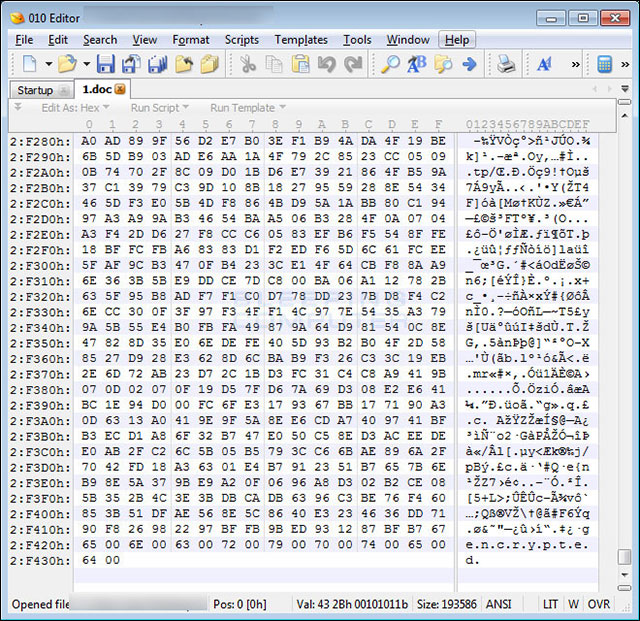 The file is encrypted with the bookmark string
Infpub. dat is also capable of spreading to other computers via SMB by trying to access the shared network via SMB with the login information stolen from the victim computer. If accessible, it will copy and execute ransomware on other machines.
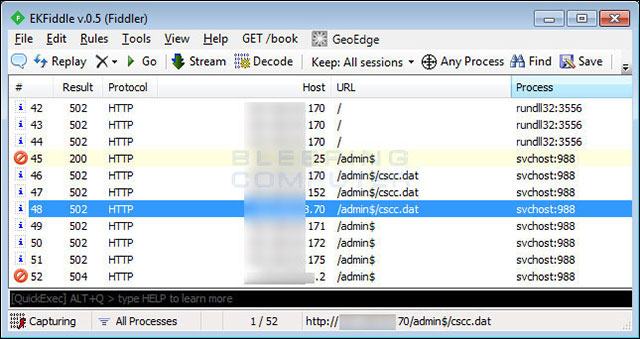 This is an example of SMB traffic
In the end, Bad Rabbit also scheduled to restart the computer. These jobs are also named after Game of Thrones, Drogon and Viserion, which are used to shut down and restart the computer and execute other programs when logging in or displaying the lock screen before starting Windows.
In general, Bad Rabbit is quite complicated and contains many stages. Security companies are still studying, so there are still many tricks that haven't been discovered in this ransomware.
See also: How to enable Controlled Folder Access to prevent ransomware on Windows 10
Bad Rabbit IOC
Hashes
install_flash_player. exe: 630325cac09ac3fab908f903e3b00d0dadd5fdaa0875ed8496fcbb97a558d0da infpub. dat: 579fd8a0385482fb4c789561a30b09f25671e86422f40ef5cca2036b28f99648 cscc. dat (dcrypt. sys): 0b2f863f4119dc88a22cc97c0a136c88a0127cb026751303b045f7322a8972f6 dispci. exe: 8ebc97e05c8e1073bda2efb6f4d00ad7e789260afa2c276f0c72740b838a0a93
Files
C: Windowsinfpub. dat C: WindowsSystem32Tasksdrogon C: WindowsSystem32Tasksrhaegal C: Windowscscc. dat C: Windowsdispci. exe
Registry entries
HKLMSYSTEMCurrentControlSetservicescscc HKLMSYSTEMCurrentControlSetservicescsccType 1 HKLMSYSTEMCurrentControlSetservicescsccStart 0 HKLMSYSTEMCurrentControlSetservicescsccErrorControl 3 HKLMSYSTEMCurrentControlSetservicescsccImagePath cscc. dat HKLMSYSTEMCurrentControlSetservicescsccDisplayName Windows Client Side Caching DDriver HKLMSYSTEMCurrentControlSetservicescsccGroup Filter HKLMSYSTEMCurrentControlSetservicescsccDependOnService FltMgr HKLMSYSTEMCurrentControlSetservicescsccWOW64 1
Network operation
Network local and remote via SMB traffic on ports 137, 139 and 445. caforssztxqzf2nm. onion
Extension when encrypted
. 3ds. 7z. accdb. ai. asm. asp. aspx. avhd. back. bak. bmp. brw. c. cab. cc. cer. cfg. conf. cpp. crt. cs. ctl. cxx. dbf. der. dib. disk. djvu. doc. docx. dwg. eml. fdb. gz. h. hdd. hpp. hxx. iso. java. jfif. jpe. jpeg. jpg. js. kdbx. key. mail. mdb. msg. nrg. odc. odf. odg. odi. odm. odp. ods. odt. ora. ost. ova. ovf. p12. p7b. p7c. pdf. pem. pfx. php. pmf. png. ppt. pptx. ps1. pst. pvi. py. pyc. pyw. qcow. qcow2. rar. rb. rtf. scm. sln. sql. tar. tib. tif. tiff. vb. vbox. vbs. vcb. vdi. vfd. vhd. vhdx. vmc. vmdk. vmsd. vmtm. vmx. vsdx. vsv. work. xls. xlsx. xml. xvd. zip
RSA-2048 key is embedded
MIIBIjANBgkqhkiG9w0BAQEFAAOCAQ8AMIIBCgKCAQEA5clDuVFr5sQxZ + feQlVvZcEK0k4uCSF5SkOkF9A3tR6O / xAt89 / PVhowvu2TfBTRsnBs83hcFH8hjG2V5F5DxXFoSxpTqVsR4lOm5KB2S8ap4TinG / GN / SVNBFwllpRhV / vRWNmKgKIdROvkHxyALuJyUuCZlIoaJ5tB0YkATEHEyRsLcntZYsdwH1P + NmXiNg2MH5lZ9bEOk7YTMfwVKNqtHaX0LJOyAkx4NR0DPOFLDQONW9OOhZSkRx3V7PC3Q29HHhyiKVCPJsOW1l1mNtwL7KX + 7kfNe0CefByEWfSBt1tbkvjdeP2xBnPjb3GE1GA / oGcGjrXc6wV8WKsfYQIDAQAB
Security note: Threat conditions and vendor guidance can change. Install current updates and verify any advisory with the official vendor before taking action.
FAQ
Why does bad Rabbit - Petya's New Ransomware Spreads Throughout Eastern Europe matter?
Learn about bad rabbit - Petya's new ransomware spreads throughout eastern, who may be affected, and which practical steps users or administrators can take to reduce exposure.
Who may be affected by this issue?
The impact depends on the affected product, version, account, device, or network. Review the article details and the vendor's current advisory to confirm whether your environment is exposed.
How can users reduce the risk?
Install current security updates, use official downloads, enable strong account protection, maintain tested backups, and follow the latest guidance from the relevant vendor.
Related Articles
 What Is Ransomware Bad Rabbit? Prevention and Security Tips7 minutes read
 Hyperloop's Dream Will Be Completed by the End of 2017 in Eastern6 minutes read
 White Rabbit Ransomware: Complete Guide4 minutes read
 Wannacry Remains One of the Most Dangerous Global Security4 minutes read
 7 Kinds of Ransomware You Didn't Expect8 minutes read
 Rabbit: Cute, Cute Bunny Wallpaper2 minutes read
Reader Comments 0
Sign in with email or Google to join the discussion.