Table of Contents
This article examines Apple Updates XProtect to Block 'Windows' Malware on a Mac. It presents the main facts, practical implications, and key points in a clearer, easier-to-follow format.
If you don't know, XProtect is Apple's built-in antivirus software that acts as a real-time protection shield on a Mac. To protect users from viruses and malicious code, XProtect uses signatures built from many Yara rules aimed at known security threats for Mac users.

- India's largest IT services company is hit by a hacker '.
According to security expert Patrick Wardle, the two new signatures released on April 19, 2019 when used together can help detect ad packages containing Windows executable files running on macOS.
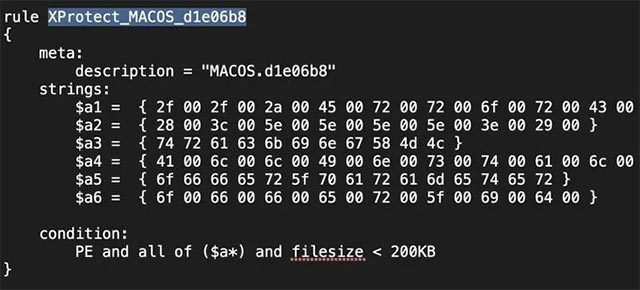
The two new signatures are called "PE", which helps detect Windows PE files and "macOS.d1e06b8", and is also used to identify a specially built Windows executable file that can run on Mac, as illustrated below:
- Malicious ad campaigns abuse Chrome to steal 500 million iOS user sessions.
Basically, XProtect will use the above rule to detect Windows executable files that contain the following strings. Note, the strings below are built based on the rules shown above, so they can also be 'torn' small.
 // * ErborC
 ()
 trackingXML
 AllInstal
 offer_parameter
 offer_id
These strings are linked to many ad packages containing modified Windows executable files to run on Mac using Mono C # framework.
Malicious Code Targeted Mac Adware Package
In February, a number of major technology news sites around the world reported cases of malware detected using the Mac installer to launch Windows executable files using Mono. C # framework.
Mono is basically a cross-platform framework, allowing C # programs to run on many popular operating systems today, including Windows, Mac and Linux.
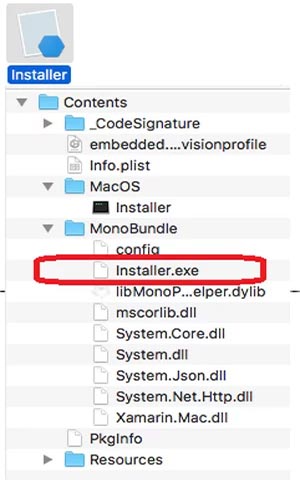
Some of the detected malware samples will extract a Windows executable file named Installer.exe. This file will then use the included Mono Mac libraries to be able to run on this operating system.
- 25% of "out-of-the-box" phishing emails are the default security of Office 365.
After successfully launching, the ad package will silently contact the crook's remote servers to download the 'offers' and install them into the victim's system. These 'offers' can be browser extensions, adware, exploit tools and unwanted password theft.
Although these ad software packages are essentially executable files of Windows, they are actually not able to run on Windows. This is because they are programmed to try to download the Mac Mono framework libraries, while those are completely unavailable in Windows. If you try to run these executable files in Windows, the system will report an error as shown in the illustration below:

- Detect spyware targeting iOS users
When programming languages like C # become cross-platform languages, being able to discover Windows PE files will play a very important role in protecting users from malware, which can be easy. spread to Mac using frameworks like Mono.
FAQ
What is the main point of Apple Updates XProtect to Block 'Windows' Malware on a Mac?
If you don't know, XProtect is Apple's built-in antivirus software that acts as a real-time protection shield on a Mac. To protect users from viruses and malicious code, XProtect uses signatures built from many Yara rules aimed at known security threats for Mac users.
Why is Apple Updates XProtect to Block 'Windows' Malware on a Mac important?
Apple Updates XProtect to Block 'Windows' Malware on a Mac matters because it can affect how readers understand, choose, use, or respond to the subject discussed in the article.
What should readers verify about Apple Updates XProtect to Block 'Windows' Malware on a Mac?
Check the date, product or software version, compatibility, and any current guidance before acting, especially when technology, security, health, or pricing is involved.
Related Articles
 How to Stop Windows Updates on Your PC10 minutes read
 Apple: Malware on Mac Updates the New Version3 minutes read
 Microsoft Patch Prevents Windows 10 1903 and 1090 Users from Updating to3 minutes read
 How to Disable Windows 10 Updates9 minutes read
 Turn Off Windows 10 Updates, 9 Ways to Completely Block Windows 10 Updates17 minutes read
 Instructions on How to Turn Off Self-update Notifications3 minutes read
Reader Comments 0
Sign in with email or Google to join the discussion.