Table of Contents
This updated guide examines Apple Blocked the Smssend Trojan on Os X and organizes the essential facts, background, and practical takeaways in clear American English.
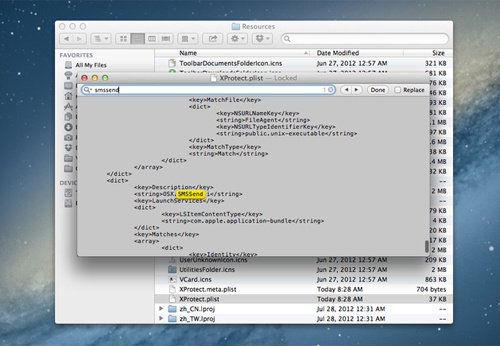 Trojan SMSSend appears on Mac computers.
Apple today released a blacklist update of Xprotect malware to protect Mac OS X from spyware that has emerged two days ago. The original SMSSend looks like a normal installation application when requiring users to enter the phone number (in the information box) and fill in the confirmation code sent via the message. However, this job accidentally caused the owner to register an expensive service, and the number of bills paid at the end of the month was huge.
This type of malicious code is already available on other operating systems, but this is the first time targeting Mac users.
Apple recently proved "soft-spoken" when announcing the previous marketing strategies that Mac is immune to the virus. The growth in the number of users will make the operating system begin to be in the sights of hackers to break into the system and steal user information. However, the upgrade that took place just two days after the malware appeared was also a commendable effort by Apple.
FAQ
What is Apple Blocked the Smssend Trojan on Os X about?
It provides a structured overview of SMSSend, explains the main context, and highlights practical takeaways for readers.
Why does this topic matter?
Understanding the main concepts helps readers evaluate the issue, avoid common mistakes, and make better-informed decisions.
How should readers use this information?
Use the guidance as a practical starting point, confirm details that may have changed, and follow current product, safety, or security recommendations.
Related Articles
 File: Apple Fake Trojan Sales Announcement1 minutes read
 What Is a Trojan? How to Avoid Trojan Attack?5 minutes read
 How to Know If Someone Blocked You on Apple Messages4 minutes read
 What Is Trojan? How to Avoid Trojan Horse Virus16 minutes read
 Apple Intelligence Blocked on All Meta Apps on iOS4 minutes read
 Trojan Dropper Explained6 minutes read
Reader Comments 0
Sign in with email or Google to join the discussion.