Currently, Apple's default web browser has just added a built-in content blocker called "Distraction Control".
Unlike traditional content blockers that primarily aim to remove online ads, Apple's approach is more careful. As the name suggests, this feature attempts to eliminate various annoyances that users may encounter on the web, such as notification subscription windows, cookie reminders, auto-playing videos, and more. other types of offensive content.
Although you can use Distraction Control to block ads, it's not really that thorough. The ad will return when you refresh the page. This clearly shows that Apple is not trying to replace third-party ad blockers. Safari will even warn users that Distraction Control cannot permanently remove ads.
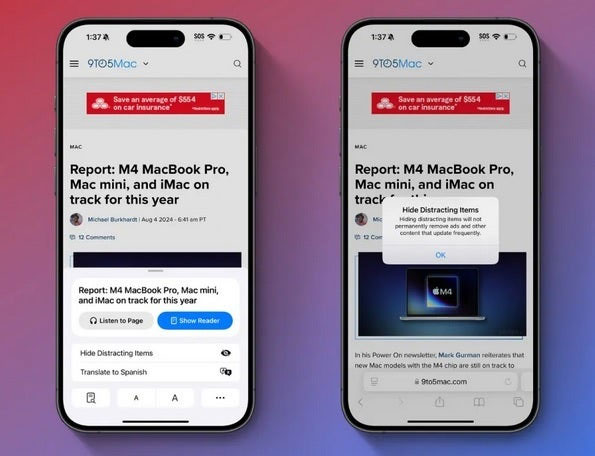
In short, Apple provides iOS, iPadOS, and macOS users with a quick and easy tool to hide distracting elements when visiting websites. Another important aspect is that hiding certain parts of a website requires users to make in-depth edits, so the process is not automatic and will not sync across devices. You must enable Distraction Control from the menu and manually select the element you want to delete. Of course, Apple users can always use a third-party ad blocker to automate the process.
Distraction Control is now available in the latest iOS 18, iPadOS 18 and macOS Sequoia developer betas. Expect this feature to be available in the next public beta and to be available with stable releases in the next month or two.





Reader Comments 0
Sign in with email or Google to join the discussion.