Table of Contents
This article examines Adobe Introduces a Cross-platform 'All in One' Video Editing Application. It presents the main facts, practical implications, and key points in a clearer, easier-to-follow format.
Understanding Adobe Introduces a Cross-platform 'All in One' Video Editing
Graphics software company Adobe recently introduced Project Rush, a cross-platform "all-in-one" video editing application. Project Rush brings three tools - Premiere Pro, Audition and After Effects - together in one place with a simple interface that gives users a better experience.
Project Rush will be uploaded to both desktop and mobile devices and all user editing projects will be synchronized with the cloud automatically. This means users can use any device anywhere with an internet connection to continue editing videos. In addition, Project Rush will also integrate with Adobe Stock and provide Motion Graphics templates for users to edit with many quick customization options.
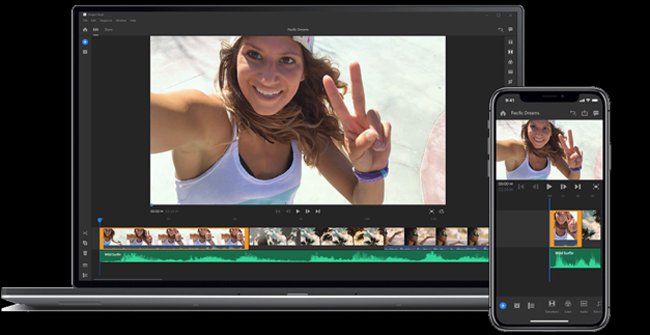
Project Rush also has sharing tools so users can download finished edited videos to YouTube and other social networks quickly.
Adobe is expected to release Project Rush later this year. Adobe now allows users to sign up for Project Rush in beta, available for Mac, Windows and iOS via the link below, and the Android beta will be available soon.
- https://www.adobe.com/go/project-rush
FAQ
What is the main point of Adobe Introduces a Cross-platform 'All in One' Video Editing Application?
Graphics software company Adobe recently introduced Project Rush, a cross-platform "all-in-one" video editing application. Project Rush brings three tools - Premiere Pro, Audition and After Effects - together in one place with a simple interface that gives users a better.
Why is Adobe Introduces a Cross-platform 'All in One' Video Editing Application important?
Adobe Introduces a Cross-platform 'All in One' Video Editing Application matters because it can affect how readers understand, choose, use, or respond to the subject discussed in the article.
What should readers verify about Adobe Introduces a Cross-platform 'All in One' Video Editing Application?
Check the date, product or software version, compatibility, and any current guidance before acting, especially when technology, security, health, or pricing is involved.
Related Articles
 What Is Adobe AIR? Overview of Adobe AIR5 minutes read
 Adobe Released the Adobe Premiere Rush Cc Video Editing2 minutes read
 Adobe Introduces AI Search and Subtitle Translation Tools for Faster5 minutes read
 Adobe Presenter - Adobe Presenter Download and Installation3 minutes read
 How to Blur Photos Using Adobe Photoshop Fix Android6 minutes read
 The Best Video Editing Applications for iPhone14 minutes read
Reader Comments 0
Sign in with email or Google to join the discussion.