Table of Contents
The most effective way to protect your privacy on ChatGPT is to avoid entering sensitive information in the first place. You can also use Temporary Chat, turn off model-improvement sharing, control memory, delete old conversations, and secure the account with multi-factor authentication. Menu names and feature availability can vary by plan, workspace, device, and region.
Privacy controls reduce exposure, but they do not make a chat an appropriate place for passwords, authentication codes, financial records, confidential client files, or information you are not authorized to share.
1. Use ChatGPT without signing in when it meets your needs
ChatGPT may allow limited use without an account in supported locations. This avoids linking a simple question to a saved account history, but it does not mean that no technical or safety data is processed. Signed-out use also lacks features such as synchronized history, paid tools, and account-level controls.
Choose this option only for ordinary, non-sensitive questions. Do not treat a signed-out session as an anonymous channel for private data.
2. Share the minimum information required
Remove names, addresses, account numbers, customer identifiers, internal URLs, and other details that are not needed for the answer. Replace real values with neutral labels such as “Customer A” or “Project X.” Redact screenshots before uploading them and inspect document metadata when it may reveal an author or organization.
Using an email login instead of Google, Apple, or Microsoft is not automatically more secure. Choose a sign-in method you can protect well, review the information shown on any consent screen, and use an alias or hide-my-email feature only if you understand its account-recovery implications.
3. Start a Temporary Chat
Temporary Chat is intended for conversations that should not appear in normal chat history or contribute to memory. Open a new chat and select the temporary-chat control shown in the interface before sending the first message.

Temporary Chat is a privacy control, not a secure vault. OpenAI may still retain limited data when necessary for safety or legal obligations, and information sent to a connected app or external service is governed by that destination's controls.
4. Turn off “Improve the model for everyone”
To stop new consumer ChatGPT conversations from being used to improve models, open Settings, select Data Controls, and turn off Improve the model for everyone. The wording or location can differ slightly across mobile and web versions.
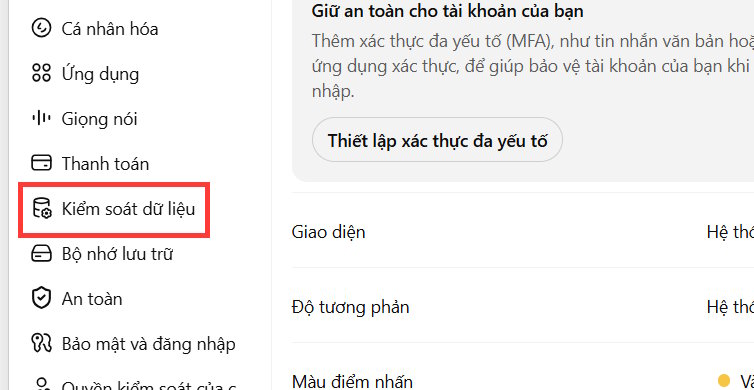
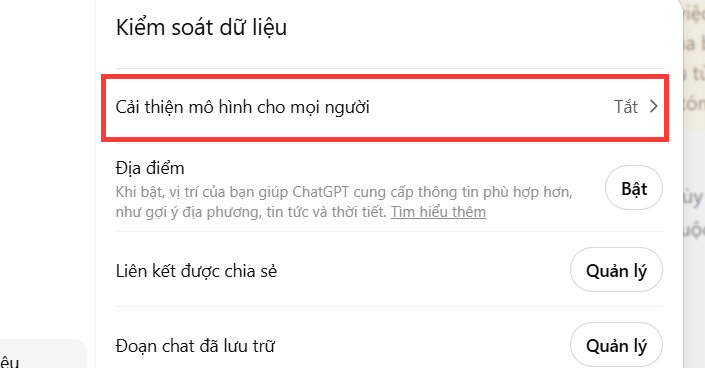
This setting is different from deleting chats or turning off memory. Review each control separately. Business, enterprise, education, API, and other managed products can have different data-handling defaults set by their agreements or administrators.
5. Turn off memory and delete saved memories
When memory is available, ChatGPT can save useful details or refer to prior conversations to personalize later replies. To control it, open Settings > Personalization and review the memory options displayed for your account.
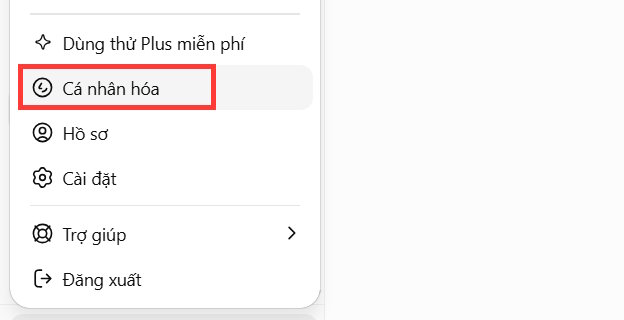
Turn off the option to reference saved memories if you do not want them used in future chats. A separate control may govern whether ChatGPT can reference chat history.
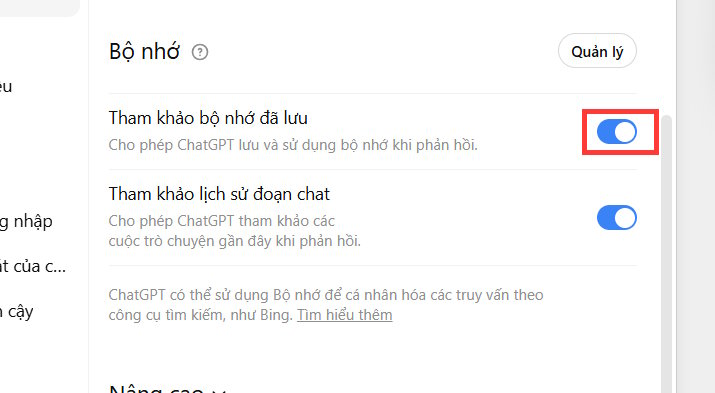
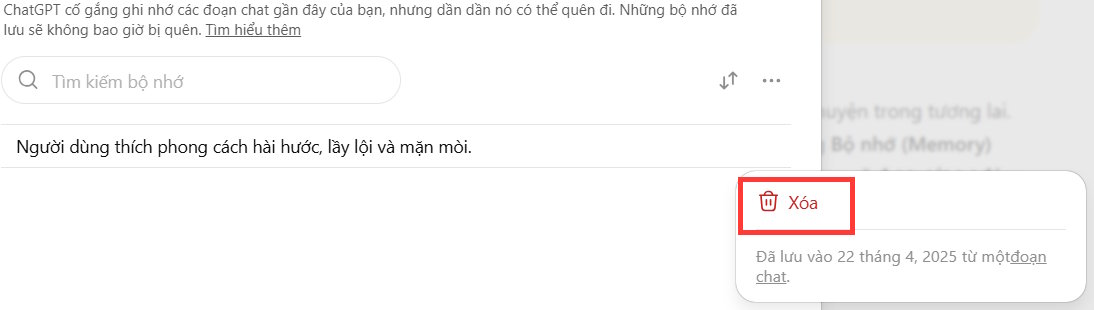
Turning memory off does not necessarily delete information already saved. Open the memory management screen, review each item, and remove anything you no longer want stored. Deleting the original chat and deleting the associated saved memory can be separate actions.
6. Delete conversations and review uploaded files
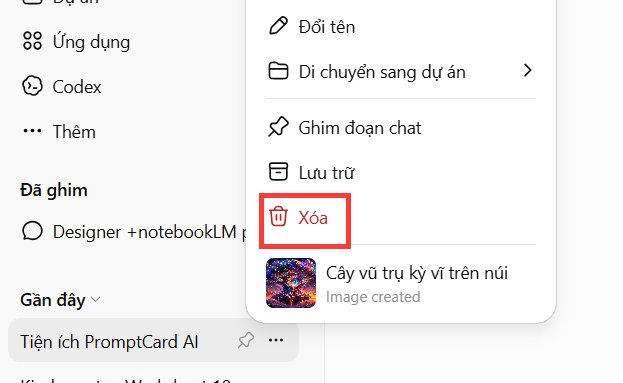
Delete individual conversations from the chat menu, or use the account's data controls if an option to remove all chats is available. Archiving only removes a chat from the main list; it is not the same as deletion.
Also review projects, custom GPTs, shared links, connected apps, and uploaded files. A file removed from one conversation may still exist in another project or external service where it was separately stored. Revoke a shared link when it is no longer needed.
7. Review connected apps and agent browser data
Connected apps can give ChatGPT access to information from another service, while agent or browser features may use cookies and website state to complete tasks. Connect only the account required for the task, check the requested permissions, and disconnect services you no longer use.
If your account includes controls for remote browser or website data, review and clear that data from the relevant settings. Deleting a ChatGPT conversation does not necessarily delete data held by a third-party site that received information during the task.
8. Protect the account with multi-factor authentication
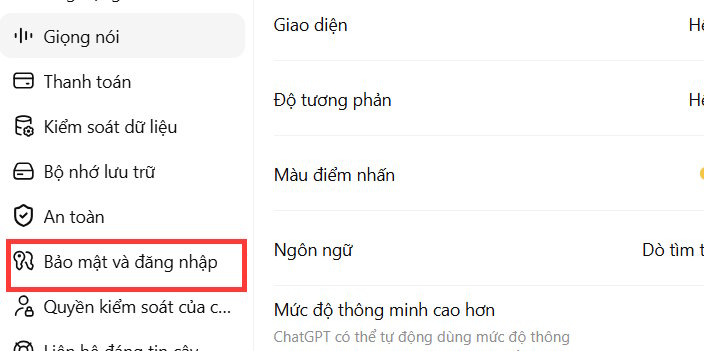
Open the account's security settings and enable the strongest multi-factor authentication option available to you. Follow the on-screen setup, store recovery information somewhere safe, and never share a one-time code in a chat.

Use a unique password if the account has a password, protect the email account used for recovery, and sign out of devices you do not recognize. Workspace users should also follow their organization's single sign-on and device-security policies.
A practical privacy checklist
- Remove unnecessary personal and confidential details before sending a prompt.
- Use Temporary Chat when normal history and memory are not needed.
- Review model-improvement, memory, and chat-history controls independently.
- Delete saved memories as well as the chats that created them.
- Audit uploads, shared links, projects, connected apps, and browser data.
- Enable multi-factor authentication and protect the recovery email.
Recheck these settings periodically because ChatGPT features and account controls evolve. The safest rule remains simple: if disclosure would cause harm, do not place the information in a chatbot unless your organization has explicitly approved that use and the applicable data protections.
Related Articles
 How to Check and Delete Personal Data on ChatGPT7 minutes read
 Does ChatGPT Have Privacy Issues: Key Facts11 minutes read
 Protect Your Privacy on Google5 minutes read
 A Wave of People Are Abandoning ChatGPT and Gemini Due to Privacy Concerns5 minutes read
 Delete Personal Information Online11 minutes read
 6 Ways to Protect Your Privacy When Using Google Products6 minutes read
Reader Comments 0
Sign in with email or Google to join the discussion.