Table of Contents
The options below offer different strengths for users interested in 8 free audio editing software. Review the key details and consider which choice best matches your needs.
- List of the best video editing software
1.Audacity
Flexible and powerful - the best free audio editor
Advantages:
+ Advanced editing tools
+ Support Plugin
+ Many effects
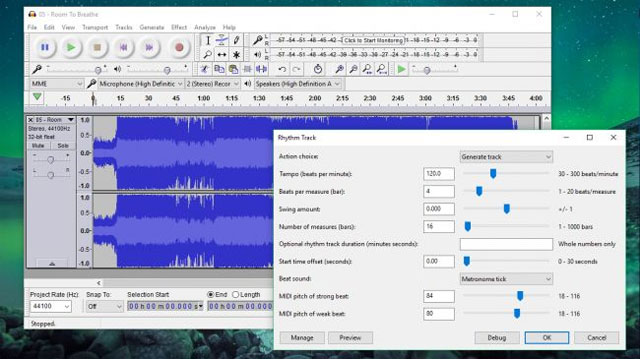
Available for many desktop platforms, Audacity is the leading free music editor on this list. This is a powerful tool, which makes some paid products feel embarrassing and although the original interface is not very eye-catching, it is easy to use even for beginners.
Audacity is equipped with a set of built-in tools, allowing editing of pre-recorded files, receiving audio through the attached microphone, or even listening to music and podcasts. the app supports a wide range of audio formats for both audio input and output.
There is also a great option that third-party plug-ins make the app more flexible (one of Gsnap's favorite add-ons, for Drake§ effects) and a tutorial Overall usage helps you to grasp the program neatly in the palm of your hand.
Great ability and amazing features make Audacity the best free audio editor available today.
Download:Audacity
2. Ocenaudio
A powerful audio editing software, but easier to master than Audacity
Advantages:
+ Contains many filters
+ Easy to see interface
Defect:
- No stacking effect

Like Audacity, Ocenaudio is available for many platforms (Windows, Linux and Mac). Although its features are not outstanding, this is a great tool for regular audio editing. Real-time preview effects will help speed up your work and a highly accurate selection tool makes it easy to apply the same application to multiple audio files.
You can use Ocenaudio for files stored on your computer or even open online storage servers. The uncomplicated interface of this audio editing software also makes users quickly get used to the shortcuts.
Ocenaudio offers many good effects with additional features like plugins and even has the option to export audio files as ringtones for iPhone.
Download : Ocenaudio
3. DVDVideoSoft Free Audio Editor
Advantages:
+ Beautiful interface design
+ Multiple choice of audio file output formats
Defect:
- No filters

There are a number of programs called Free Audio Editor, which is understandable because developers want their software to rank well on Google but not useful, especially for users. Here we are referring to a software created by experts at DVDVideoSoft rather than FAEMedia's tool.
Unlike Audacity, this software will not create sound recordings or remove background noise because this is not its purpose. With Free Audio Editor, you can easily cut and convert audio files, even for those who have never used a previous audio editing program.
The interface of Free Audio Editor is simply not confusing for users. The most outstanding feature of this software is the simple cutting tool, but Free Audio Editor also includes an excellent metadata editor for music files (with covers) and a number of audio file output formats. to be able to store songs with different purposes.
Download:DVDVideoSoft Free Audio Editor
4. Mp3DirectCut
Advantages:
+ Automatically pause
+ Many cutting tools
Defect:
- Icons are easy to confuse
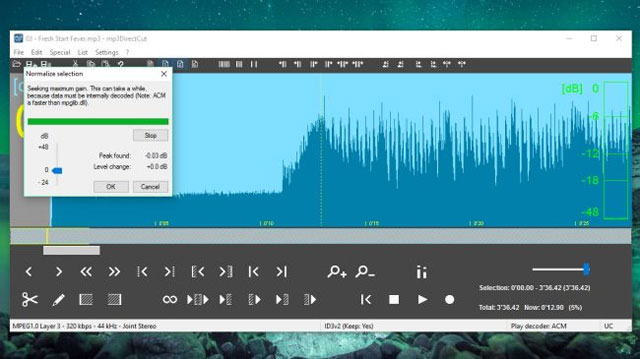
With mp3DirectCut you can record directly into the program or use existing audio files. Auto-pause makes it easy to select song cutting points. In addition mp3DirectCut also features a batch processing option used to quickly apply the same settings and effects to all folders.
Download:Mp3DirectCut 5. CD to MP3 Converter

This program helps you compress music files from CDs converted to MP3, WAV, OGG or WMA formats. The program automatically updates information from the CD and can store the song name based on the name on the CD. In addition, you can record audio from the microphone and switch to formats like MP3, WAV, OGG or WMA.
Download : CD to MP3 Converter 6. Expstudio Audio Editor Free

The program supports WAV PCM, WAV (ADPCM, GSM, DSP, A-LAW, U-LAW, ALF2), MP2, MP3 (MPEG Layer-3), VOX (Dialogic ADPCM), WMA (Windows Media Audio), RAW (PCM, A-LAW, U-LAW), CDA (Audio CD Tracks), OGG (Ogg Vorbis), G.721, G.723, G.726. This free tool also helps you edit audio files like editing a text file. With intuitive tools like collage, copy, delete, mix audio files, and a range of outstanding sound effects.
Download : Expstudio Audio Editor Free 7. Free video to MP3 Converter Free video to MP3 Converter splits audio files from video formats such as *. avi, *. mpg, *. mp4, *. wmv, *. asf, *. mov, *. qt, *.3gp, *.3g2 and *. flv and save in MP3 format. You can split the entire sound of the video or some part you like.
Download : Free video to MP3 Converter 8. FreeRip FreeRip is a free and simple application for recording tracks directly from a CD to a personal computer. You can burn music from CD to quality WAV with CD or you can compress in OGG, WMA, MP3 or Flac format. The program also converts audio files to WMA, WAV, MP3, OGG, Flac and vice versa.
Download : FreeRip
FAQ
How were the 8 free audio editing software options selected?
The options are compared by usefulness, ease of use, core features, and their fit for the situations described in the article.
Which option is best for beginners?
Choose the option with the simplest setup, clear documentation, and the features you actually need. A more advanced option is not always the better starting point.
What should I check before choosing?
Check compatibility, current availability, pricing or licensing, privacy requirements, and whether the product still receives updates and support.
Related Articles
 5 Free Audio Editing Software: Complete Guide6 minutes read
 9 Best Audio Editing Software for Linux7 minutes read
 Top 10 Best Free Audio Editing Software 20216 minutes read
 Top 20 Best Music and Audio Editing Applications for Android10 minutes read
 Discover Free Software27 minutes read
 5 Cutting Software, Best Free Music Composer and Download Link6 minutes read
Reader Comments 0
Sign in with email or Google to join the discussion.