Table of Contents
To prevent your phone from overheating while charging and to extend its battery life, here are some solutions you can try.
How can I charge my phone without it overheating?
Detailed instructions:
1. Avoid using your phone while it's charging .
2. Turn on airplane mode while charging .
3. Limit the use of fast charging .
4. Use genuine charging cables .
5. Close background applications .
6. Avoid placing your phone on blankets or sofas while charging .
7. Remove the phone case while charging .
How to charge your phone without it overheating.
Method 1: Avoid using your phone while it's charging.
One of the main culprits behind overheating phones is the habit of using them while charging. This seemingly harmless habit is actually extremely dangerous; besides affecting the battery life, it can also cause a series of unfortunate incidents and accidents such as fires and explosions.
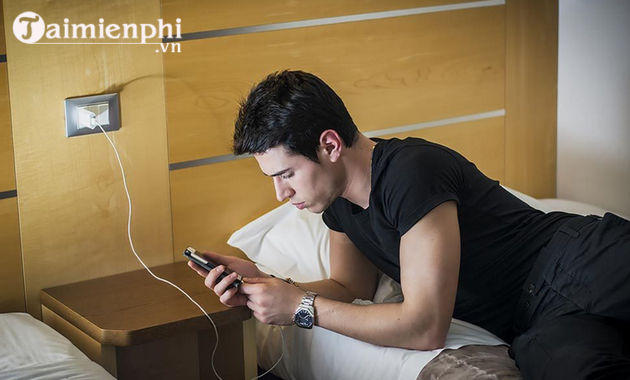
Therefore, to prevent your phone from overheating while charging, it's best to charge the battery properly, avoid using the device while charging, and wait until the phone is fully charged before using it.
Method 2: Turn on airplane mode while charging.
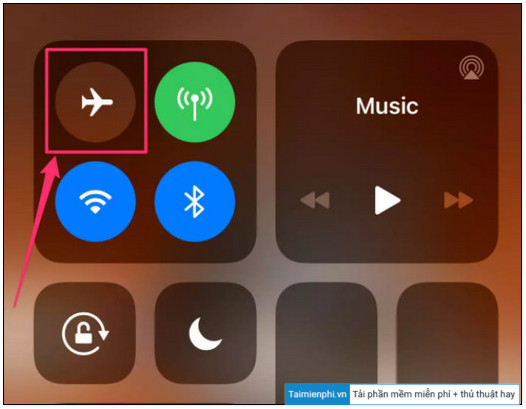
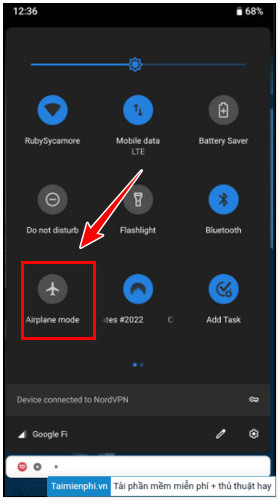
To turn on airplane mode on Android and iPhone phones, the quickest way is to open the Control Center window by swiping up from the bottom of the screen. There, find and turn off the airplane mode icon as shown below:
On iPhone:
On Android:
Method 3: Limit the use of fast charging.
Undeniably, fast charging on smartphones is extremely useful, especially when users need to use their phones urgently. However, the biggest drawback of this feature is that it causes the device to overheat and shortens the battery life.
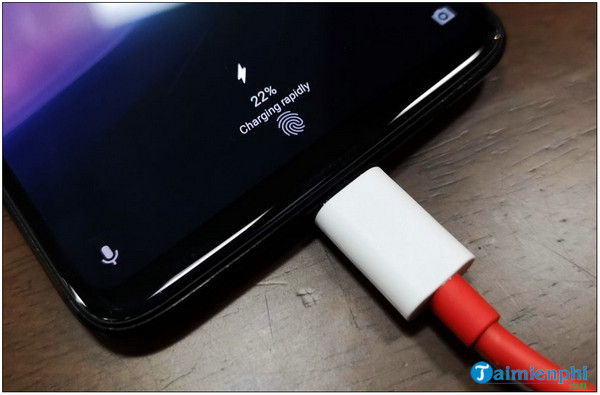
Therefore, TipsMake recommends that you limit the use of fast charging to avoid overheating your device.
Method 4: Use genuine cables.
Another way to reduce overheating while charging is to use genuine charging cables. Using non-genuine chargers and cables will not only result in slower charging times but also cause both the charger and the device to overheat.
Method 5: Close background applications
Close background apps on Android.
To close background apps on Android, the first step is to check which apps are running in the background and consuming device resources.
To do this, follow the steps below:
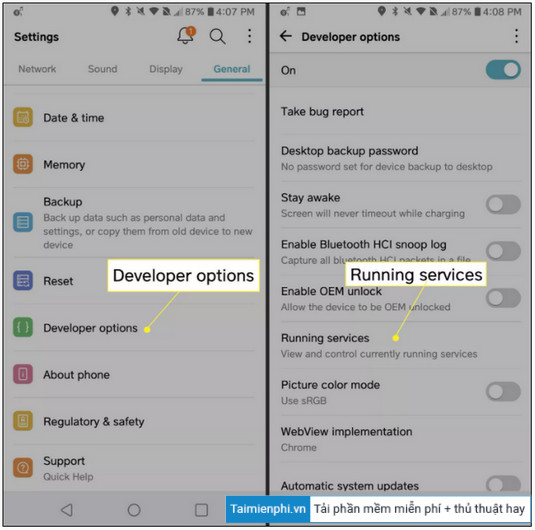
Bước 1: Trên điện thoại Android, mở ứng dụng Settings (cài đặt) =>General (cài đặt chung).
Bước 2: Tìm và nhấn chọn Developer options (tùy chọn nhà phát triển), sau đó nhấn chọn Running Services (dịch vụ đang chạy).
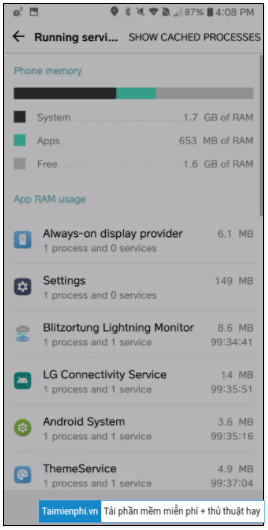
Bước 3: Lúc này trên màn hình sẽ hiển thị danh sách các ứng dụng đang chạy trên thiết bị Android của bạn cũng như chiếm dụng bao nhiêu RAM.
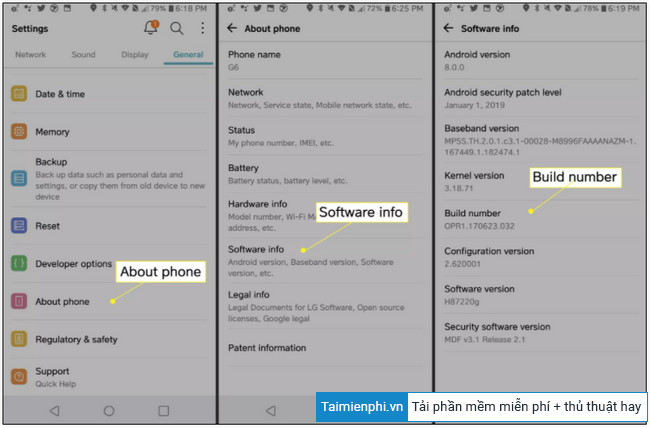
Lưu ý:
Nếu tùy chọn Developer Options (nhà phát triển) không hiển thị trong menu cài đặt, cuộn xuống dưới tìm và nhấn chọn tùy chọn About phone (giới thiệu điện thoại) =>Software info (thông tin phần mềm) => nhấn chọn tùy chọn Build number 7 lần để kích hoạt tùy chọn nhà phát triển.
Bước 4: Để xem các ứng dụng tiêu thụ bao nhiêu pin điện thoại, truy cập Settings (cài đặt) =>Battery (pin) / Battery Usage (sử dụng pin).
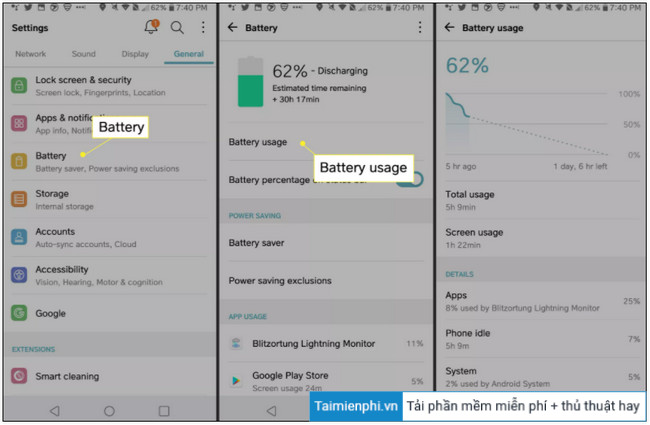
Tiếp theo, thực hiện theo các bước dưới đây để tắt các ứng dụng chạy ngầm trên Android:
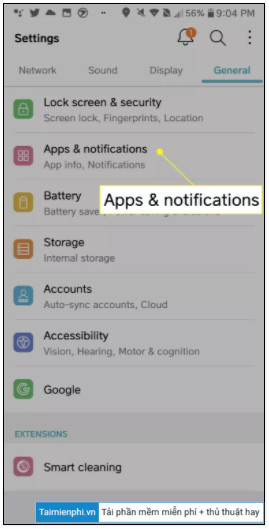
Bước 5: Mở ứng dụng Settings (cài đặt) =>Apps & notifications (ứng dụng & thông báo).
Bước 6: Chọn ứng dụng bất kỳ mà bạn muốn tắt, ngăn không chạy ngầm trên nền background, chọn Force Stop (buộc dừng).
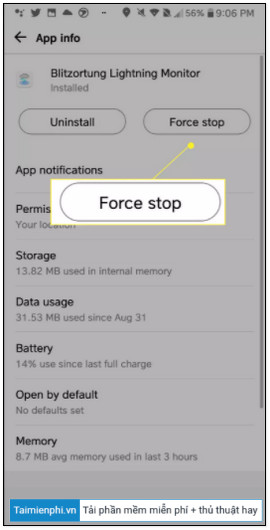
Lưu ý: Nếu khởi động lại điện thoại Android, các ứng dụng này có thể chạy trên nền background và gây ra các sự cố tương tự.
Lý tưởng nhất là gỡ bỏ cài đặt các ứng dụng này để giải phóng dung lượng trống thiết bị cũng như khắc phục tình trạng điện thoại bị nóng máy khi sạc pin.
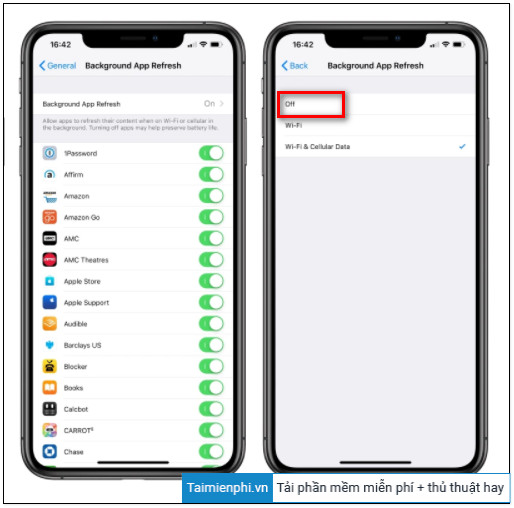
Tắt ứng dụng chạy ngầm trên iPhone
Để tắt các ứng dụng chạy ngầm tự động làm mới trên iPhone, bạn thực hiện theo các bước dưới đây:
Bước 1: Mở Settings (cài đặt) =>General (cài đặt chung) =>Background App Refresh (làm mới ứng dụng trong nền).
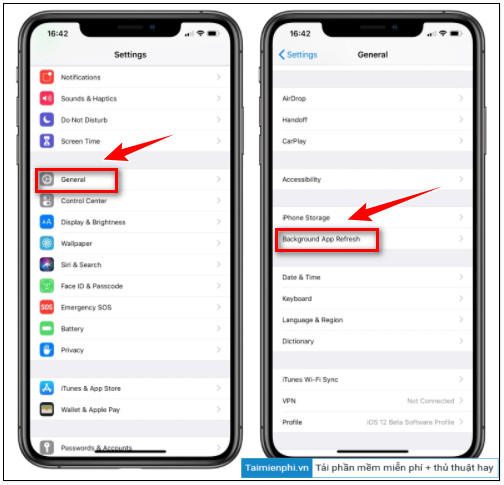
Bước 2: Tại đây tìm và nhấn chọn từng ứng dụng mà bạn muốn tắt tính năng làm mới trên nền background, trên cửa sổ tiếp theo chọn tùy chọn Off (tắt).
Cách 6: Tránh đặt điện thoại trên chăn, ghế sofa khi sạc
Điện thoại sẽ tỏa nhiệt khi đang sạc, do đó trong quá trình sạc, tốt nhất bạn nên đặt thiết bị ở vị trí thoáng mát, tránh đặt trên chăn, đệm hay ghế sofa, bề mặt vải để tránh tình trạng máy nóng.
Cách 7: Tháo ốp khi sạc
Cuối cùng, ốp lưng điện thoại là một trong những thủ phạm chính khiến thiết bị bị nóng. Tốt nhất bạn nên tháo ốp lưng khi sạc pin vừa để kéo dài tuổi thọ pin cũng như để tránh tình trạng máy nóng.
The article above, shared by TipsMake, provides some ways to charge your phone without overheating. If you have any further questions or need clarification, please leave your comments in the section below the article.
To prevent your phone battery from degrading quickly, you should avoid the following mistakes:
1. Charging overnight and not unplugging it when full
. 2. Charging for too long, similar to charging overnight.
3. Waiting until the battery is completely depleted before charging.
4. Using the phone before the battery is fully charged.
Related Articles
 We Have Been Charging the Wrong Way for a Long Time5 minutes read
 Device to Charge the Phone with Water and Wind for Phượt People2 minutes read
 Causes of GPU Overheating and How to Fix It8 minutes read
 Charge Phone with Battery: Step-by-Step Guide4 minutes read
 5 Ways to Increase Charging Speed for Your Phone, Both Safe and Easy to Do3 minutes read
 Causes and Effective, Simple Solutions for Laptop Overheating12 minutes read
Reader Comments 0
Sign in with email or Google to join the discussion.