Table of Contents
Google's AI features can reduce some of the research involved in a trip: Canvas in AI Mode can organize an itinerary, hotel price tracking can watch rates, Ask Maps can help find places, and Google Translate can assist with live conversations. Availability varies by country, account, device, and language, so check which controls appear in your Google apps before relying on them.
These tools should support travel planning rather than replace it. Verify prices, opening hours, entry requirements, addresses, and reservations with the relevant provider before you travel.
1. Build an itinerary with Canvas in AI Mode
In Google Search, open AI Mode and choose Create Canvas if the option is available. Describe the destination, travel dates, budget, pace, and interests. Canvas can organize recommendations for places, hotels, flights, and activities into a plan that you can refine with follow-up requests.
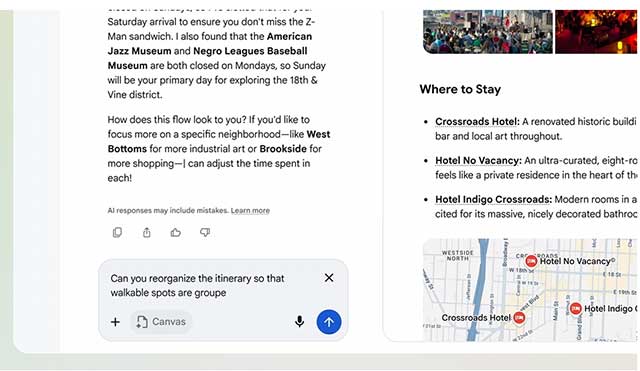
A useful prompt includes constraints, not just a destination. For example: “Plan four days in Kyoto for two adults, with one quiet afternoon, vegetarian lunch options, and no activities more than 30 minutes apart by public transport.” Review every suggestion because generated itineraries can contain outdated or impractical details.
For alternatives outside Google's ecosystem, compare these AI travel-planning apps.
2. Track hotel prices before booking
Google Hotels and Search can show a price-tracking control for selected dates and destinations or properties. Enable it while signed in to receive alerts when tracked prices change. This is most useful when your dates are flexible or you are not ready to book immediately.
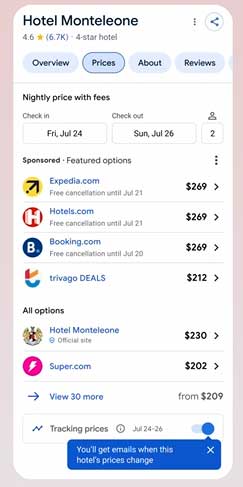
Compare the total price, cancellation rules, taxes, room type, and payment terms on the booking page. A lower headline rate is not automatically the better deal.
3. Find restaurants and check reservations with Ask Maps
Where Ask Maps is available, describe the kind of restaurant you need, including location, party size, cuisine, time, budget, and accessibility requirements. The feature can surface matching places and may connect you to reservation options.
Availability and real-time booking coverage depend on region and participating services. Open the final provider page and confirm the date, time, party size, and cancellation policy before submitting a reservation. TipsMake's overview of useful Google Maps features covers more ways to save and organize places.
4. Use live translation through headphones
Google Translate's live translation experience can deliver translated speech through compatible headphones in more than 70 languages where the feature has rolled out. In the Translate app, choose the relevant languages, connect your headphones, and look for the live translation control.
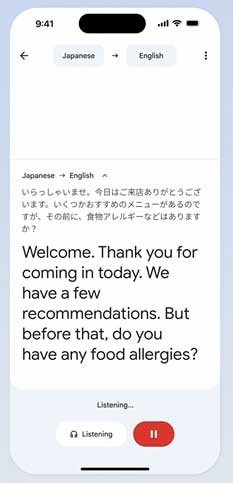
Use it as an aid, not as the sole source for medical, legal, safety, or immigration conversations. Download offline language data when supported and keep essential addresses or phrases written down in case connectivity fails. You can also compare translation apps and software for other situations.
5. Explore places with Ask Maps
Ask Maps accepts detailed questions such as finding a scenic campsite with restrooms, parking, and sunset views. It can use Maps information to suggest places and help you save them to a list, share them, or start navigation.
Check recent reviews, official operating information, seasonal closures, road access, and local restrictions. Community information is useful context but may not reflect current conditions.
Plan with a verification checklist
- Confirm transport and accommodation directly with the provider.
- Check visa, health, and entry rules through official government sources.
- Save key addresses and booking confirmations for offline access.
- Review location and activity permissions if you do not want travel queries stored or personalized.
- Keep a backup plan for time-sensitive connections.
Google describes the current travel features in its official travel tips, while the Ask Maps announcement lists its rollout details.
Related Articles
 Does Translation Earpiece Technology Make Foreign Language: Key Facts5 minutes read
 TOP AI Tools for Highly Accurate Translation5 minutes read
 The Translation of Google Translate Also Sometimes Has to Surrender Before Vietnamese4 minutes read
 ChatGPT Translate: a Smarter New Translation Tool: Explained4 minutes read
 How to Turn Off Automatic Language Translation in Google Chrome5 minutes read
 Google Translate Launches Real-time AI Translation Feature and Foreign3 minutes read
Reader Comments 0
Sign in with email or Google to join the discussion.