Table of Contents
This guide covers xps 14 ultrabook - l421x battery 'buffalo' with practical context and easy-to-follow details. Use it to understand the subject and apply the information confidently.
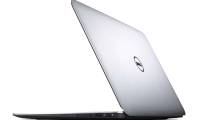
 The XPS 14 - L431x can operate for nearly 11 hours continuously (Photo: Dell)
XPS 14 Ultrabook - L421x is 20. 7 mm thick and weighs 2. 1 kg. The device uses a 14-inch screen with a resolution of 1, 600 x 900 pixels and is coated with Gorilla Glass bearing glass with a luminous intensity of 400 nit. Dell XPS 14 - L421x is equipped with Core i5-3317U processor with 1. 7 GHz dual-core speed and Intel HD Graphics 4000 graphics, 4 GB DDR3 RAM, 500 GB hard drive and 32 GB SSD cache. The operating system used on this model is Windows 7 Premium 64 bit.
Regarding connectivity, the XPS 14 - L421x is integrated with USB 2. 0 and 3. 0 ports, HDMI, MiniDisplayPort, Ethernet, Bluetooth 4. 0, and Wi-Fi. In addition, it also has a 3-in-1 card reader, HD webcam and Intel WiDi wireless projection technology.
Selling price of XPS 14 - L421x is VND 30 million.
Photos of the official Dell XPS 14 - L421x:
Dell XPS 14 - L421x uses a monolithic shell and frame.
This model is equipped with Core i5 dual-core processor, 4 GB RAM, 500 GB hard drive with 32 GB SSD cache.
The machine uses chiclet keyboard that supports backlight.
Selling price of XPS 14 - L421x is VND 30 million.
FAQ
What should I check before following these steps?
Confirm device and software compatibility, save important data, and make sure you have the required permissions, files, and account access.
Why might the process not work?
Common causes include outdated software, missing permissions, incompatible hardware, an unstable connection, or completing a step in the wrong order.
Can I undo the changes if necessary?
That depends on the tool or setting. Use built-in restore options when available, keep a backup, and record the original configuration first.
Related Articles
 List of the Most Current Buffalo Battery Smartphones by Phone Arena3 minutes read
 How the Laptop Is Called Ultrabook5 minutes read
 Amazingly, the Whole Herd of Buffaloes Returned to Save the Same Kind from Hungry Lions4 minutes read
 Wild Buffalo: Complete Guide3 minutes read
 The Newer the Phone, the Weaker the Battery3 minutes read
 Blackview P10000 Pro: a 50-day 'Big' Android Phone Is Out of Standby Mode, 'Buffalo' More Than4 minutes read
Reader Comments 0
Sign in with email or Google to join the discussion.