Table of Contents
This guide provides a practical overview of write together and watch in real time with Microsoft whiteboard with clear explanations and useful details. It focuses on the information users are most likely to need.
One of the highlights in the introduction of the Surface Pro tablet is the Surface Pen touch pen. Although it looks like an old pen, Microsoft has redesigned it to feel more precise than its force, tilt and latency, so the ink will look exactly like it is floating from a real pen.
How Write Together and Watch in Real Time with Microsoft Whiteboard Works
Steven Bathiche, who works at Microsoft Applied Sciences, said: " People want to write as accurately and as small as possible, like writing on paper ." And to see the capabilities of this new pen the clearest, more ineffective than the Whiteboard app, is shown at the Microsoft, Redmond campus demo.
Ian Mikutel, the project manager said: " It's a real-time, unlimited writing board ." Mikutel opened Whiteboard on the Surface Studio Windows 10. He also opened the app on another Surface Studio and a Surface Pro. Mikutel started writing on Whiteboard, Bathiche also wrote on the second Surface Studio and Han Yu Shaw, program director, hardware inventor, wrote on the Surface Pro.
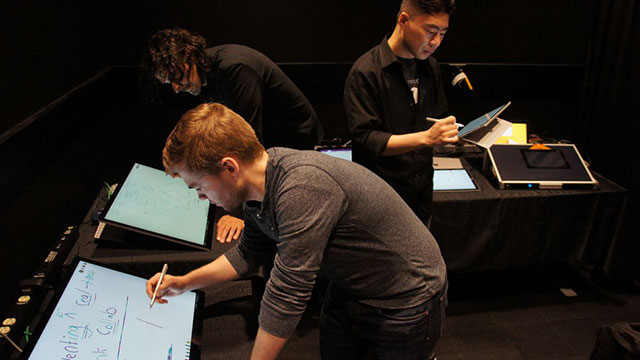 Experience the team work atmosphere with Whiteboard
What Bathiche and Shaw wrote simultaneously displayed on Mikutel's computer screen. He said that this is part of a new technology called Live Ink. In addition, each stroke of the writer will come with a small avatar (circle, with photos of their faces). This is called Local Ink Identity. When asked how many people could write at the same time, Mikutel answered "many people", although a group would normally be between 5 and 7 people.
The app is specially designed for Surface devices and Surface Pen pens. During development, Microsoft focused on the speed and identity of the ink. It can then identify the shape, for example when drawing a circle, it will turn itself into a sharp and editable circle.
"There is no need to take a picture of the board after every meeting," Mikutel said, adding that users can export images in various formats. Also, the ability to write unlimited is a strong point, but it can be a bit confusing, for example, Shaw draws more in one place but Mikutel can't see it because he is zooming in on the image somewhere else.
FAQ
What is the main benefit of write together and watch in real time with Microsoft whiteboard?
The main benefit is a clearer understanding of the topic and a practical way to apply the information covered in this guide.
What should I check before using write together and watch in real time with Microsoft whiteboard?
Confirm compatibility, review the required settings, protect important data, and use the latest supported version whenever possible.
What should I do if the result is different?
Repeat the steps carefully, verify permissions and version differences, and consult the product's official support documentation for changes not shown in the article.
Related Articles
 5 Free Digital Whiteboard Solutions to Replace the Whiteboard8 minutes read
 Instructions for Group Work via Miro Whiteboard4 minutes read
 How to Use Microsoft Whiteboard Windows 103 minutes read
 How to Use Real Time Text (RTT) on Mac and iPhone8 minutes read
 Microsoft Launches Breakthrough Live Interpreter API3 minutes read
 How to Turn Off Real-time Protection in Microsoft Defender on Windows 103 minutes read
Reader Comments 0
Sign in with email or Google to join the discussion.