Table of Contents
Learn what is an operator? everything you need to know about ai-based browser agents means.
What is an operator?
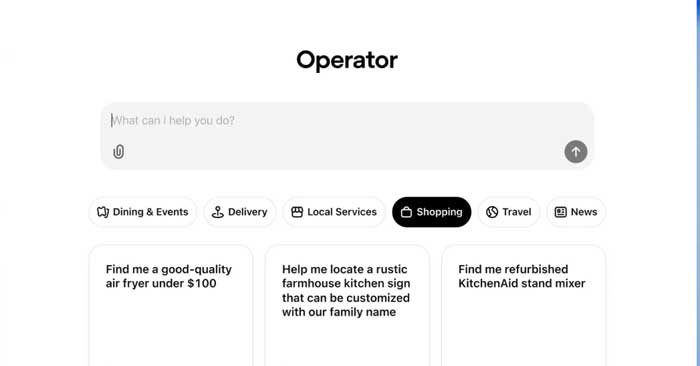
OpenAI's operator is an AI agent, meaning it's designed to perform automated actions based on available information. But unlike conventional programs, AI agents are capable of considering changing conditions in real time and reacting accordingly, rather than simply executing predefined commands. Therefore, AI agents can perform many complex, multi-step tasks, from taking notes, summarizing, and generating action items from a business meeting to booking flights, hotel rooms, and rental cars for an upcoming vacation based on your family's varying schedules, to automatically researching a topic and compiling multi-page studies on that topic.
Operator operates slightly differently from other existing agents. While Claude's Computer Use is an API and Microsoft's AI agents operate within the Copilot chat user interface, Operator is designed to operate in a dedicated web browser window running on OpenAI's servers and perform tasks remotely. Your local web browser has nothing to do with this process and can be used normally even while Operator is running.
The Application Operator is powered by a new "Computer-Using Agent" (CUA) model, built on the GPT-4o platform, providing multimodal capabilities for the application. OpenAI states that CUA is trained in a similar way to their o1 and o3 inference models. Therefore, the CUA model will break down complex tasks into component problems before attempting to solve them sequentially, returning to its original approach if any logical obstacles are encountered.
How to activate the Operator in ChatGPT
To use Open AI Operator , you need to subscribe to the ChatGPT Plus (Pro) plan and activate navigation with Operator. The process is very simple:
- Access ChatGPT settings;
- Turn on the 'Enable browser automation with Operator' option;
- In the custom agent settings (Agent Mode), add the "Browser Automation" tool;
- ChatGPT will display a visual notification indicating that the Operator is activated.
- This feature is being rolled out gradually, but many users with active plans already have access to it.
What can an operator actually do?
The main advantage of OpenAI Operator is its ability to automate repetitive or complex tasks directly on the website interface. This includes:
- Monitor price trends on e-commerce sites and generate reports;
- Fill in data in a Google Sheets spreadsheet by copying data from other sources;
- Book appointments for services online;
- Manage systems without APIs, such as legacy ERP systems;
- Log in to your account and verify your information automatically.
These actions are made possible through a combination of computer vision, natural language understanding, and navigation rules.
Operator simulates human browser usage, but with superior speed and accuracy.
Is it safe to use OpenAI Operator for sensitive tasks?
Operator security and privacy are among OpenAI's top concerns. Therefore, the agent does not perform any sensitive actions (such as making purchases or sending passwords) without the user's explicit permission.
Furthermore, the entire interaction history is recorded and auditable. The operator operates in a controlled environment, with domain restrictions, session timeouts, and contextual isolation between tasks.
For businesses, it's possible to customize Operator action limits and monitor their activity through Google Analytics 4, with features like custom header-based agent traffic detection and behavioral fingerprinting.
Final Thoughts
Understanding what is an operator? everything you need to know about ai-based browser agents makes it easier to evaluate the information and apply the most relevant recommendations. Focus on the key points above and verify details that may change over time.
FAQ
What is what is an operator? everything you need to know about ai-based browser agents?
Learn what is an operator? everything you need to know about ai-based browser agents means.
What key points does this article cover?
The article focuses on What is an operator?, How to activate the Operator in ChatGPT, What can an operator actually do?, with practical explanations and examples.
How can you use this information in practice?
Use the explanations to compare options, verify important details, and make a more informed decision. Apply the recommendations that best match your goals and situation.
Related Articles
 Operator in Programming C10 minutes read
 Overview of AI-Based Agent Creation7 minutes read
 Operator +: The '+'' Operator in SQL Server2 minutes read
 Overload the One-seat Operator in C ++2 minutes read
 Increase Operator in C ++: Load Operator ++ and - in C ++1 minutes read
 7 Best Firefox-Based Web Browsers7 minutes read
Reader Comments 0
Sign in with email or Google to join the discussion.