Table of Contents
A Facebook post, tag, or message claiming your account will be disabled unless you “verify” through a link may be a phishing attempt. Do not sign in through that warning. Open the official Facebook app or type the address yourself and check your account there.
This is a recurring scam, rather than a newly discovered trick. Malwarebytes documented fake support warnings that used threats of account loss to push people toward fraudulent verification pages.
How the scam works
Attackers use accounts or Pages made to resemble Facebook or Meta support. A compromised business Page may be renamed and reused, so an established-looking account is not enough to prove the message is genuine.
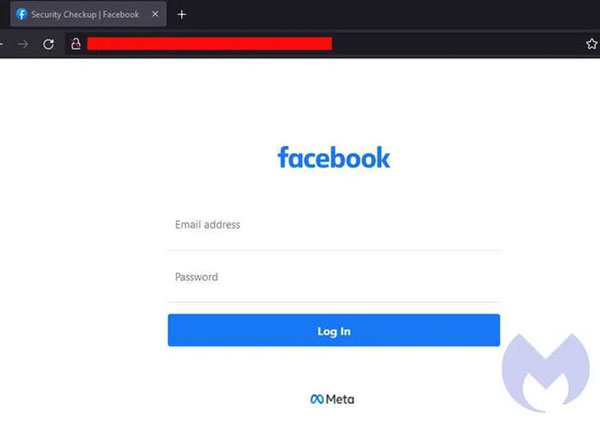
The warning claims that someone reported your content or that you violated a rule. A short deadline, sometimes only 12 hours, pressures you to follow an attached link. The destination may copy Facebook's login screen to capture your password, security code, or other account information.
Warning signs to check
- An unsolicited tag or message demands immediate verification.
- A support-looking profile asks you to enter your password or share a login or recovery code.
- The link uses a misspelled, unrelated, or shortened address.
- The sender discourages you from checking the issue independently.
A convincing logo, familiar name, or HTTPS padlock does not prove that a page belongs to Meta. Review the actual destination rather than trusting the text displayed on the link.
Verify a warning without following its link
Open Facebook independently and look for account notices, Account Status, or the Support Inbox in the app's help and settings areas. For business issues, use Meta's support tools from within the account. Menu names can vary.
If you need to sign in again, follow the official Facebook login process. Report the suspicious post, message, or Page through Facebook's reporting controls, then block the sender if appropriate.
If you already entered your details
- Open Facebook independently on a trusted device and change your password. If you cannot access the account, use
https://www.facebook.com/hacked. - Review logged-in devices and end sessions you do not recognize.
- Check recovery email addresses, phone numbers, and two-factor authentication settings for unauthorized changes.
- If you manage Pages or business assets, inspect access permissions and recent changes.
- Change the password on other services where you reused it, especially the email account used for recovery.
See Meta's guidance for people who have been phished. TipsMake also explains Facebook password recovery. Recovery results depend on the account; avoid anyone promising guaranteed access in exchange for money or a security code.
Reduce the chance of another takeover
Use a unique password stored in a trusted password manager, enable two-factor authentication, and review available login alerts. These are useful layers of protection, but they do not make it safe to approve an unexpected login or enter a code on a fake page.
Related Articles
 9 apps that scam and steal users' Facebook accounts
 Warning: Accessing the personal page of a comment about a scam can be robbed of a Facebook nick
 Warning of donkey by accepting money on Facebook
 Be wary of phishing when logging on to Facebook and how to protect your Facebook account
 23 malicious apps that steal Facebook and Instagram accounts and blackmail users, need to be removed immediately
 Why is Facebook account hacked?
Reader Comments 0
Sign in with email or Google to join the discussion.