Table of Contents
Use this guide to understand using mp3 splitter & joiner to merge audio files and the factors that affect it. The information is organized to make the topic easier to apply in practice.
Music compositing with MP3 Splitter & Joiner software will merge multiple audio files into a single file. MP3 Splitter & Joiner is one of the professional audio file editing software used by many people today.
How Using MP3 Splitter & Joiner to Merge Audio Files Works
Many people used to think that editing audio files, cutting or merging files would need to use technical software that requires knowledge to use. However, MP3 Splitter & Joiner has a simple interface and easy to use. We can download audio files up to 4G, then proceed with editing operations such as cutting or merging without compromising quality. The steps below explain how to join music by MP3 Splitter & Joiner software.
- How to use MP3 Splitter & Joiner to cut audio files
Step 1:
You start MP3 Splitter & Joiner software on your computer after the installation is completed. The free version will try out within 10 days. At the main interface click The MP3 Joiner item , then click The Add button To download the audio file.
- Download MP3 Splitter & Joiner software

Step 2:
A folder appears on the computer. Users navigate to the folder containing the audio files you want to merge, click and then Click Open .

Step 3:
In the interface of the app will display the music file you selected, along with the time of each song. Here, users can select the output audio file folder after completing the transplant, at Target Folder . click The Save icon And select the archive folder.
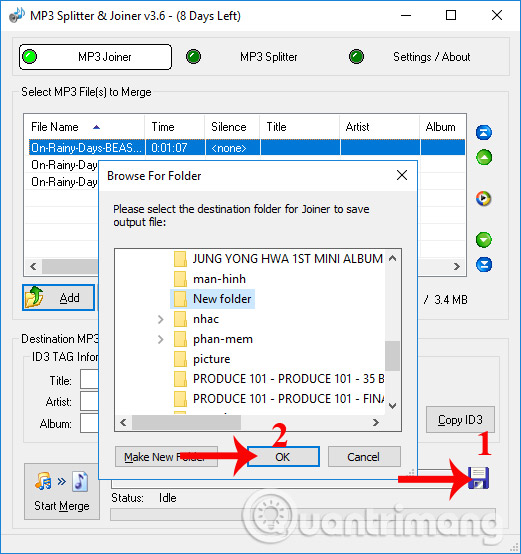
Finally Click Start Merge To conduct music compositions.

Step 4:
Name the complete audio file after transplanting, then Click Save To then merge the file and save it to the previously selected folder.

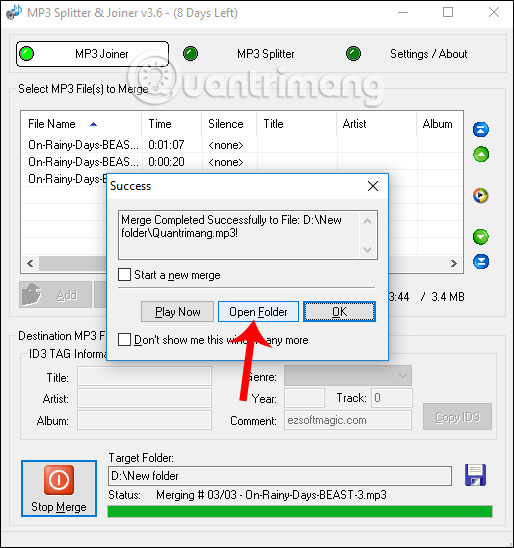
When the file merge process is completed, users will see the interface below. when needed to stop the file merge process, press the red Stop Merge button. The process of merging files quickly or slowly depends on the number of files you want to merge, as well as the size of each audio file.
Click Open Folder To immediately open the output audio file folder, or click Play Now to listen to the complete audio file right away.
Finally, you only need to use music and video playback software such as Windows Media Player, VLC,. to run the audio file. The sound quality is always guaranteed, there are no flashy or tripping phenomena when connecting audio files with MP3 Splitter & Joiner.
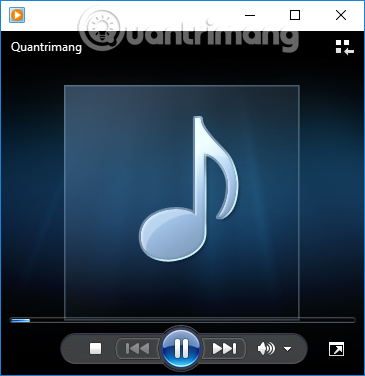
MP3 Splitter & Joiner music compositions are extremely simple and fast. You just need to select the audio file you want to merge and the app will do the rest. when needed to search for audio file editing software, cut or merge music, MP3 Splitter & Joiner is a quality choice.
I wish you all the best!
FAQ
What is the main benefit of using mp3 splitter & joiner to merge audio files?
The main benefit is a clearer understanding of the topic and a practical way to apply the information covered in this guide.
What should I check before using using mp3 splitter & joiner to merge audio files?
Confirm compatibility, review the required settings, protect important data, and use the latest supported version whenever possible.
What should I do if the result is different?
Repeat the steps carefully, verify permissions and version differences, and consult the product's official support documentation for changes not shown in the article.
Related Articles
 Cut Music with MP3 Splitter & Joiner7 minutes read
 Instructions for Cutting MP3 Files6 minutes read
 How to Join and Split Audio Files Without Installing Any Software5 minutes read
 What Is FFSJ? Instructions on How to Use FFSJ File Splitter Software5 minutes read
 Instructions for Checking MD5 Code When Downloading Files2 minutes read
 How to Merge PDF Files, Merge Multiple PDF Files4 minutes read
Reader Comments 0
Sign in with email or Google to join the discussion.