Table of Contents
This guide covers ultrabook lavie z will use ivy bridge chips with practical context and easy-to-follow details. Use it to understand the subject and apply the information confidently.
The New Ultrabook weighs less than 1kg by NEC
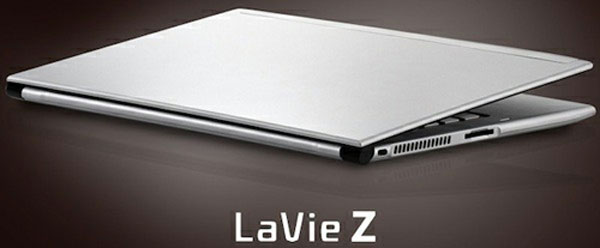 LaVie Z will be equipped with Ivy Bridge chip (Photo: Engadget).
After revealing the LaVie Z ultrabook model less than 1kg last month, NEC has just added some configuration information for this product.
LaVie Z will have two models using Core i5-3317U and i7-3517U chips. Both processors are manufactured on Intel's latest Ivy Bridge platform. The 13. 3-inch screen of this model has a resolution of 1, 600 x 900 pixels. According to Engadget, NEC's LaVie Z has a frame made of magnesium - lithium lighter than aluminum on other ultrabooks up to 50%. As a result, this product has a light weight of less than 1kg.
As expected, LaVie Z will only be sold in Japan starting from the end of this summer. NEC said it will expand the market for this product later.
FAQ
What should I check before following these steps?
Confirm device and software compatibility, save important data, and make sure you have the required permissions, files, and account access.
Why might the process not work?
Common causes include outdated software, missing permissions, incompatible hardware, an unstable connection, or completing a step in the wrong order.
Can I undo the changes if necessary?
That depends on the tool or setting. Use built-in restore options when available, keep a backup, and record the original configuration first.
Related Articles
 LaVie Z 'Lost Weight', Priced at 1, 600 USD in Japan3 minutes read
 7 Ultrabook Uses Ivy Bridge Chips in Vietnam7 minutes read
 The First Ultrabook Duo to Run Windows 8 from Samsung5 minutes read
 The New Ultrabook Weighs Less Than 1kg by NEC3 minutes read
 Toshiba Ultrabook Was Upgraded to Ivy Bridge3 minutes read
 Ultrabook Running Ivy Bridge Chip for $$ 2, 200 of Toshiba3 minutes read
Reader Comments 0
Sign in with email or Google to join the discussion.