Table of Contents
This guide covers touch screen ultrabook first with practical context and easy-to-follow details. Use it to understand the subject and apply the information confidently.
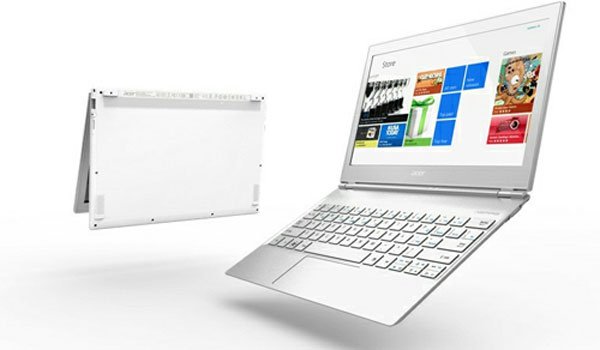 Acer Aspire S7 is only 12. 5mm thin.
At Computex 2012, which took place in Taiwan, China, Acer became the first manufacturer to launch an ultrabook with a tap screen. Like Asus, Acer this time launched two different screen sizes, 11. 6 inches and 13. 3 inches, supporting Full HD resolution options. In addition, this screen can flip 180 degrees to help users put on the table and use as a regular tablet. Notably, the device will run Windows 8 to optimize the interface and software with the tap screen.
Unlike S3 with quite a lot of details made of plastic, Aspire S7 has a rugged aluminum alloy cover, only 12. 5 mm thin. Acer did not announce the specific weight of this line of products, but it is likely to be only equivalent to Asus' Zenbook line and Apple's MacBook Air.
The 13-inch version will come with a glass cover on the front similar to the HP Envy 14 and backlit keyboard. The light sensor on the device will help the S7 to provide a reasonable brightness for the keyboard to help users use in low-light conditions and without wasting battery in unnecessary cases.
Running Windows 8 on launch will help S7 optimize with the tap screen.
Despite its slim design, Acer also promises much better heat dissipation capability than S3, the previous model has bad feedback on this feature. The company said Twin Air cooling system will help the product to be used well for hours without causing heat.
Acer Aspire S7 has about 12 hours of battery life with 13. 3-inch screen model and 9 hours with 11. 6-inch screen model.
The price of the Aspire S7 will range from $ 999 to $ 1, 799. The " Shelf" time Has not been announced yet.
Official Photos Aspire S7
S7 has a thickness of 12. 5 mm.
Optional screen Full HD resolution.
S7 runs Windows 8 at launch.
The 13-inch version has a mirror-coated cover.
Connections at the side.
FAQ
What should I check before following these steps?
Confirm device and software compatibility, save important data, and make sure you have the required permissions, files, and account access.
Why might the process not work?
Common causes include outdated software, missing permissions, incompatible hardware, an unstable connection, or completing a step in the wrong order.
Can I undo the changes if necessary?
That depends on the tool or setting. Use built-in restore options when available, keep a backup, and record the original configuration first.
Related Articles
 Sony Announced the Price of Ultrabook Vaio T14 and T15 Touch Screens4 minutes read
 Samsung Touch Screen Ultrabook Price from 16. 7 Million3 minutes read
 Ultrabook Touch Running Sony's Windows 8 Appears4 minutes read
 Panasonic Introduces Ultrabook Ultra-durable Flip Screen3 minutes read
 Aspire S7 Can Be Sold in the UK in Late September3 minutes read
 New Generation Ultrabooks Will Have 3D Touch Screens4 minutes read
Reader Comments 0
Sign in with email or Google to join the discussion.