Table of Contents
This guide provides a practical overview of Tips for Moving in the Skeld Map, Tips for Beginners Among Us, including its main features, benefits, limitations, and important considerations.
So please follow me through the article guide map The Skeld. You will do the task more smoothly.
Map overview The Skeld
In Map The Skeld you need to keep in mind the following:
In which room "upload"?
- Admin
- Cafe
- Nav
- Storage
Where is the trash?
- Reactor
- Weapons
- Storage
- Elec
Where is the main shield?
- Cafe
- Medbay
- Shields
- Co2
Where are asteroids?
- Cafe
- Admin
- Medbay
- Elec
Where are asteroids?
- Security
- Weapons
- Lower engine
- Storage
Where is the gas tank?
- Cafe
- Storage
- Shields
- Upper engine
Where to unlock multi-function?
- Cafe
- Reactor
- Elec
- Comms

Above is the general layout of the map The Skeld's. We quite like to play this map. At the start of the game and after each discussion, players will start in Cafeteria.
From here, players begin to divide to different rooms in thirteen rooms and to complete their missions. Each hallway has doors that imposters can lock, making it impossible for the crew to pass until the automatic timer expires.
One of the most important rooms in The Skeld is the Admin room, as it contains a map where players can interact to see where everyone is. This includes imposters using their vents to jump between positions, making it a convenient tool for finding Imposter.
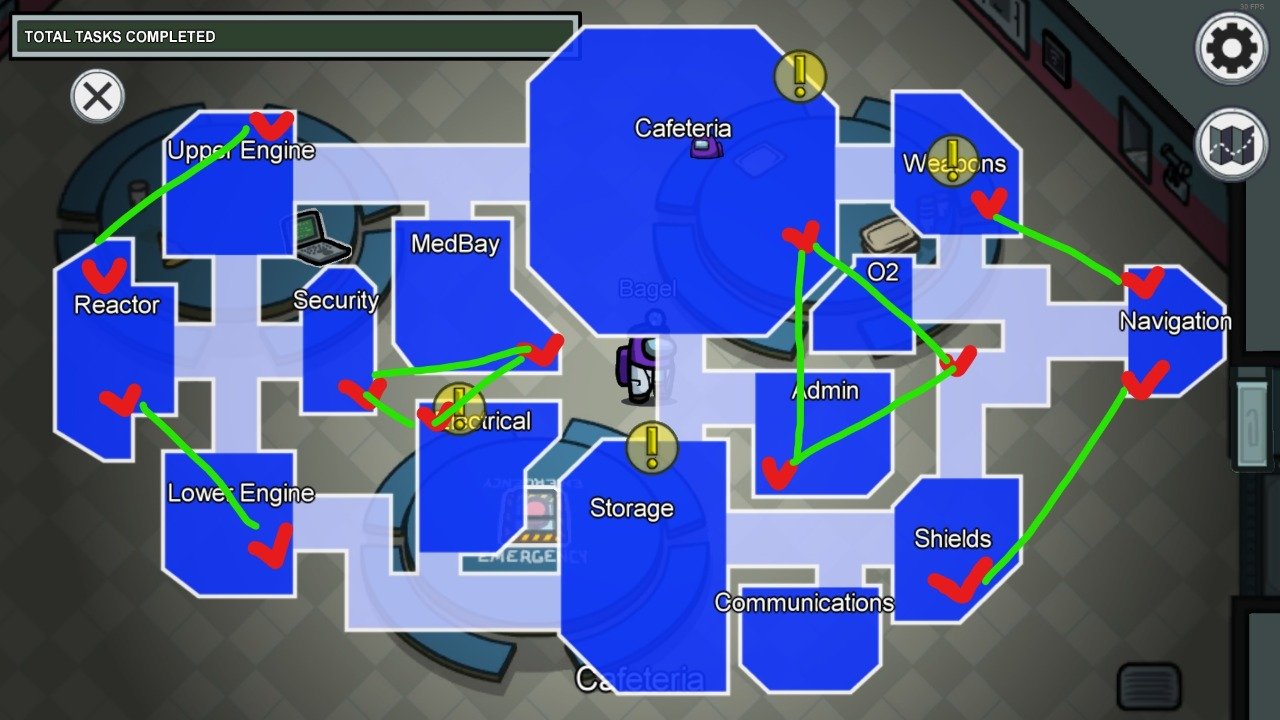
In addition, there are fourteen Vents that the Impostors can use. All the Vents are not connected, so it's important to know where they lead if you want to get rid of suspicion after killing.
Below is a map of The Skeld with Vent locations highlighted in red and Vents connected in green. You should memorize this map while playing. Surely you do not want when you both kill and run away with Vent, appear right where everyone is, right?
Make sure no one is around you while leaving Vent.
Tips for new players on The Skeld map
The Skeld is a large map. Be careful you can get lost while wandering the corridors. The tip for Crewmate here is to arrange your tasks clockwise or counterclockwise. The key lets you quickly re-start where you left off after meetings and save you from wandering around. no purpose throughout the level.
Additionally, The Skeld has a number of visual quests that other users can see when completed. These are: medical sweep in Medbay, destruction of asteroids in Weapons and littering in Storage. So it is beneficial evidence to believe that the person who is performing the above 3 actions is Crewmate.
In discussions use the action to do one of the three tasks above if you have one. Because the Impostors cannot complete this quest. This is perfect for dispelling doubts, while giving you more power in discussions where you have a more decisive voice.
As for Impostor, the hint for this map is that you will isolate and destroy those who like to go solo. Use the Vents to jump to another room and create alibi immediately after the murder. Remembering on purpose with the Crewmates gives you confidence to avoid being suspicious.
For example, let's say you want to kill someone in Electrical, but have a group in the Reactor. Spend some time pretending to fix in Reactor for a few seconds for everyone to see you, then quickly head over to Security.
Then use the vent, kill your teammates in the Electrical department and then re-enter Vent so you can continue to join the team. This makes it seem like you are with or near the group so you cannot kill poor miserable victim in Electrical.
You always need to find an excuse for people to protect you, otherwise people will most likely throw you in the void because you like to go alone!
Wish you happy gaming.
FAQ
What should I know about Tips for Moving in the Skeld Map, Tips for Beginners Among Us?
Focus on the key features, requirements, limitations, and practical use cases explained in this guide.
How do I get the best results with Tips for Moving in the Skeld Map, Tips for Beginners Among Us?
Follow the recommended steps, use current software or information, confirm compatibility, and review settings before major changes.
Are there any risks or limitations?
Potential limitations depend on compatibility, data quality, cost, privacy, support, and how the product or method is used.
Related Articles
 Among Us: Map the Skeld - How to Complete Mission in the Map the Skeld12 minutes read
 Tips to Play the Map Skeld in Among Us for Newbies7 minutes read
 Instructions for Doing the Map Quest the Skeld in Among Us8 minutes read
 Among Us: a Convenient Location for Imposter on the Skeld in5 minutes read
 Moving Tips in the Polus Map, Tips for Beginners Among Us4 minutes read
 Tips for Playing Inscryption for Beginners4 minutes read
Reader Comments 0
Sign in with email or Google to join the discussion.