Table of Contents
This guide provides a clear, practical overview of "This Small Change on Windows 11 Was So 'hated' That Microsoft Was". It organizes the most useful details, explains important considerations, and highlights the steps or choices that matter most.
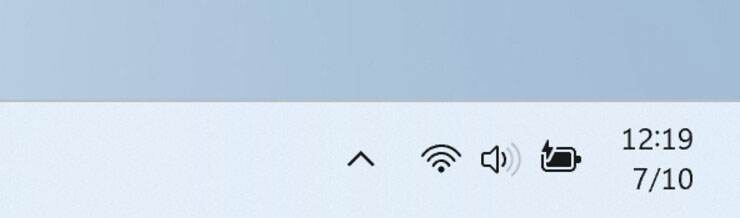
Windows Insider engineer Brandon LeBlanc recently told X that user feedback on the feature was "not pleasant," and Microsoft decided to remove it.
This radical approach to customer feedback is odd. In recent years, when Microsoft has introduced new features, particularly to the taskbar or Start menu, the company has often given users the flexibility to turn those changes on or off at will. For example, the upcoming notification clock is customizable—if you don't want to see it, you can just go into Settings and turn it off. Many have argued that Microsoft should have kept the simplified system tray area as an optional feature that was turned off by default. However, Brandon's response suggests that few people actually want such a change.
It's hard to say exactly what aspect of the simplified tray area so upset Windows insiders that Microsoft had to remove it, but it did. Now, if you want a simpler taskbar, you can try enabling Microsoft's touchscreen version (which also works on desktops), but that version is a bit too minimalistic.
Interestingly, the option to hide the notification bell button is still available in Windows 11. If you want to keep the system tray cleaner, go to Settings > System > Notifications and turn off the " Show notification bell icon " option.
FAQ
What does this guide cover?
This guide explains this small change on Windows 11 was so 'hated' that Microsoft was, including the main steps, important details, and practical considerations.
Who is this guide for?
It is designed for readers who want a clear, practical overview and a reliable process they can follow without unnecessary complexity.
What should you check before getting started?
Review the requirements, confirm that your software or device is up to date, and save any important data before changing settings.
Related Articles
 Microsoft Begins to Force Many Computers to Update Windows 10 21H23 minutes read
 How to Remove Microsoft Teams on Windows 113 minutes read
 Statistics of the Most 'Hated' Programming Languages10 minutes read
 How to Change iOS Interface Without Jailbreak5 minutes read
 Windows 10 1809 Users Were Forced to Update to Windows 10 20043 minutes read
 Microsoft Just Made a Small, but Useful Change to the3 minutes read
Reader Comments 0
Sign in with email or Google to join the discussion.