Table of Contents
This guide covers Samsung's 9-hour battery netbook with practical context and easy-to-follow details. Use it to understand the subject and apply the information confidently.
Unlike other netbooks, which often have a 12-inch screen, Samsung's products are a bit smaller with an 11. 6-inch HD HD backlit 16: 9 aspect ratio (resolution of 1366 x 768 pixels). This model is also equipped with a CULV power-saving processor and slightly changed from the Pinetrail platform from the manufacturer.
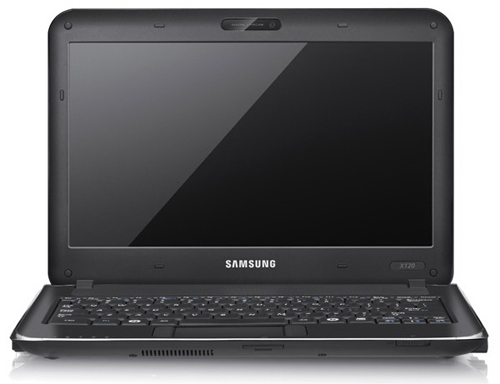 The X120 can use batteries continuously for more than 8 hours Photo: Samsung .
The X120 stands out with its 8, 850 mAh battery that can be used continuously for 8 to 9 hours. It has a Chrome-plated metal rim around the luxury machine. Touchpad has multi-tap feature with two mouse buttons on both sides. However, although the area above the keyboard is pretty much empty, Samsung does not add some shortcuts to these locations for the convenience of users. The X120 has an Intel Pentium ULV SU4100 processor (1. 30 GHz, 800MHz, 1MB), GMA 4500M HD graphics chip, 2GB DDR3 memory, and achieved 2, 440 points with PCMark05 test software. In addition to being integrated with standard Wi-Fi, Samsung's products also have common connectors such as Ethernet, HDMI, 3 USB ports, headsets, microphones, memory card readers. The X120 comes preloaded with Windows 7 Home Premium operating system and sells for nearly $ 800.
FAQ
What should I check before following these steps?
Confirm device and software compatibility, save important data, and make sure you have the required permissions, files, and account access.
Why might the process not work?
Common causes include outdated software, missing permissions, incompatible hardware, an unstable connection, or completing a step in the wrong order.
Can I undo the changes if necessary?
That depends on the tool or setting. Use built-in restore options when available, keep a backup, and record the original configuration first.
Related Articles
 Samsung's 10. 5-hour Battery Netbook3 minutes read
 MSI's 15-hour Battery Netbook3 minutes read
 Netbook Battery 13. 5 Hours, with Samsung 3G Connection3 minutes read
 Netbook Weighs Only 1kg, MSI's 15 Hour Battery4 minutes read
 Netbook with USB 3. 0 Standard, Asus 13-hour Battery3 minutes read
 Samsung's Nearly 14-hour Battery Netbook3 minutes read
Reader Comments 0
Sign in with email or Google to join the discussion.