Table of Contents
This guide covers review hp probook 4430s with practical context and easy-to-follow details. Use it to understand the subject and apply the information confidently.
The Model 4430s is the first model of the 2011 ProBook series sold in Vietnam with significant upgrades. In addition to the more powerful hardware with Intel Core i second-generation processor, this model also has a rugged alloy shell, USB 3. 0 port and fingerprint recognition feature for trendy businessmen. The ProBook 4430s is aimed at business people but is priced and attractive.
 HP ProBook 4430s (Photo: Tuan Hung).
One of the two versions sold genuine in Vietnam and also the product is evaluated in the article owns the Core i5-2410M processor with 2. 3 GHz speed, 2 GB RAM, 500 GB hard drive At 7, 200 rpm, the Intel HD Graphics 3000 graphics chip, DVD reader / recorder has a reference price of VND 15 million.
The remaining version is equipped with 14 inch HD screen, Intel Core i3-2310M processor with speed of 2. 13 GHz, 2 GB RAM, hard disk with 320 GB capacity, 7, 200 rpm, graphics chip Intel HD Graphics 3000, DVD reader / writer has a reference price of VND 14 million.
Here are some general reviews, details about this model (select each section to see details).
General assessment.
* Advantages:
- Luxury design with scratched aluminum cover. - Good sound quality. - High performance. - Improved heat dissipation capability compared to the ProBook 2010 series. - Good battery life.
* Disadvantages:
- The mouse button on the touchpad is a bit heavy. - Navigation key is too small. - Shadow screen.
Design
 The design is still horizontal (Photo: Tuan Hung).
The ProBook 4430s features a luxurious scratch-resistant aluminum case with two layers of color on the front to create accents. The device has a detailed dimension of 2. 81 x 33. 9 x 23. 5 cm, but it is quite thick but with a small silver colored border design and a smooth downward plastic part that feels slim. The ProBook 4430s weighs 2. 18 kilograms like most laptops with the same screen size.
Not only on the outside, the ProBook 4430s also has an internal armrest that is also designed with a scratched aluminum layer to help users feel more comfortable. This design also helps the heat sink better than plastic. However, when plugging in the battery charger and letting your feet tap the ground, the user's hand will feel slightly numb when touching the inner shell.
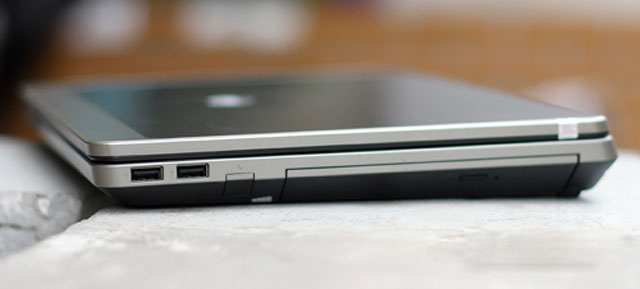 Right next to the machine (Photo: Tuan Hung) .
 Left edge. USB 3. 0 port is second from the right (Photo: Tuan Hung) .
The ProBook 4430s is fully equipped with ports that connect to VGA, HDMI, USB 2. 0, USB 3. 0, LAN and DVD read / write optical drives. Unlike many other laptops, the USB 3. 0 port does not have a noticeable blue footprint, but only a small symbol on the side is quite hard to identify.
 Fingerprint identification slot (Photo: Tuan Hung).
With a price of only about 15 million VND, ProBook integrates fingerprint identification slot. This feature can be used to set passwords for Windows, websites that require login or software such as Skype or Yahoo Messenger.
Keyboard, Touchpad
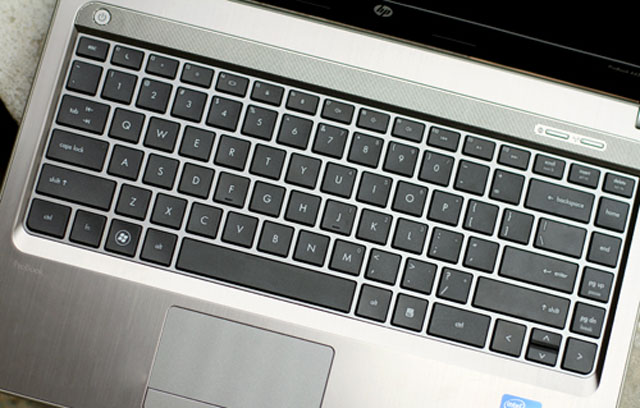 Typical HP keyboard (Photo: Tuan Hung).
Like the 2010 ProBook series, the 4430s still features a popular chiclet keyboard. The keys have good bounce, proper spacing, but feel slightly loose when used. To " Sacrifice" For the design, the two navigation keys have been made smaller by almost half as normal. Although HP has separated these two buttons a bit further to avoid mishandling, this situation is still very likely to happen in this case, these are two good buttons used when browsing the web.
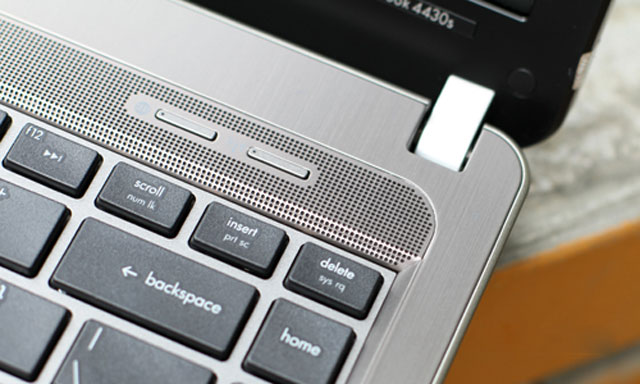 Keyboard shortcuts are straightforward (Photo: Tuan Hung).
The ProBook 4430s does not have many shortcuts, the device has only two keys on the top and is Wi-Fi on and off and a simple browser. An easy point to understand because this is an office-oriented model, there are no dedicated multimedia keys.
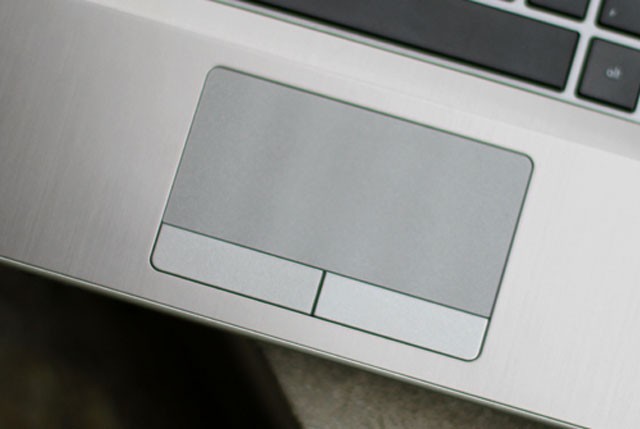 Trackpoint has a very high sensitivity (Photo: Tuan Hung).
The ProBook 4430s touchpad has a moderate size, a certain amount of grip to help it move smoothly and perform precise operation. Delay when used at acceptable levels. However, the mouse buttons of the device are quite heavy, the operation is quite difficult despite high sensitivity.
Screen
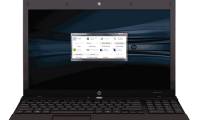
 Screen of ProBook 4430s (Photo: Tuan Hung).
As a business model but with a mid-range price, the ProBook 4430s does not have anti-glare displays. This mirror screen has a size of 14 inches with a resolution of 1, 366 x 768 pixels.
Like most popular laptops, this screen gives a sharp image but suffers from a shadow when viewed at an angle of about 45 degrees above the screen perpendicular. Shadowing when watching videos with dark scenes also occasionally occurs when used with the rear light source.
Performance Performance
The ProBook 4430s version is rated to include 2. 3 GHz Core i5-2410M processor, 2 GB RAM, 500 GB hard drive, 7, 200 rpm, Intel graphics chip. HD Graphics 3000, DVD reader / writer.
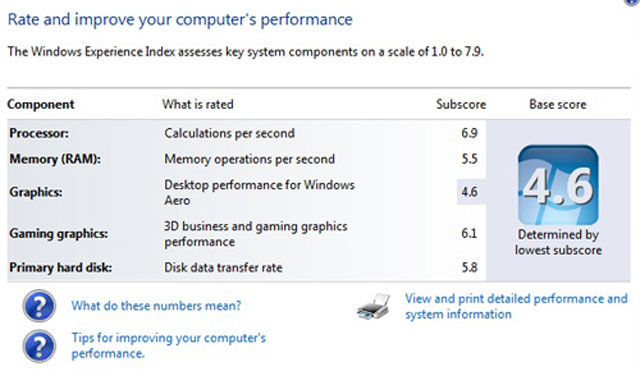 Scoring with Windows Experience Index.
With hardware like this, this model reaches 4. 6 points (get low score is clicked due to graphics capabilities) when marked by Windows Experience Index system on Windows 7 Ultimate (64-bit). On a scale of detail, the processor reaches 6. 9 points, RAM memory is 5. 5 points while the graphics capability is 4. 6 points and the graphics for the game reaches 6. 1 points.
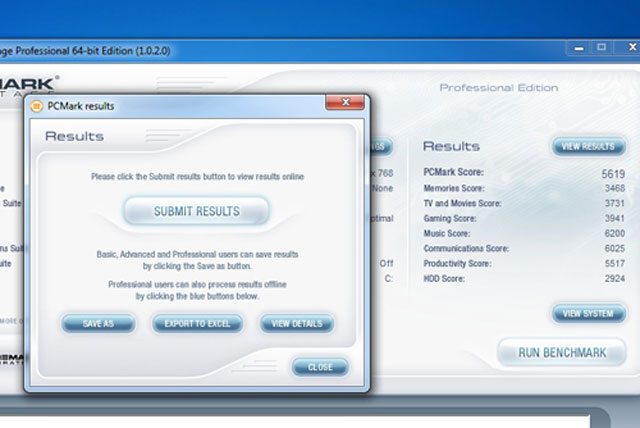 Scoring with PC Mark Vantage.
Continuing to use the PCMark Vantage program to evaluate overall power, the ProBook 4430s scored 5, 619 points, a pretty good score, especially compared to an average of about 5, 000 points in popular laptops of the same price range.
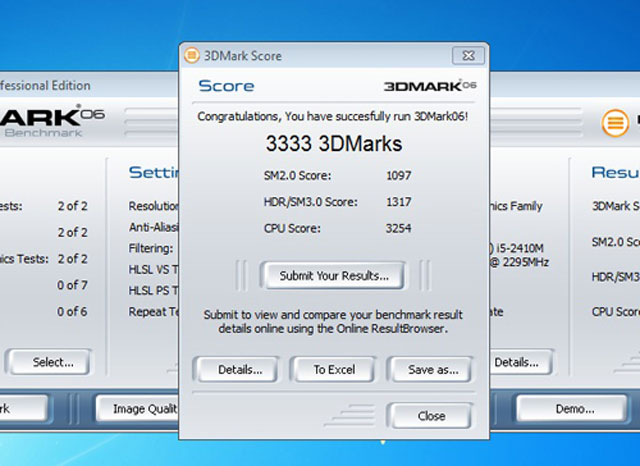 Score with 3D Mark 06.
Do not use discrete graphics card but instead of integrated graphics chip but the 3D Mark 06 score of the machine is still quite high with 3, 333 points. This is explained by the graphics chip that comes with the Core i second-generation processor that has performed better than before.
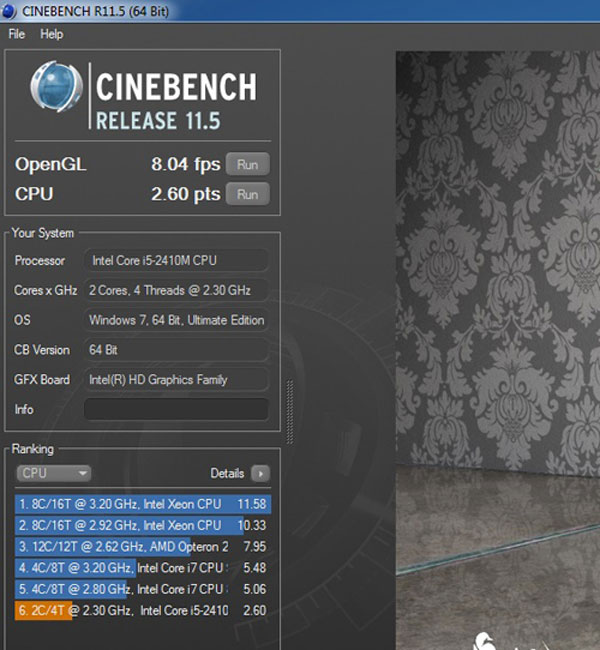 Microprocessor scoring.
Continue using the Cinebech 11. 5 program to evaluate the processor and try OpenGl. The result with microprocessor reached 2. 6 points and graphics with 8. 04 frames per second.
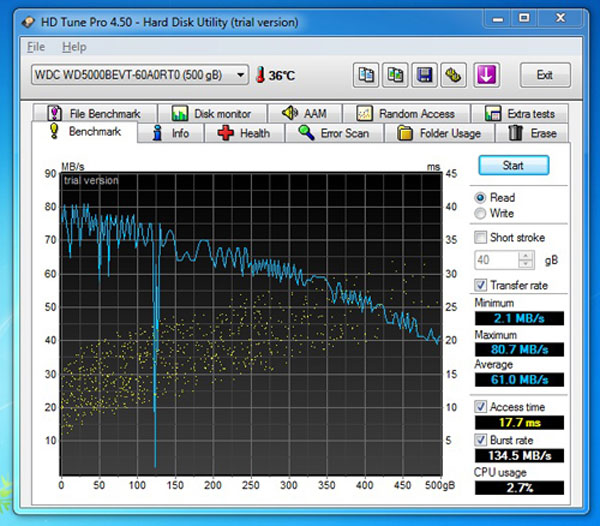 Large hard drive.
The hard drive that the ProBook 4430s uses is 500GB of 5, 400 revolutions per minute. In fact, the average data reading ethnicity is 61 MB per second, approximately the average of 60MB / sec in the high-speed drives of 5, 400 rpm.
Radiators
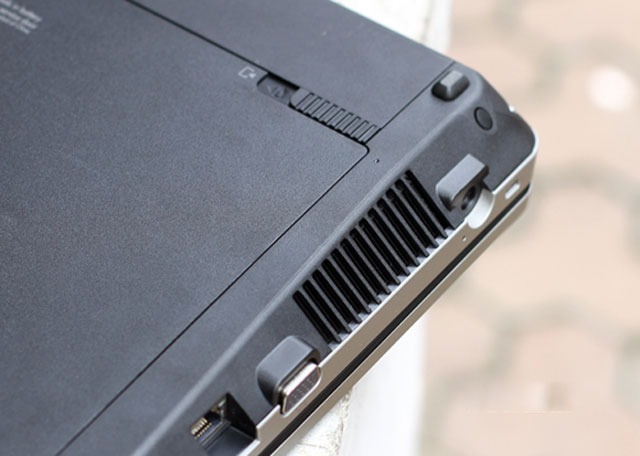 The bottom of the machine has an exhaust fan to increase heat dissipation (Photo: Tuan Hung) .
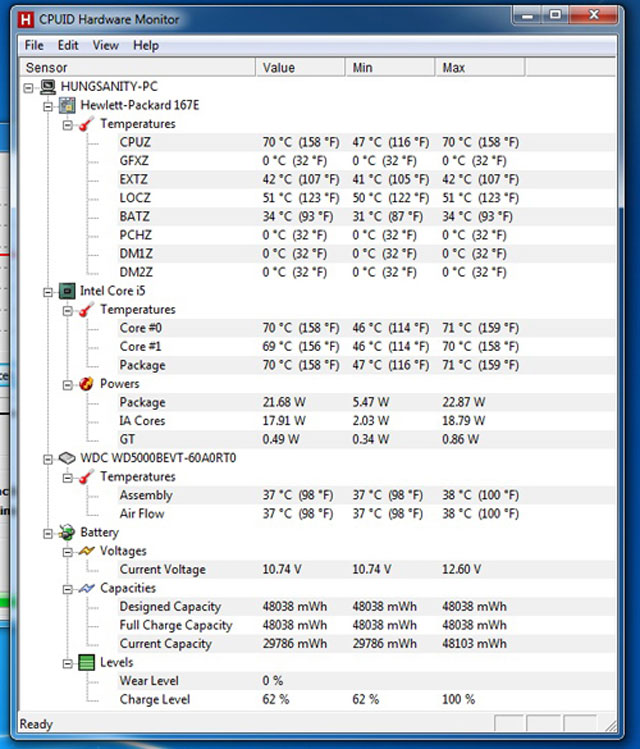 Machine temperature when running CPU full-load (100%) about 30 minutes.
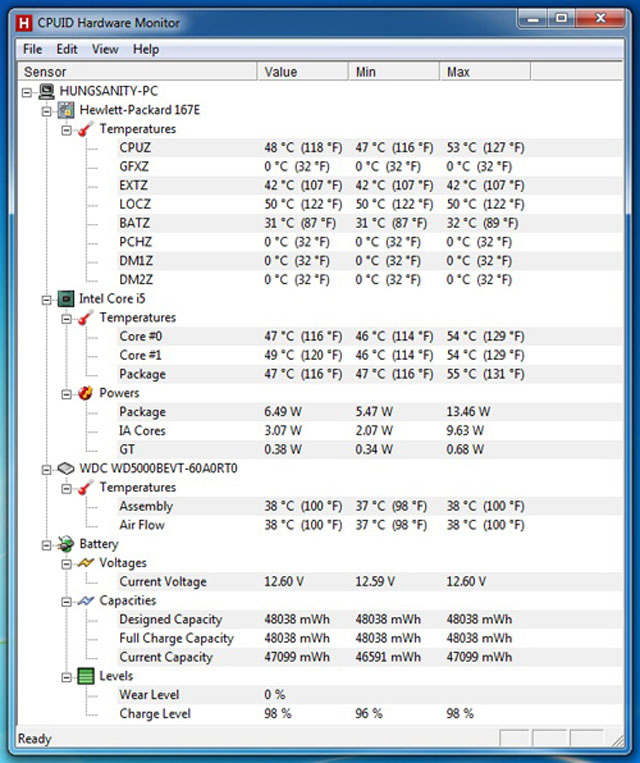 Machine temperature when watching HD video about 30 minutes.
The heat dissipation capability of the new ProBook series on 4430s is much better than before. The results were tested in a room with a constant temperature of about 26 degrees Celsius. The underside of the machine went up to the right side but could still be used well on both legs. Meanwhile, the top is only slightly warm when using long time, watching HD video, and can still operate normally.
Battery Life
The ProBook 4430s uses the included 6-cell battery. To fully charge from 7% when turning off the whole machine takes about 3 hours or 3 hours while still in normal use.
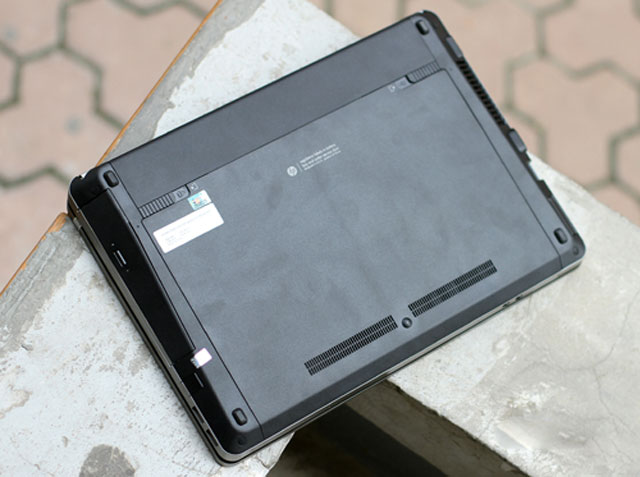 Compact battery design behind the machine (Photo: Tuan Hung) .
Experimental open Firefox loads 10 web pages and automatically reloads every 15 minutes, opens an online music player page and gives continuous playback, using headphones instead of the speakerphone and leaving the volume level at 70%. 50% light for the machine to run until it turns itself off (to 5%), this time reaches 3 hours 14 minutes.
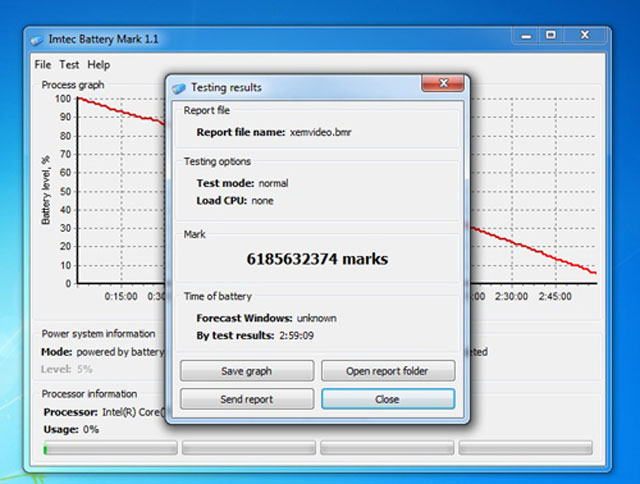 Time to watch movies in HD.
While testing the device to run a standard 720p HD movie and play it back continuously until it is off, turn off the Wi-Fi connection, use a headset instead of the speaker and put it at a volume of 70% (negative Windows Media Player program bar to 100%), 50% brightness for the device to run until it is turned off (with 5% battery level), this time is 2 hours 59 minutes.
These figures show that the battery life of the ProBook 4430s is quite impressive. Time is 3 hours more than most popular laptops with about 2 hours and 30 minutes. For practical use, this time can be up to more than 3 hours and 30 minutes only if listening to music, surfing the web and manipulating simple office apps.
Sound
Not for entertainment, but the speaker is still a strong point for the ProBook 4430s. True to HP's advertising, Beats Audio sound technology has brought a very interesting music experience on this model.
The volume is not too big, enough entertainment in the room 25 m2But the bass and treble are very clear. The sound is pretty clear, like HP's other Pavilion entertainment laptops.
FAQ
What should I check before following these steps?
Confirm device and software compatibility, save important data, and make sure you have the required permissions, files, and account access.
Why might the process not work?
Common causes include outdated software, missing permissions, incompatible hardware, an unstable connection, or completing a step in the wrong order.
Can I undo the changes if necessary?
That depends on the tool or setting. Use built-in restore options when available, keep a backup, and record the original configuration first.
Related Articles
 HP Probook 450 G1 Beautifully Designed, Powerful Configuration6 minutes read
 HP Launched a Very Cheap Business Laptop5 minutes read
 The 2013 HP ProBook Is Lighter and Costs from $$ 4993 minutes read
 HP Probook 4411s Is Simple but Convenient5 minutes read
 Elite of HP - ProBook 4510s7 minutes read
 HP Out Probook Aluminum Shell3 minutes read
Reader Comments 0
Sign in with email or Google to join the discussion.