Table of Contents
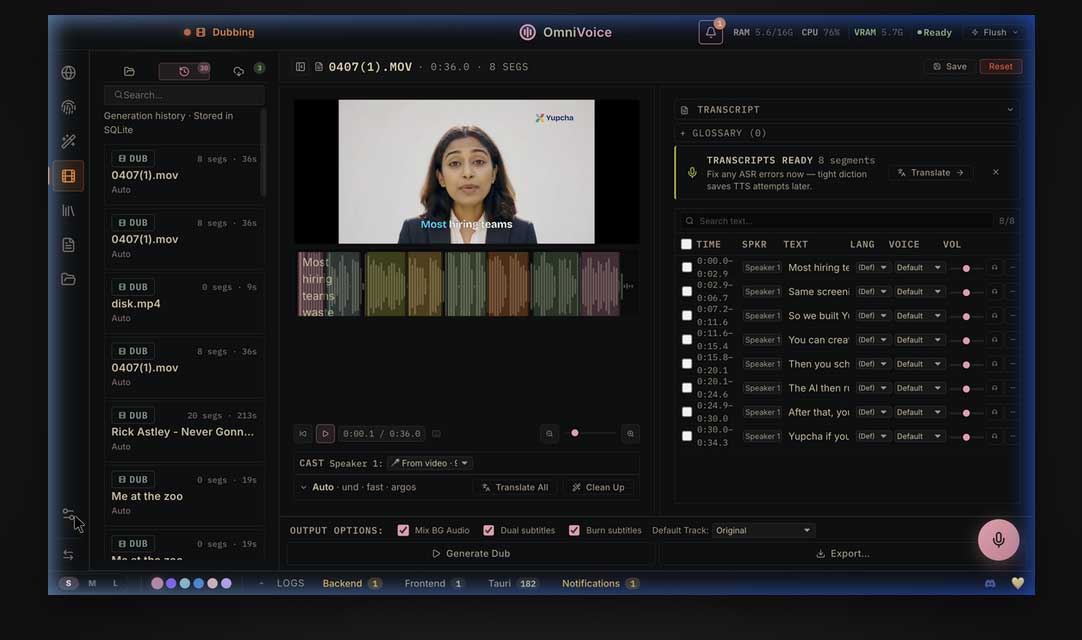
VoiceStudio, previously called OmniVoice Studio, is a desktop application for local text-to-speech, voice cloning, dictation, transcription, audiobook creation, and video dubbing. It combines several open-source speech tools in one interface and can expose selected functions through an MCP server.
The project is an active beta, not a polished drop-in replacement for every commercial voice platform. It is most useful for technically comfortable users who value local processing and control, and who are willing to manage model downloads, hardware limits, and occasional release issues.
What VoiceStudio can do
The application brings several parts of a voice workflow into one desktop environment:
- Text-to-speech: Generate speech with a choice of supported TTS engines.
- Zero-shot voice cloning: Condition a supported model on a short, clean recording instead of training a new model for that speaker.
- Voice design: Describe or adjust characteristics such as age, accent, pitch, emotion, or speaking style, depending on the selected engine.
- Video dubbing: Transcribe speech, separate voices from background audio, translate supported languages, synthesize replacement speech, and export a video.
- Dictation and transcription: Capture speech and insert or export the resulting text.
- Audiobooks and multi-speaker stories: Assign voices to longer documents or scripted characters.
- Batch processing: Queue multiple jobs rather than processing each file manually.
These stages correspond to the speech-to-text and text-to-speech components described in how voice AI works. Actual output quality varies with the engine, language, reference recording, hardware, and source audio, so the project’s feature list should not be treated as an independent quality test.
How local is the workflow?
The core application and supported models can run on the user’s computer, which means recorded audio does not have to be uploaded to a commercial speech API. Local processing can also allow work without a continuous internet connection after the required models are installed.
“Local” does not mean the computer never contacts the internet. Initial installation and model downloads require network access. Some optional translation providers are online services, while the project documentation says its bundled Argos and NLLB options work locally. Users should review the selected engine and provider before processing confidential material.
If privacy is the main reason for considering the application, compare the practical differences between offline and online AI, then test the complete workflow with non-sensitive files first.
Voice cloning and voice design
Voice cloning uses a reference clip to guide the generated voice. The project recommends a clean, single-speaker recording and notes that longer audio does not continually improve a zero-shot clone. Background music, echo, multiple speakers, or a mismatched speaking style can carry into the result or reduce intelligibility.
Voice design is different: it creates a new voice from selected or described characteristics instead of attempting to reproduce a specific person. Available controls depend on the TTS engine, so a control shown in the interface may not behave identically across models.
The default OmniVoice engine is advertised by its maintainers as supporting hundreds of languages, while other engines cover smaller language sets. Language availability is not the same as consistent naturalness or pronunciation quality; test the exact language, accent, names, and technical vocabulary you need.
Video dubbing and transcription workflow
A typical dubbing job moves through several stages:
- Import a local media file or other supported source.
- Transcribe the speech and align the words with the audio.
- Identify speakers and, when needed, separate speech from music or effects.
- Review and correct the transcript before translation.
- Choose local or optional online translation.
- Assign a voice to each speaker and generate replacement speech.
- Review timing, pronunciation, and loudness, then export the video.
Automation saves setup time, but it does not remove the need for review. Names, overlapping dialogue, background noise, jokes, and culture-specific wording can all require manual correction. Keep the source project and an untouched copy of the original media so a failed batch job does not destroy your only copy.
Dictation and MCP integration
VoiceStudio includes a floating dictation widget. On supported macOS setups, the documented default shortcut is Command + Shift + Space; operating-system permissions and shortcuts may need adjustment. Transcribed text can be used in the active application, which is useful for drafting notes or messages without a separate cloud dictation account.
The bundled MCP server lets compatible clients discover and call supported VoiceStudio tools. This can connect speech generation or transcription to a larger automation workflow. The available tools have changed during development, so confirm the current tool schema rather than assuming every feature in the desktop interface is exposed through MCP.
Engines and technical architecture
The current project uses a Tauri desktop shell with a web interface and a local Python/FastAPI backend. Its speech and media pipeline integrates tools such as WhisperX for transcription and alignment, Demucs for source separation, Pyannote for speaker diarization, and AudioSeal for optional audio watermarking.
VoiceStudio has an engine registry rather than a single fixed TTS model. This makes the application flexible, but also means installation size, speed, language support, licensing, and GPU requirements differ by engine. The repository’s current feature list is broader than the original six-engine description, so check the compatibility matrix for the release you install.
Hardware and installation requirements
The project detects supported CUDA, Apple silicon MPS, Linux ROCm, or CPU execution. A GPU is optional for some tasks, but CPU processing can be much slower, and not every engine supports every accelerator.
| Component | Project minimum | More practical for regular use |
|---|---|---|
| Operating system | Windows 10, macOS 13.3 or later on Apple silicon, or Ubuntu 24.04 or later | A currently supported 64-bit operating system |
| Memory | 8GB RAM | 16GB or more |
| Graphics memory | 4GB when using a compatible GPU; some work can offload to CPU | 8GB or more for smoother GPU workloads |
| Storage | About 10GB free for models and cache | 20GB or more on an SSD, with extra room for media projects |
These are the maintainer’s current baseline figures, not a guarantee for every model. Large media files, additional engines, and cached model weights can require substantially more storage.
Download the application or source only from the official VoiceStudio repository. Read the installation guide for your operating system, verify release notes, and use the built-in self-check before troubleshooting individual models. The repository explicitly labels the software as an active beta and warns that releases may break behavior.
Important limitations
- Output varies: Language coverage and feature availability do not prove natural speech, correct pronunciation, or production-ready dubbing.
- Hardware still matters: Local processing moves the cost from a subscription to your computer, storage, electricity, and setup time.
- Beta changes are frequent: Names, engines, shortcuts, requirements, and MCP tools can change between releases.
- Model licenses differ: The application code uses an open-source license, but individual model weights and dependencies may impose separate terms. Review them before commercial use or redistribution.
- Local is configuration-dependent: Optional online translation or other connected services may send data outside the machine.
- Voice cloning can be abused: Technical access does not create permission to imitate another person.
Use voice cloning responsibly
Clone only your own voice or a voice for which you have clear, documented permission. Do not use generated speech to impersonate someone, bypass authentication, mislead an audience, or conceal the origin of a recording. Obtain the rights to source audio, scripts, translations, music, and video before publishing a dub.
For public or client work, disclose synthetic speech when context could otherwise mislead listeners. Keep consent records and evaluate whether watermarking or other provenance signals are appropriate for the distribution platform.
Who should try VoiceStudio?
VoiceStudio is a reasonable test project for developers, podcasters, video creators, accessibility experimenters, and privacy-conscious users who want a local voice workflow and can tolerate beta software. It is less suitable when a team needs guaranteed uptime, formal support, predictable enterprise licensing, or consistent output without technical setup.
Test one short, non-sensitive sample before committing a large project. Measure generation speed, memory use, pronunciation, export quality, and the amount of manual correction required. That practical result is more useful than comparing feature counts with a cloud service.
Related Articles
 How to Create AI Voices on OmniVoice3 minutes read
 Why Should You Stop Using LM Studio and Switch to the Open-Source Alternative Jan?6 minutes read
 How to Install Obs Studio in Ubuntu3 minutes read
 Mozilla Launched the First Open Source Voice Recognition Engine4 minutes read
 S Code and VSCodium: Two 'Open-source' Versions, but How Different Are They6 minutes read
 Can Open Source Technology Make Money?5 minutes read
Reader Comments 0
Sign in with email or Google to join the discussion.