Table of Contents
JavaScript can run machine-learning models in a web browser or under Node.js. It is a practical choice when a model must work inside an interactive web application, when developers want to use an existing JavaScript stack, or when some inference should happen on the user's device.
JavaScript does not replace Python for every machine-learning task. Python still has a broader research, data-science, and training ecosystem. The right language depends on where the model runs, how it is trained, the available libraries, and the application's performance and privacy requirements.
What JavaScript machine learning can do
- Run supported pretrained models in a browser.
- Build interactive demonstrations for image, audio, text, pose, or numeric data.
- Retrain or fine-tune certain models with new examples.
- Define and train smaller models directly in JavaScript.
- Run server-side inference and training with Node.js.
- Connect predictions directly to web interfaces, Canvas, audio, video, and other browser APIs.
Why use machine learning in the browser?
Direct web integration
A browser model can respond to a camera frame, drawing, form, chart, or audio stream without sending every interaction through a separate application backend. This can make prototypes and educational tools easier to distribute.
Potential on-device processing
Data can remain on the device when the application is deliberately designed to process it locally. That can reduce latency and limit uploads, but privacy is not automatic. Model downloads, analytics, API calls, logs, or other application code may still send data over the network. Inspect the complete data flow before making a privacy claim.
Hardware acceleration
JavaScript machine-learning libraries may use browser or native backends that take advantage of available hardware. Actual speed varies by model, backend, browser, device, tensor shape, and memory pressure. It is inaccurate to claim that JavaScript is universally faster than Python.
TensorFlow.js
TensorFlow.js is an open-source machine-learning platform for JavaScript. It can run existing models, convert certain Python TensorFlow models, retrain supported models, and build or train models in the browser or Node.js.
A minimal training example with the npm package looks like this:
import * as tf from "@tensorflow/tfjs";

const model = tf.sequential();
model.add(tf.layers.dense({
  units: 1,
  inputShape: [1]
}));

model.compile({
  optimizer: "sgd",
  loss: "meanSquaredError"
});

const xs = tf.tensor2d([1, 2, 3, 4], [4, 1]);
const ys = tf.tensor2d([2, 4, 6, 8], [4, 1]);

await model.fit(xs, ys, { epochs: 100 });

const prediction = model.predict(
  tf.tensor2d([5], [1, 1])
);

prediction.print();

xs.dispose();
ys.dispose();
prediction.dispose();
This demonstration teaches a simple relationship rather than providing a production model. Real projects need separate training and evaluation data, suitable metrics, input validation, reproducibility, and monitoring for errors and bias. Tensor disposal also matters because unmanaged tensors can retain browser memory.
ml5.js
ml5.js provides approachable browser APIs for artists, creative coders, students, and other learners. It builds on TensorFlow.js and offers access to machine-learning models and workflows without exposing every low-level tensor operation.
It is a good fit for teaching and interactive creative projects. Check the current ml5.js documentation before copying an older tutorial because model names, initialization patterns, and asynchronous APIs can change between major releases.
Brain.js
Brain.js is a JavaScript neural-network library for browsers and Node.js. It can use GPU acceleration where supported and fall back to JavaScript when a suitable GPU path is unavailable.
Brain.js can be useful for compact neural-network experiments, but it is not a substitute for the wider model and tooling ecosystem around TensorFlow.js. Before adopting it, review the current release activity, supported network types, platform requirements, and performance on representative data.
Math.js
Math.js is a numerical and symbolic mathematics library, not a machine-learning framework. It provides matrices, complex numbers, fractions, units, big-number support, an expression parser, and many mathematical functions.
It can support data preparation or educational calculations, but it does not provide the complete training, automatic differentiation, model serialization, and optimized tensor backends expected from an ML framework.
Visualize data and model output
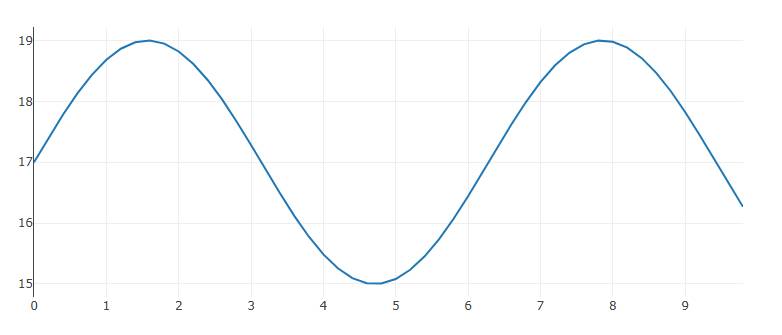
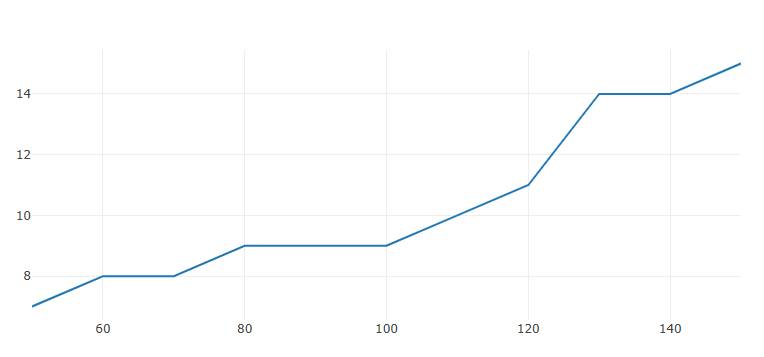
JavaScript charting and graphics tools can show training loss, input distributions, confusion matrices, and predictions. Common choices include the Canvas API, D3.js, Chart.js, and Plotly.js. These tools display results; they do not train a model by themselves.
For paired numeric variables, a scatter plot can reveal clusters or unusual observations before training.
WebGL and browser computation
WebGL is a browser API for accelerated two-dimensional and three-dimensional graphics. Machine-learning libraries can also use graphics-oriented browser capabilities as computational backends. Support and behavior vary, and an available GPU does not guarantee that every operation is accelerated.

Benchmark the complete workload on target devices. Model download time, preprocessing, memory transfers, warm-up, and user-interface responsiveness can matter as much as the prediction operation itself.
Limitations and safety checks
- Model size: Large model files increase startup time and memory use.
- Training cost: Browsers are not ideal for every long-running or large-scale training job.
- Compatibility: Backends and performance differ across browsers and devices.
- Privacy: Local inference protects data only when no other part of the application transmits it.
- Security: Treat model files and user inputs as untrusted, use standard web protections, and keep dependencies updated.
- Accuracy: A model can produce confident but wrong results. Test it on representative data.
- Fairness: Evaluate performance across relevant groups and use cases.
- Maintenance: Confirm that a library and model remain supported before production adoption.
Choosing a JavaScript ML library
| Tool | Best fit |
|---|---|
| TensorFlow.js | General browser or Node.js model development and deployment |
| ml5.js | Approachable creative-coding and learning projects |
| Brain.js | Smaller neural-network experiments with a compact API |
| Math.js | Supporting mathematics and data manipulation, not full ML workflows |
Beginners can explore these AI and machine-learning learning websites or choose from AI projects for different skill levels. If JavaScript itself is new, start with this guide to learning computer programming before adding a machine-learning library.
Related Articles
 Machine Learning Terminology: Explained6 minutes read
 AI and Machine Learning in the Enterprise5 minutes read
 What Is Machine Learning? Complete Guide9 minutes read
 How to Learn Machine Learning8 minutes read
 7 Practical Applications of Machine Learning9 minutes read
 The Difference Between AI, Machine Learning and Deep Learning10 minutes read
Reader Comments 0
Sign in with email or Google to join the discussion.