Table of Contents
Minecraft has nine wolf variants, and each wild variant is tied to a specific biome. The pale wolf appears in taiga, the woods wolf in forest, the ashen wolf in snowy taiga, the black and chestnut wolves in old growth taiga biomes, the rusty wolf in sparse jungle, the spotted wolf on savanna plateau, the striped wolf in wooded badlands, and the snowy wolf in grove biomes.
The eight additional appearances arrived with the Armored Paws release alongside armadillos and wolf armor. The variants behave the same after taming; the differences are their appearance, natural spawn biome, and typical wild pack size.
Wolf variants and spawn locations
| Wolf variant | Biome | Typical pack size | Finding difficulty |
|---|---|---|---|
| Pale | Taiga | 4 | Usually easy once you find taiga |
| Woods | Forest | 4 | Generally the easiest because forests are common |
| Ashen | Snowy Taiga | 4 | Depends on locating the snowy biome |
| Black | Old Growth Pine Taiga | 2–4 | Uncommon biome and smaller packs |
| Chestnut | Old Growth Spruce Taiga | 2–4 | Uncommon biome and smaller packs |
| Rusty | Sparse Jungle | 2–4 | Limited to a particular jungle variant |
| Spotted | Savanna Plateau | 4–8 | The biome may take time to find, but packs are larger |
| Striped | Wooded Badlands | 4–8 | Uncommon biome, with larger packs when found |
| Snowy | Grove | 1 | Often the hardest because it spawns alone |
“Rarity” is not a separate quality stat for these wolves. How difficult one is to collect depends mainly on the frequency of its biome in your world, the distance you must travel, and its pack size. The woods wolf is normally easiest to encounter; the snowy wolf is the only variant that naturally appears alone.
Pale wolf
- Biome: Taiga
- Pack size: 4
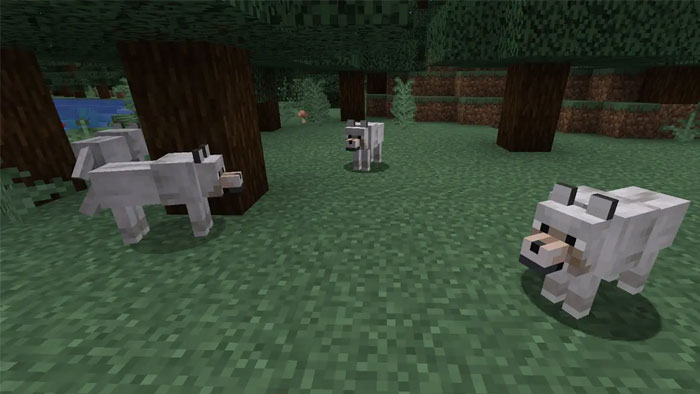
The pale wolf is the familiar light-colored wolf from earlier versions of Minecraft. It now has its own variant name and natural habitat. Search ordinary taiga rather than snowy taiga or old growth taiga.
Woods wolf
- Biome: Forest
- Pack size: 4
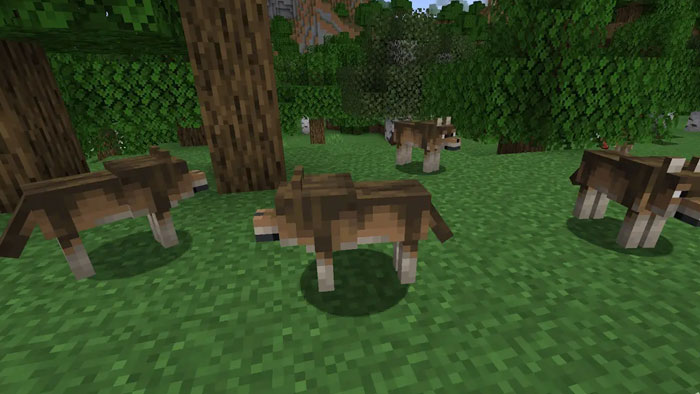
The woods wolf has dark brown fur with lighter legs and markings. Because ordinary forest biomes are widespread, this is generally the most accessible variant when beginning a collection.
Ashen wolf
- Biome: Snowy Taiga
- Pack size: 4
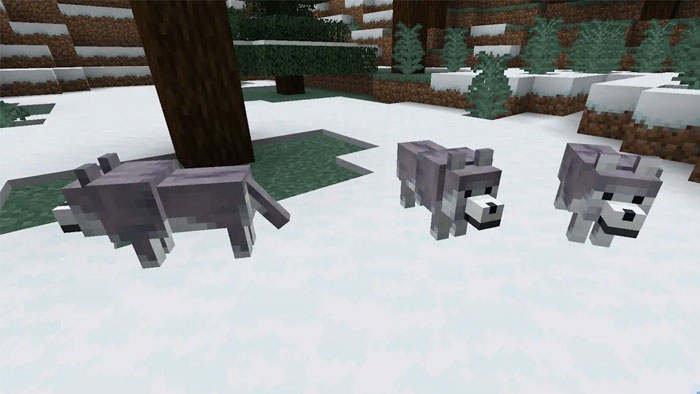
The ashen wolf has gray-purple fur and pale details. Make sure you are in a Snowy Taiga; a snowy plain, grove, or regular taiga produces different mobs.
Black wolf
- Biome: Old Growth Pine Taiga
- Pack size: 2–4
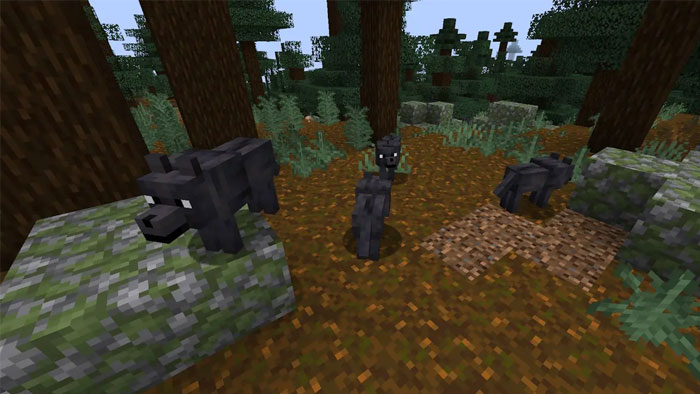
The black wolf is found among the tall spruce trees of old growth pine taiga. It appears in smaller packs than pale, woods, or ashen wolves, so bring several bones when you locate one.
Chestnut wolf
- Biome: Old Growth Spruce Taiga
- Pack size: 2–4
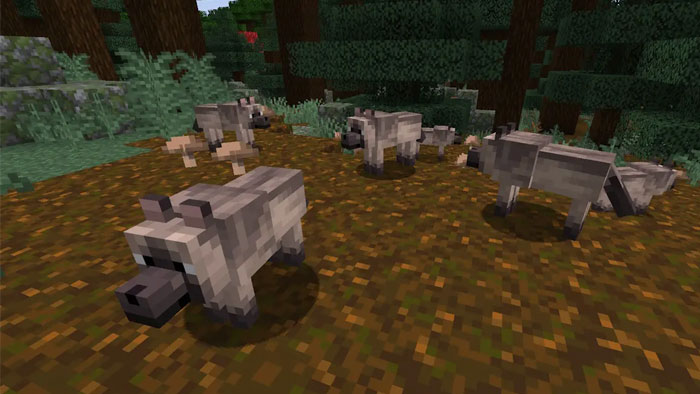
The chestnut wolf has cream and brown fur with a darker face, legs, and tail. Its biome is Old Growth Spruce Taiga, not Old Growth Pine Taiga—the similar biome names make this an easy mistake.
Rusty wolf
- Biome: Sparse Jungle
- Pack size: 2–4
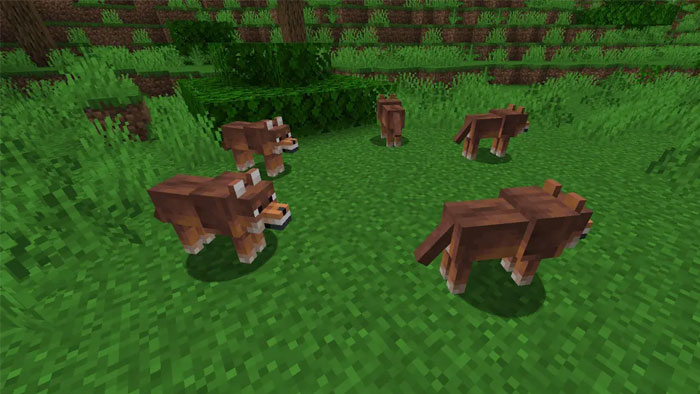
The rusty wolf’s orange-brown coat suits its warmer habitat. Look specifically for a sparse jungle, where the trees are more widely spaced than in an ordinary dense jungle.
Spotted wolf
- Biome: Savanna Plateau
- Pack size: 4–8
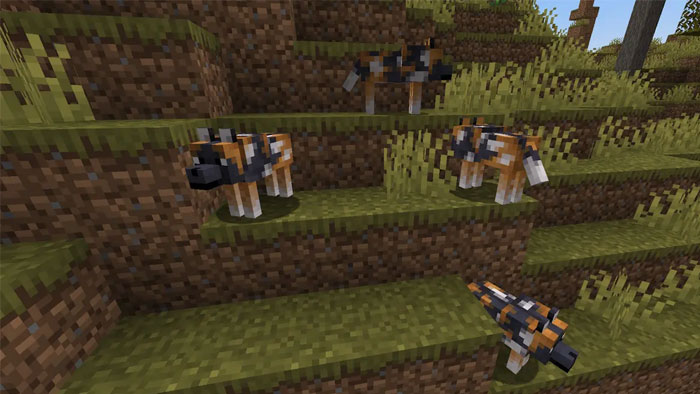
The spotted wolf has a multicolored pattern and appears in the elevated savanna plateau biome. The biome can be less convenient to locate than an ordinary forest, but its wolf packs are among the largest.
Striped wolf
- Biome: Wooded Badlands
- Pack size: 4–8
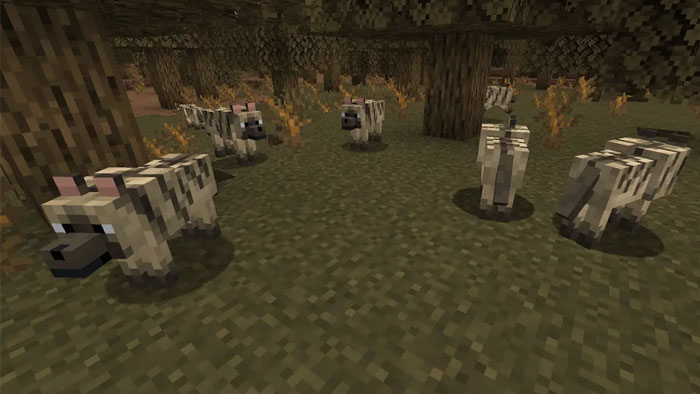
The striped wolf resembles a blocky hyena and lives in wooded badlands. Search the badlands variant with trees on its upper grass layer, not the more exposed badlands or eroded badlands.
Snowy wolf
- Biome: Grove
- Pack size: 1
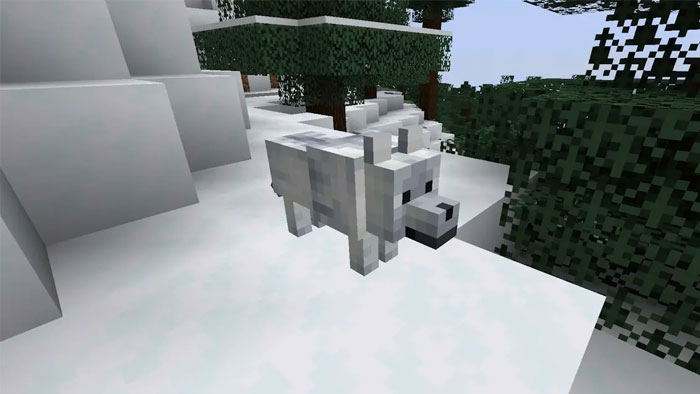
The snowy wolf has white fur with cool-toned details. It lives in grove biomes and always spawns alone, making it the slowest variant to collect if you want multiple wild snowy wolves.
Tips for finding every variant
- Confirm the exact biome name. Similar areas such as taiga, snowy taiga, old growth pine taiga, and old growth spruce taiga contain different variants.
- Use the F3 screen in Java Edition. The biome line helps confirm where you are. Bedrock players can use maps, landmarks, or permitted commands and tools for their world.
- Explore new terrain if necessary. In a long-running world, traveling beyond familiar regions makes it easier to locate biomes you have not visited.
- Carry extra bones. Taming succeeds randomly, so there is no fixed number guaranteed for a wolf.
- Bring leads, food, and a safe route home. A tamed wolf can teleport to its owner in many situations, but water, distance, unloaded areas, and hazardous terrain can complicate transport.
- Breed a backup. Once a rare variant is safely at your base, breeding makes accidental loss less costly.
How to tame and breed wolves
Approach a wild wolf and use bones on it until heart particles appear and it gains a collar. The number of bones varies because each attempt is random. Avoid attacking the wolf or nearby pack members.
To breed two tamed adult wolves, first make sure they have full enough health to enter love mode, then feed each one an accepted meat item. If the parents have different appearances, the puppy inherits one parent’s variant. Breeding does not create a tenth mixed pattern.
A tamed wolf’s collar can be dyed, which is useful for identifying pets or matching the collar to its fur and armor.
How to craft and use wolf armor
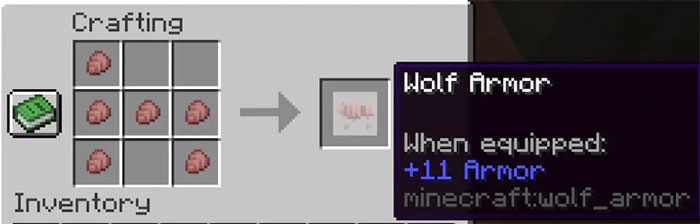
Wolf armor is crafted from six armadillo scutes. Adult armadillos drop scutes periodically, and a brush can also be used to obtain them. The image below shows the crafting arrangement.
- Only an adult tamed wolf can wear wolf armor.
- Only the wolf’s owner can equip, repair, or remove its armor.
- Use the armor on the wolf to equip it.
- Use armadillo scutes on equipped damaged armor to repair it.
- Use shears on the armored wolf to remove the armor.
- Wolf armor can be dyed in a similar way to leather armor.
- The armor protects against most damage until its durability is exhausted, but it does not make the wolf invulnerable.
Version note
The nine variants and wolf armor are normal gameplay features, not snapshot-only content. They debuted in Java Edition 1.20.5 and Bedrock Edition 1.20.80. If they are missing, update the game and confirm that the world is using a compatible vanilla version; servers, modpacks, add-ons, and commands may behave differently.
Related Articles
 Dire Wolf: Scientists Successfully Revive Ancient Wolf Species7 minutes read
 TOP Rarest Mob Variants in Minecraft 1.18 Caves and Cliffs5 minutes read
 How to Teleport in Minecraft: Practical Guide8 minutes read
 Download the Wolf Among Us, a Great Action Adventure Game, Is3 minutes read
 How to Find a Location to Save Minecraft Windows 10 Edition3 minutes read
 How to Determine Coordinates on Minecraft: Clear Instructions7 minutes read
Reader Comments 0
Sign in with email or Google to join the discussion.