Table of Contents
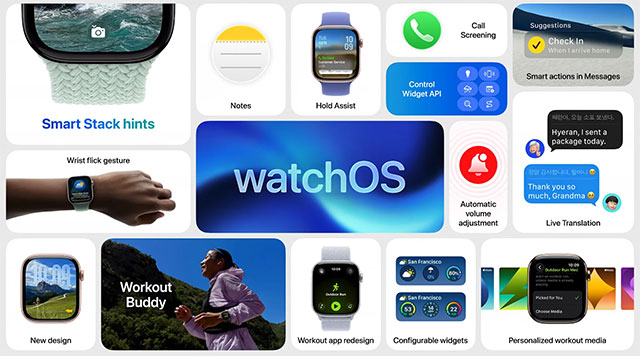
watchOS 26 supports Apple Watch Series 6 through Series 11, Apple Watch SE 2 and SE 3, and the original Apple Watch Ultra through Ultra 3. Series 5 and the first-generation Apple Watch SE cannot run it.
watchOS 26 compatibility by model
| Watch family | Models that support watchOS 26 |
|---|---|
| Apple Watch Series | Series 6, 7, 8, 9, 10, and 11 |
| Apple Watch SE | 2nd and 3rd generation |
| Apple Watch Ultra | Ultra, Ultra 2, and Ultra 3 |
Check the paired iPhone and the update offered
To run watchOS 26 with a paired phone, use an iPhone that supports iOS 26, such as an iPhone 11 or newer, and update the phone first. If you have an iPhone SE or you’re buying a used watch, check Apple’s model-by-model pairing requirements for the exact combination.
On the iPhone, open Watch → My Watch → General → Software Update. Keep the watch on its charger with at least 50% battery and the iPhone on Wi-Fi. Software Update shows the version available for your watch. If your model supports a later major release, the screen may offer that version.
Which features have extra requirements?
Compatibility with watchOS 26 does not guarantee every feature. Wrist flick requires a supported watch, such as Series 9 or Ultra 2, and Workout Buddy requires a nearby Apple Intelligence-capable iPhone. For maintenance releases on older watch models, see Apple’s security release list.
Related Articles
 watchOS 9 is available, users can download it immediately
 upgrading to WatchOS 10.1 for Apple Watch
 How to update Apple Watch to watchOS 6
 watchOS 9 launched: More new watch face options, additional heart rhythm monitoring feature
 Apple releases watchOS 7.3: More Unity watch faces
 WWDC 2019: watchOS 6 officially launched with many notable improvements
Reader Comments 0
Sign in with email or Google to join the discussion.