Table of Contents
This guide covers lenovo stirred up the summer laptop market with ideapad y460 with practical context and easy-to-follow details. Use it to understand the subject and apply the information confidently.
This machine is more powerful but smaller than the Y550P version. Compared to the previous series, Lenovo has invested quite a bit in the form of the Y460. The design of the machine has an eye-catching appearance with a hexagonal crust on the black background, dotted around the lid is a bronze border.
The interior "interior" when opening the lid is a blend of not-so-glossy black plastic and plastic tones of the same color. But the most eye-catching point is the backlit tap-sensitive keyboard above the keyboard, and a small IdeaPad backlit logo on the bottom and right of the keyboard.
With these unique tap controls, users can easily access functions such as increasing / decreasing sound, activating Power Manager and OneKey Theater to increase image quality. Photos when watching movies. Besides, SlideNav key cluster helps quickly turn on apps such as computers, notepad, recording. Or other apps that users can optionally add. You can also change the background image by sliding your finger on the SlideNav key from right to left, or "screen lock" when sliding from left to right (then, the device will temporarily disable the function of the keyboard, the key mouse and touchpad). This is a feature not available on previous Lenovo models.
Function
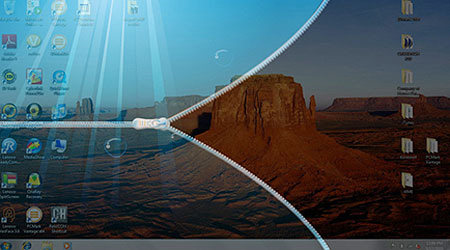 The "screen lock" feature is quite unique, helping to switch the screen saver mode And keyboard lock, touchpad and mouse function keys.
The keyboard of the Y460 is quite spacious, with a slightly different look of the ThinkPad. The keys are wide and reasonable. Tap-sensitive touchpad with smooth surface gives comfort when manipulating fingers to hover around the screen and perform multi-tap gestures from select to zoom in / out. The right / left key of the mouse is located just below the mouse touchpad, which is also highly sensitive.
A notable feature of IdeaPad Y460 that previous Y450 "elder" models do not have is the built-in JBL speaker duo above the keyboard, for good sound quality.
The 14-inch wide screen uses LED-backlit technology (resolution of 1, 366 x 768) with glossy borders for brilliant images and wide viewing angles. The Y460 has an integrated Ambient Light Sensor, which adjusts screen brightness in different lighting environments.
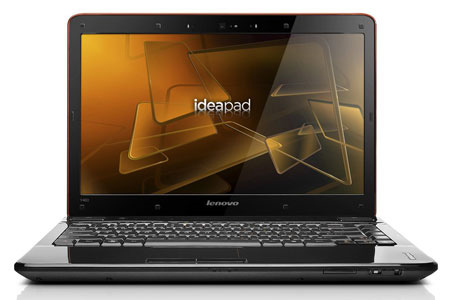 Wide screen LED-backlit 14 inches with 1. 3 megapixel camera.
IdeaPad Y460 is equipped with an Intel Core i3 processor with a speed of 2. 26 GHz, 2 GB of DDR3 RAM, a discrete graphics card with the latest ATI 5650 DDR3 1024M conversion technology, making the machine stable and smooth, even in a multi-tasking environment. Y460 is also Lenovo Enhanced Experience certified for the Windows 7 operating system, so the startup / shutdown time is very fast.
The feature of video card conversion software is also a highlight of the Y460 series (for models with separate ATI cards), users can easily transfer the usage of Intel Graphics Media Accelerate HD card. To discrete ATI Radeon HD 5650 card and vice versa. For most tasks, even watching HD movies, the Intel integrated card mode is more reasonable. However, the discrete card allows executing tasks that require higher image processing capabilities, costing more resources such as high-profile gaming, or displaying GoogleEarth images with more details.
With a 6-cell battery, IdeaPad Y460 can operate continuously for more than 2 hours and 30 minutes when watching DVD movies (using an integrated video card) and about 4 hours when using common tasks. The device is fully equipped with VGA, HDMI, USB ports, SATA, Ethernet ports, headphone and mic jacks, ExpressCard card slot, DVD drive, Wi-Fi b / g / n and receive features. VeriFaceTM Face Recognition face format, Dolby Home Theater and other Lenovo support software.
Currently Lenovo IdeaPad Y460 is sold in Vietnam for about 16 million VND without tax (for models without an ATI discrete graphics card) and 17. 7 million VND without tax (with discrete graphics card). IdeaPad Y460 general configuration: Intel Core i3 Processor 350M processor (2. 26GHz / 1066MHz / 3MB L3 cache); 14. 0 "screen 16: 9 HD, 1366x768 pixels WXGA, LED; 2 GB DDR3 memory; Intel Graphics Media Accelerate HD video card or select ATI Mobility Rade on HD 5650 w / 1G DDR3; Hard drive from 320 GB to 500 GB, Wi-Fi Intel 100 BGN, Camera 1. 3 megapixel, 6 cell battery, Other utilities: DVD, USB, 6-in-1 card reader, Ambient Light Sensor, JBL spearkers, 2. 0 Dolby, VeriFace technology, OneKey Rescue System. , PC-DOS operating system Warranty: 1 year (can be upgraded)
FAQ
What should I check before following these steps?
Confirm device and software compatibility, save important data, and make sure you have the required permissions, files, and account access.
Why might the process not work?
Common causes include outdated software, missing permissions, incompatible hardware, an unstable connection, or completing a step in the wrong order.
Can I undo the changes if necessary?
That depends on the tool or setting. Use built-in restore options when available, keep a backup, and record the original configuration first.
Related Articles
 Laptop 4K Screen of Lenovo Is About to Be Sold3 minutes read
 Lenovo Introduced G Series Laptops and New IdeaPad Z4 minutes read
 Lenovo IdeaPad: Affirm Your Rank7 minutes read
 Review Lenovo Ideapad S540 Laptop: a Safe Option5 minutes read
 Lenovo Launched a New Series of Laptops7 minutes read
 Lenovo IdeaPad Laptop Series5 minutes read
Reader Comments 0
Sign in with email or Google to join the discussion.