Table of Contents
This guide covers lenovo ideapad laptop series with practical context and easy-to-follow details. Use it to understand the subject and apply the information confidently.
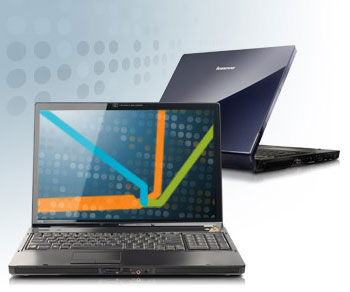 Lenovo IdeaPad is a laptop line aimed at general users Photo: Lenovo
To overcome this weakness, before CES 2008, Lenovo announced three new popular laptops, Y510, Y710 and U110, marking the birth of the IdeaPad brand. All three new laptops have appeared at the largest consumer electronics fair of the year and have attracted the attention of quite a number of visitors, thanks to possessing good looks, affordable prices and many jobs. Advanced technology.
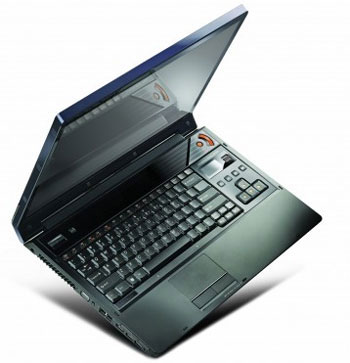 Lenovo IdeaPad Y710 has a 17-inch screen, the lowest price is $ 1, 200 Photo: Laptoping
Three new Lenovo laptops with screen sizes of 11. 1 "to 17", equipped with Dolby Home Theater surround sound system and face detection technology called "VeriFace". Besides the sexy appearance, the VeriFace feature is also a highlight to create a big attraction for Lenovo's popular laptops. This feature allows users to set a password for the device with their own face, with the help of the built-in 1. 3 Megapixel camera. It not only helps users more convenient when they no longer have to memorize passwords in their heads, but also enhances the security of new machines. Of the three new IdeaPad laptops, the Lenovo Y710 is the most bulky model, with a 17-inch widescreen display with a 1, 440 x 900 pixel resolution. It is equipped with 2. 5 GHz Intel Core 2 Duo processor, ATI Mobility Radeon HD2600 256 MB graphics card and can support 2 hard drives, with a maximum capacity of up to 500 GB. Besides, IdeaPad Y710 also has 2 GB of memory (can be upgraded to 4 GB), 1. 3 Megapixel camera and 2-layer DVD burner or Blu-ray reader. It supports standard 802. 11a / g / n wireless connection. In addition, this entertainment laptop is also equipped with 4 stereo speakers and 1 subwoofer, tap-sensitive multimedia features management keys and ultra-thin screen edges. Lenovo IdeaPad Y710 will be available in March for $ 1, 200 or more.
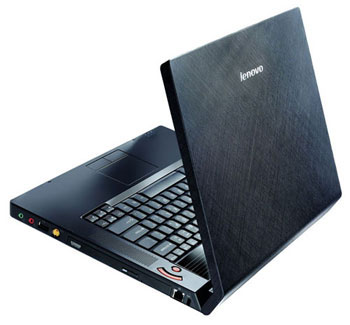 Lenovo IdeaPad Y510 has a 15. 4-inch screen, priced at $ 800 or more Photos: Digitaltrends
The 15. 4-inch model, IdeaPad Y510, is equipped by Lenovo for the 1. 83 GHz Intel Core 2 Duo processor, Intel GMA X3100 256 MB graphics card, 250 GB hard drive and 2 GB RAM (can be upgraded) level up to 4 GB). In addition, the Y510 also has a 1. 3 Megapixel camera and 2-layer DVD burner. This laptop will be available in January, with the price for the model with the lowest configuration of 800 USD.
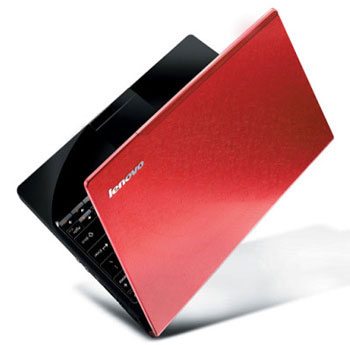 Lenovo IdeaPad U110 has a small body and stylish red case Photo: Laptoping
The ultra-compact U110 laptop, with an 11. 1-inch screen and a slight weight of just over a kilogram, is also very attractive with a red patterned case. The device also supports SSDs, besides conventional hard drives. Lenovo IdeaPad U110 will be available in April, but the price hasn't been revealed. Mr. Linh
FAQ
What should I check before following these steps?
Confirm device and software compatibility, save important data, and make sure you have the required permissions, files, and account access.
Why might the process not work?
Common causes include outdated software, missing permissions, incompatible hardware, an unstable connection, or completing a step in the wrong order.
Can I undo the changes if necessary?
That depends on the tool or setting. Use built-in restore options when available, keep a backup, and record the original configuration first.
Related Articles
 Lenovo Introduced G Series Laptops and New IdeaPad Z4 minutes read
 Lenovo Started Selling IdeaPad V Series3 minutes read
 Lenovo Launched a New Series of Laptops7 minutes read
 Laptop Series for 2012 from Lenovo4 minutes read
 Lenovo Ideapad Gaming 3 Detailed Review: the Perfect Match!13 minutes read
 Lenovo IdeaPad: Affirm Your Rank7 minutes read
Reader Comments 0
Sign in with email or Google to join the discussion.