Table of Contents
This guide covers powerful lenovo y550p with practical context and easy-to-follow details. Use it to understand the subject and apply the information confidently.
 The spacious keyboard is comfortable to use Photo: SoHoa .
The surface of the Y550P is decorated with honeycomb-shaped patterns and curved down to four sides with orange borders around it. The manufacturer's Lenovo logo is embossed with metal on the top left. Y550P is quite bulky with dimensions of 8. 6 x 25. 4 x 3. 8 cm and weighs 2. 7 kg (when installing 6-cell battery included). In general, considering the overall design of the machine is not really "worthy" of the configuration and the price to own it. Lenovo's new model has quite a number of connection ports and is reasonably distributed to all four sides of the machine. The front includes signal lights, infrared sensors to receive control signals, switch on / off network usage mode, headphone jack, microphone and memory card reader. The right side includes 2 USB 2. 0 ports, TV antenna signal receiver, Blu-ray optical drive and power jack. The left edge includes VGA, HDMI, eSATA / USB, LAN, 34mm Express Card slot and Kenshington lock.
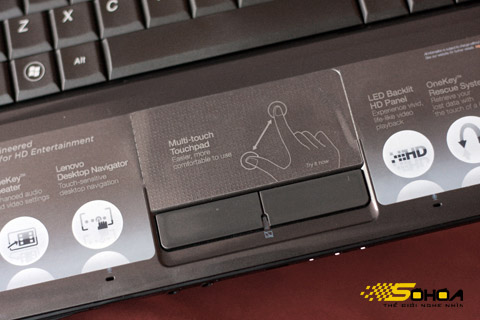 Touchpad is sensitive and accurate while 2 mouse keys are offensive With users Photo: SoHoa .
Machine keyboard with large keys area and a good spaced way to create comfort for users, but the keyboard is only made of plastic has slightly reduced the "value" of the machine. The Y550P is also equipped with a multi-tap touchpad with a grid-shaped shelf, so it is not sticky and sweaty when used. Through testing, this touchpad also impressed quite well when using sensitivity and accuracy. However, the two keys of the touchpad can be considered a major failure of the manufacturer when used with a very loose feel, great depth and bounce very slowly causing discomfort to the user. The Y550P's speaker system is also well-equipped with two speakers on each side and a subwoofer on the bottom. Through listening, the Dolby Home Theater speakers offer good quality at high volume, reverberation and bass are also acceptable.
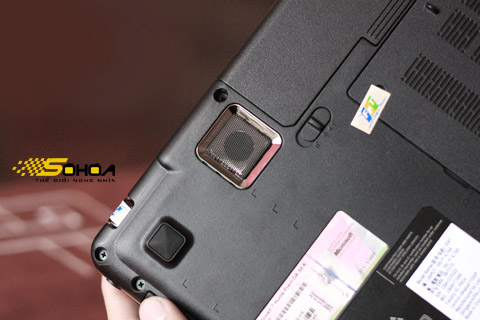 Y550P is equipped with an extra subwoofer for better bass Photo: SoHoa .
The Y550P has a 16. 6-inch wide 16. 6-inch LED backlight display with a bright 1. 366 768 pixel resolution that displays well and in true color. The machine has a good viewing angle, when tilted about 45 degrees compared to the line of sight can still monitor the screen with relatively accurate colors. This model is also quite interesting to integrate the ability to watch TV through signals from an antenna attached to the machine or from cable TV. However, through testing, while the machine displayed a sharp wave channel when using cable TV, this system was not catching up well with the accompanying antenna, in Thai Thinh area, only the Hanoi channel with the signal could be captured. Very weak effect.
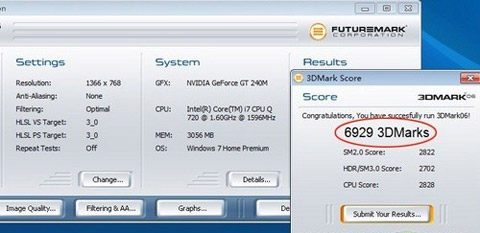 The device achieved 6, 929 points when tested with the 3DMark06 program Photo: Zol .
It owns an Intel Core i7-72QM 1. 6 GHz, 1, 333MHz processor, 6 MB L2 Cache, 4GB DDR3 DRAM and 1 GB discrete NVIDIA GeForce GT 240M graphics card. Perhaps with this configuration will not surprise many people on the graphics processing power it brings. When scored by Windows Experience Index system on Windows 7 Home Premium Edition operating system (installed with the machine), Y550P achieved 5. 8 points. This is a "superfluous" point for smooth running of the Aero Peak graphics interface with all the highest settings and smooth HD video playback. Meanwhile, if using the 3DMark06 graphics program to measure the graphics power of this machine, the result is also commensurate with its own configuration, 6, 929 points, but not much higher than the model. Lenovo Y450A with 6, 540 points using the same graphics card but with a lower memory of 512MB (data according to Zol). Also according to Zol, if using 3DMark Vantage program at Entry, E level, the Y550P will achieve the total of E11286. In which GPU reached 11, 814 points, CPU reached 9, 952 points.
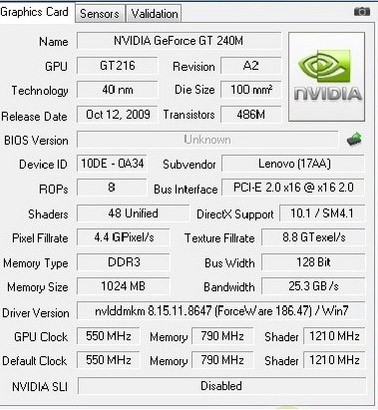 Graphics card parameters of the machine Screen shot .
Test playing heavy graphics games, Y550P also handled quite smoothly. Gaming can Need For Speed: Shift with the highest settings at an average speed of 32 frames per second, Resident Evil 5 game (setting level 2 x AA High Definitio) at an average speed of 29 frames every second and Street Fighter 4 game (setting level 2 x AA High Definitio) averages 45 frames per second. In the continuous gaming test, the device was not too hot, the area on the left, the middle part of the touchpad and right on the touchpad felt the highest temperature, however, overall compared to the configuration and performance of the device. The heat level of this machine shows that the heat dissipation is good.
 Game Need For Speed: Shift at 32 frames per second Photo: Zol .
With the "terrible" configuration but only the 6-cell battery included, the battery life of Y550P is acceptable with about 2 hours and 30 minutes of normal use like listening to music, surfing the web and nearly 2 hours of playing games continuity. Y550 is a machine that is worth using with a "terrible" configuration and good machine performance, but that is if the user is not interested in the price and "equally" of it is $ 1, 800 (about 35 million copper) in Vietnam.
FAQ
What should I check before following these steps?
Confirm device and software compatibility, save important data, and make sure you have the required permissions, files, and account access.
Why might the process not work?
Common causes include outdated software, missing permissions, incompatible hardware, an unstable connection, or completing a step in the wrong order.
Can I undo the changes if necessary?
That depends on the tool or setting. Use built-in restore options when available, keep a backup, and record the original configuration first.
Related Articles
 Lenovo's 'Super Strong' Laptop in Vietnam3 minutes read
 Lenovo IdeaPad Y550P - the Most Powerful Core i7 Laptop Today3 minutes read
 IdeaPad Y550P Becomes the Strongest Gaming Laptop3 minutes read
 Lenovo's Latest IdeaPad Collection4 minutes read
 Lenovo Stirred Up the Summer Laptop Market with IdeaPad Y4607 minutes read
 Lenovo IdeaPad: Affirm Your Rank7 minutes read
Reader Comments 0
Sign in with email or Google to join the discussion.