Table of Contents
Redeem codes for Soccer: One Touch by 64 Kicks in the game’s Shop. Enter them inside the Roblox experience and check the result before trying the next one.
One Touch codes to try
Recent third-party lists report COMEBACK and WINTER. These codes haven’t been verified in-game for this guide, and the developer can disable them without notice. Reports disagree on older codes such as 5KCCU, THANKSFORPLAYING, and RELEASE, so don’t count on the old rewards.
How to redeem a One Touch code
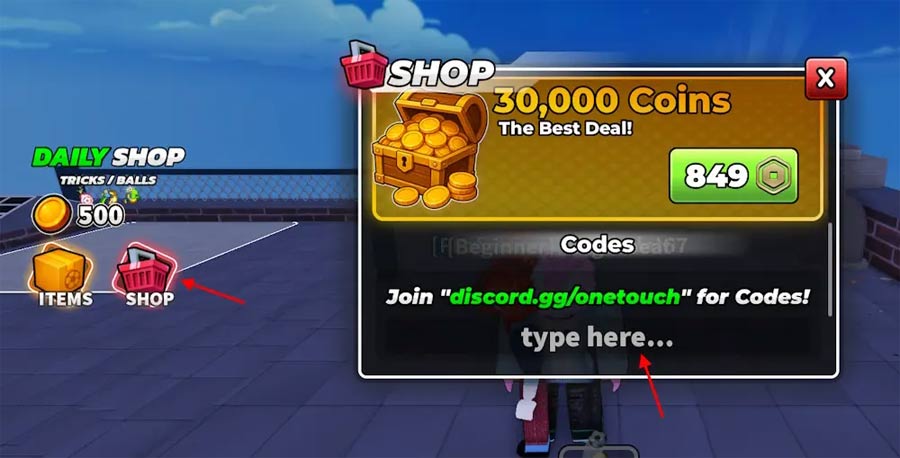
- Launch Soccer: One Touch on Roblox. Finish the tutorial if the Shop is unavailable.
- Open Shop on the left and scroll to the code box.
- Paste the code exactly as shown and press Enter to submit it.
- Look for the confirmation or error, then check your inventory or coin balance if the game reports success.
What to check if a code fails
Remove any spaces before or after the code and confirm that you’re in the right game. An older code may have expired, or your account may have used it before. For new codes, check the updates and community links from the Roblox experience page. Use the in-game redemption box and keep your Roblox sign-in details out of third-party code forms.

Reader Comments 0
Sign in with email or Google to join the discussion.