The release time of the most awaited update in the Windows 11 user community - version 24H2 - is getting closer and closer. This is also a sprint time for third-party developers to quickly complete and release software/driver update packages that provide better compatibility for upcoming Windows versions. Today, Intel officially released a new Wi-Fi driver update package, adding Wi-Fi 7 support to Windows 11 version 24H2.
Thus, to be able to use Wi-Fi 7, the prerequisite is that your computer must run Windows 11 version 24H2, have installed Intel wireless Wi-Fi driver 23.70.2, and have a Wi-Fi network card. Fi 7 compatible, such as Intel Wi-Fi 7 BE202, BE201 or BE200. If you don't know the adapter version you're using, go to Settings > Network & Internet > Wi-Fi > Hardware properties and check the Description string.
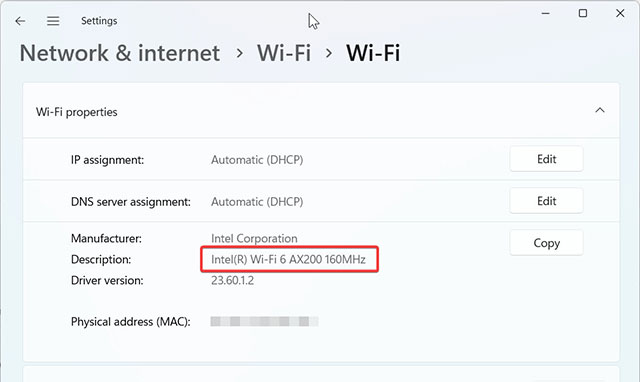
Here are what's new in the new Intel Wireless Wi-Fi Driver 23.70.2 update package:
| Describe | Operating system |
| This software package includes Windows 11 drivers for new Intel Wi-Fi 7 products - Intel Wi-Fi 7 BE201. | Windows 11 |
| Added Wi-Fi 7 support for Windows 11 24H2. | Windows 11 |
| Updated Wi-Fi 7 regulations for China and South Korea. | Windows 11 and Windows 10 |
| Update Wi-Fi driver to support hardware tuning sensors. | |
| Updated QoS Management Offload support. | |
| This soft release version 23.70.2 includes functional and security updates. There may be a few other minor issues that will affect performance, stability or specific functionality not listed above. Users are encouraged to update to the latest version for best performance. |
Intel's latest Wi-Fi driver supports the following network cards:

You can download Intel Wireless Wi-Fi Driver 23.70.2 from Intel's official website. Read more details in the release notes.






Reader Comments 0
Sign in with email or Google to join the discussion.