Table of Contents
Wayground AI can draft assessments from a topic, prompt, document, webpage, video, or image. It can save authoring time, but the output is not ready for students until a teacher verifies the questions, answer key, explanations, reading level, and alignment with the approved source.
Wayground is the current name of Quizizz. Existing Quizizz accounts and resources carried over, while the product domain and branding changed.

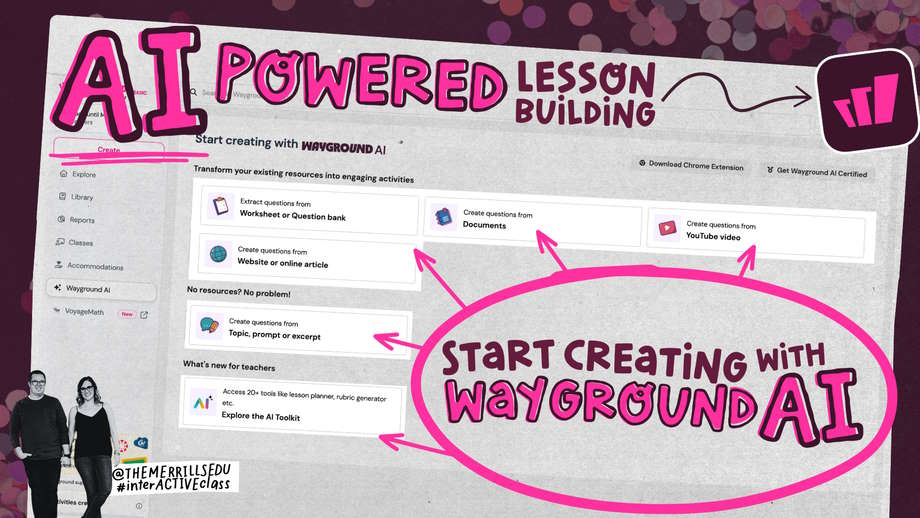
What Wayground AI can use as a source
Current official guidance describes several generation routes:
| Source | Useful for | Main check |
|---|---|---|
| Document or slides | Turning approved lesson material into a draft assessment | Confirm which pages and text were actually read |
| Prompt or pasted text | Building a quiz from a defined topic and objectives | Provide enough source detail to avoid generic questions |
| Webpage | Using a specific online article or reference | Check authorship, date, permissions, and whether the page changed |
| YouTube video | Questions based on supported video content | Compare every item with the video or transcript |
| Image or photographed worksheet | Importing printed material from a mobile device | Check OCR errors, diagrams, handwriting, and cropped text |
| Standards or curriculum options | Drafting an assessment aligned to an available standard | Confirm the exact jurisdiction, code, level, and wording |
The supported formats, limits, languages, and source types can vary by plan, account, device, and later product updates. Check the upload dialog shown in the account rather than relying on an old fixed character or file-count limit.
Before generating questions
- Write the learning objectives and decide what evidence will show mastery.
- Choose an authoritative, current source that you are allowed to upload.
- Remove student names, grades, accommodations, and other personal information.
- Decide the number and type of questions, difficulty mix, time, and allowed resources.
- Prepare a rubric for open-response items.
A scanned document with complex tables, diagrams, or handwritten notes may not be interpreted correctly. Wayground's AI terms state that PDF image handling focuses on text extraction, so visually essential material requires especially careful review.
Create an assessment from a document
The exact labels may differ as Wayground updates its authoring interface, but the current flow is:
- Select Create and choose Assessment.
- Choose the AI/import route for a document or file.
- Upload an authorized file from the device or a supported cloud source.
- Specify the relevant pages, topic, grade, subject, language, number of questions, and depth or difficulty where offered.
- Choose any suggested subtopics that genuinely match the objectives.
- Generate the draft resource.
- Edit every item, then publish only after completing the review checklist below.
Document prompt template
Use only pages [range] of the uploaded document.

Create a draft assessment for Grade [level] on these objectives:
1. [objective]
2. [objective]
3. [objective]

Requirements:
- [number] questions
- [question-type distribution]
- 30% recall, 50% application, 20% analysis
- one clearly correct answer for each multiple-choice item
- plausible distractors based on common misconceptions
- a brief explanation and source page for every answer
- mark any unsupported item [REMOVE]
- do not add facts from outside the document
Create an assessment from a prompt
- Select Create > Assessment.
- Enter the topic or paste the approved text.
- Set the grade, subject, question count, and depth where offered.
- Select or edit suggested subtopics.
- Create the resource and open the full editor.
A topic alone often produces broad, generic questions. Include objectives, required vocabulary, misconceptions to test, exclusions, and an authoritative reference. If facts must come from a particular curriculum, paste or upload that material instead of relying on general model knowledge.
Use webpages, videos, and images carefully
Webpage
Confirm that the page is accessible without a login and that you may use its material. Dynamic pages, paywalls, ads, and navigation text can confuse extraction. Save the page title, author, date, and access date in your records.
Video
Check whether the generated item is based on the actual spoken content, captions, description, or inferred context. Watch the relevant timestamp yourself and correct transcript errors, especially for names, numbers, formulas, and technical terms.
Image
Use a sharp, straight photo with the full page visible. Verify every recognized number and symbol. OCR can confuse minus signs, exponents, subscripts, decimal separators, and similar-looking letters.
Review every generated question
| Check | What to look for |
|---|---|
| Source support | The answer and explanation are present in the approved material |
| One correct answer | No second option is defensible under a reasonable reading |
| Clear wording | No double negatives, hidden assumptions, or unnecessary complexity |
| Plausible distractors | Wrong choices represent real misconceptions without tricking the learner |
| Difficulty | Thinking required matches the intended level, not merely obscure vocabulary |
| Math and science | Calculations, units, signs, diagrams, significant figures, and rounding are checked independently |
| Language and bias | Names, examples, idioms, and cultural context do not create irrelevant barriers |
| Accessibility | Images have alternatives; timers, audio, color, and interaction do not block students |
Do not validate an answer by asking the same AI to “double-check” and accepting its confidence. Compare with the source and, for high-stakes content, ask a qualified colleague to review.
Improve questions without regenerating the entire quiz
Use targeted edits:
Revise questions 4 and 9 only.
Question 4 currently has two correct options. Keep the objective but make the
stem and options unambiguous.
Question 9 tests recall. Replace it with an application question using only
pages 12–14.
Return both revised items with answers, explanations, and source pages.
Preserving verified items reduces the chance that a full regeneration introduces new mistakes.
AI-assisted differentiation
Wayground AI can simplify, translate, change question type, or produce differentiated versions. Review each version independently. A “simpler” item may accidentally remove the target skill, a translation may change the correct answer, and an accommodation should follow the learner's approved plan rather than a generic AI suggestion.
Publish and run a student-view test
- Set the resource name, subject, grade, language, and visibility.
- Publish it to your library.
- Preview or run a private practice session.
- Answer every question on a student device.
- Check scoring, timers, accepted variants, media, feedback, navigation, and the final report.
- Correct any flaw and repeat the affected path.
Privacy and data handling
Wayground's AI documentation says its system uses external AI providers and logs certain inputs, outputs, and metadata for operation and improvement. Follow school policy and the applicable account terms. Do not upload student records, individualized education information, unpublished exams, confidential staff material, or copyrighted content without authorization.
The official generation guide lists current source routes and editing options, while the Wayground AI terms explain data handling and limitations.
Pre-publish checklist
- The source is authorized, current, and clearly identified.
- Every item maps to a learning objective.
- Every answer and explanation was verified.
- Questions do not depend on unreadable or missing source content.
- Timers, feedback, accommodations, and visibility are intentional.
- No protected student data or confidential assessment material was uploaded.
- The complete quiz was tested in student view.
Related Articles
 Wayground User Guide for Teachers7 minutes read
 How to Create Questions and Quizzes Using Quizizz11 minutes read
 How to Use Wayground AI to Create Quizzes7 minutes read
 Wayground: Great Educational Tool8 minutes read
 Guide to Quickly Creating AI Quiz Questions5 minutes read
 How to Create Quizzes on Quiz. Com7 minutes read
Reader Comments 0
Sign in with email or Google to join the discussion.