Table of Contents
This guide covers inside and out of the small laptop acer aspire one with practical context and easy-to-follow details. Use it to understand the subject and apply the information confidently.
 Acer Aspire One laptop and accessories when purchased.
 This is a version for Chinese writing systems so the keyboard has additional characters. The size is equal to 95% of the normal keyboard.

 The left and right edges of the device have USB, VGA, memory card slots, headphones.
 The bottom of the Aspire One.
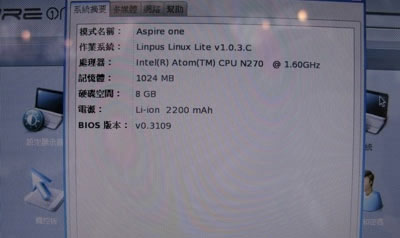 This machine uses Linux operating system. Configuration: Intel's Atom chip 1. 6 GHz, 1GB RAM memory, 8GB storage capacity. 8. 9 inch small screen. Portable 0. 3 megapixel webcam, Wi-Fi. However, customers can still purchase Windows XP installers.
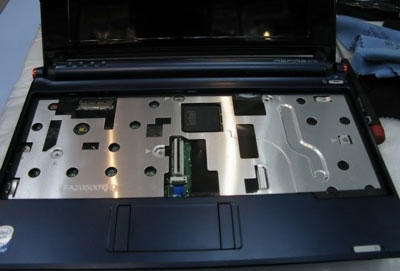 Aspire One after removing the keyboard.
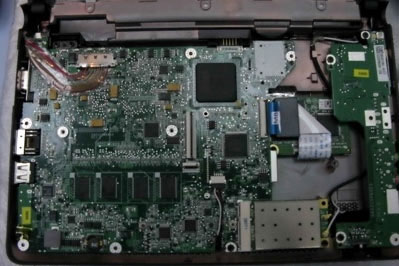 Below that is the motherboard.
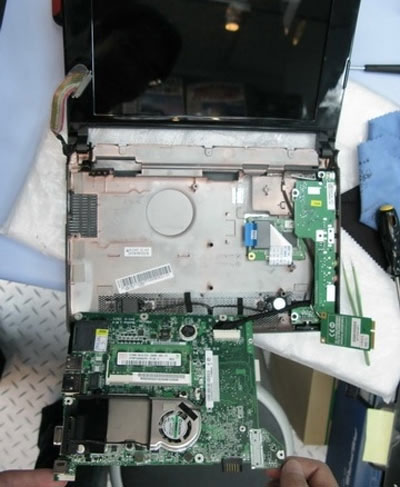
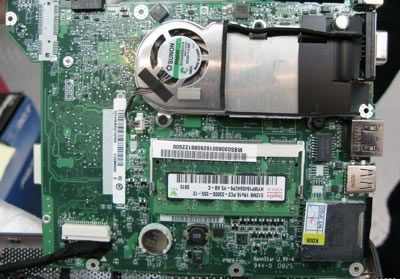 Components are neatly arranged.
FAQ
What should I check before following these steps?
Confirm device and software compatibility, save important data, and make sure you have the required permissions, files, and account access.
Why might the process not work?
Common causes include outdated software, missing permissions, incompatible hardware, an unstable connection, or completing a step in the wrong order.
Can I undo the changes if necessary?
That depends on the tool or setting. Use built-in restore options when available, keep a backup, and record the original configuration first.



Reader Comments 0
Sign in with email or Google to join the discussion.