Table of Contents
This guide covers acer aspire 5738zg: laptop watching cheap hd movies with practical context and easy-to-follow details. Use it to understand the subject and apply the information confidently.
Acer's familiar design
Aspire 5738 has a clamshell style with rounded corners, most connections focus on the left side of the device, while a few ports are located on the right with a DVD - RW drive. This laptop uses a standard 15. 6-inch mirror screen, 16: 9, with a small webcam on the screen.
The keyboard of the Aspire 5738ZG is beautifully designed with glossy keys similar to those on high-end laptops, with many keyboard shortcuts, but more specifically, it incorporates a separate numeric keypad that gives users the freedom to work. .
Touchpad tap is also arranged to the left, not in the middle like other laptops, so convenient " Drag - drop " operations for right - handed people. The touchpad of the device uses multi-tap and right on the left there is a toggle button to prevent users from accidentally touching when doing the operation on the machine. Between the two keys on the touchpad is the fingerprint recognition reader.
The Aspire 5738ZG has a rich connection port, notably the HDMI port that allows users to connect the Acer Aspire 5738ZG to larger sized LCD TVs to enjoy HD movies. High-speed network connection including Gigabit LAN connection (100/1000 Mbps) and draft-N standard Wi-Fi connection (compatible with standard a / b / g / n) with connection speed and coverage wider than the old or ExpressCard / 54 Slot (supports ExpressCard / 34), 3 USB 2. 0 ports, TV out (S-Video), RJ-11 (modem), RJ-45 (LAN), VGA.
The weight of the Acer Aspire 5738ZG is only 2. 4kg and is equipped with a 6cell battery.
High performance
Although it belongs to the low-cost model, when the price of Aspire 5738ZG distributed by CMC in Vietnam is 10, 710, 000 VND including VAT. But the performance of Aspire 5738ZG is highly appreciated, besides the configuration also belongs to the average category compared to the current laptops in Vietnam.
The Acer Aspire 5738ZG is built on the Centrino2 platform with a combination of three: Intel Pentium Dual Core T4200 CPU (2 * 2. 0GHz, 1MB L2 cache, 800MHz FSB), Intel Mobile GL40 Express, and the latest wireless communication 802. 11b / g / N. It uses DDR3 bus memory 1333Mhz. 250GB hard drive. In addition, the speaker system with Dolby Home Theater audio support is good for entertainment needs.
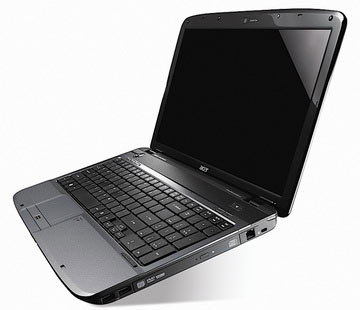 The performance of the machine is quite good
With Windows Vista the Aspire 5738ZG boot time is only about 35 seconds, after a few tweaks, the boot time decreases to 26 seconds. The machine is very stable in handling daily tasks as well as for entertainment. Equipped with 6 cell battery, the usage time can last nearly 3 hours when used in combination with Wi-Fi, text work, web browsing. Time increases from about 20 minutes when the LCD brightness is reduced. For entertainment, watching movies, using multitasking programs, the battery life of the device is 1. 5 hours. What is particularly cool is that although it works continuously for a day, it is only slightly warm on the surface.
The Acer Aspire 5738ZG has a high screen resolution (1280 x 800), suitable for enjoying HD movies right on your computer. Thanks to Brighview technology, LCD-TFT images show quite good sharpness and bright, wide viewing angles. The webcam supports Crystal Eye technology for beautiful images in low-light environments.
Overall this is considered a laptop line of Acer quite suitable for students, or those who have just started working to afford a high-end laptop.
FAQ
What should I check before following these steps?
Confirm device and software compatibility, save important data, and make sure you have the required permissions, files, and account access.
Why might the process not work?
Common causes include outdated software, missing permissions, incompatible hardware, an unstable connection, or completing a step in the wrong order.
Can I undo the changes if necessary?
That depends on the tool or setting. Use built-in restore options when available, keep a backup, and record the original configuration first.
Related Articles
 Acer Launched Netbooks to Watch Cheap HD Movies4 minutes read
 Acer Aspire 715-42g Review: Gaming Laptop with Cheap6 minutes read
 Acer 4736Z Supports Strong Entertainment7 minutes read
 The White Acer Aspire One Is Priced at VND 8. 6 Million in Vietnam3 minutes read
 Acer Entertainment Laptop with Centrino 2 App5 minutes read
 How to Remove Laptop Acer Aspire ES1-532G5 minutes read
Reader Comments 0
Sign in with email or Google to join the discussion.